Answer

Dropdown List not displaying

  • January 7, 2023
  • 12 replies
  • 452 views

Forum|alt.badge.img+3

Hello experts,
I have been trying to add a dropdown list to a new processing screen but, the list isn’t getting displayed. I have shared the dac and graph codes below. Please guide me out where i am getting wrong.
Thanks in advance.

Dac code:
using System;
using PX.Data;

namespace MassCust
{
  [Serializable]
  [PXCacheName("Mass_Activity_Table")]
  public class Mass_Activity_Table : IBqlTable
  {
    #region Activities
    [PXDBString(50, IsUnicode = true, InputMask = "")]
    [PXUIField(DisplayName = "Activities")]
    public virtual string Activities { get; set; }
    public abstract class activities : PX.Data.BQL.BqlString.Field < activities >  { }
    #endregion

    #region Source
    [PXDBString(10, IsFixed = true, IsUnicode = true, InputMask = "")]
    [PXUIField(DisplayName = "Source")]
    public virtual string Source { get; set; }
    public abstract class source : PX.Data.BQL.BqlString.Field < source >  { }
    #endregion

    #region Cust_Lead_ID
    [PXDBString(IsUnicode = true, InputMask = "")]
    [PXUIField(DisplayName = "Cust_ Lead_ ID")]
    public virtual string Cust_Lead_ID { get; set; }
    public abstract class cust_Lead_ID : PX.Data.BQL.BqlString.Field < cust_Lead_ID >  { }
    #endregion

    #region Cust_Lead_Name
    [PXDBString(IsUnicode = true, InputMask = "")]
    [PXUIField(DisplayName = "Cust_ Lead_ Name")]
    public virtual string Cust_Lead_Name { get; set; }
    public abstract class cust_Lead_Name : PX.Data.BQL.BqlString.Field < cust_Lead_Name >  { }
    #endregion

    #region City
    [PXDBString(IsUnicode = true, InputMask = "")]
    [PXUIField(DisplayName = "City")]
    public virtual string City { get; set; }
    public abstract class city : PX.Data.BQL.BqlString.Field < city >  { }
    #endregion

    #region State
    [PXDBString(IsUnicode = true, InputMask = "")]
    [PXUIField(DisplayName = "State")]
    public virtual string State { get; set; }
    public abstract class state : PX.Data.BQL.BqlString.Field < state >  { }
    #endregion

    #region Country
    [PXDBString(IsUnicode = true, InputMask = "")]
    [PXUIField(DisplayName = "Country")]
    public virtual string Country { get; set; }
    public abstract class country : PX.Data.BQL.BqlString.Field < country >  { }
    #endregion

    #region UsrActivityType
    [PXDBString(20, IsUnicode = true, InputMask = "")]
      [PXIntList (new int[] {0,1,2,3}, new string[] {"Add Note","Add Call","Add Escalation","Add Work Item"})]
    [PXUIField(DisplayName = "Activity Type")]
    public virtual string UsrActivityType { get; set; }
    public abstract class usrActivityType : PX.Data.BQL.BqlString.Field < usrActivityType >  { }
    #endregion
  }
}


Graph code:

using System;
using PX.Data;
using PX.Data.BQL.Fluent;

namespace MassCust
{
  public class MassMaint : PXGraph < MassMaint > 
  {
    public SelectFrom < Mass_Activity_Table > .View ActivityView;
    public PXSave < Mass_Activity_Table >  Save;
    public PXCancel < Mass_Activity_Table >  Cancel;
    public PXProcessing < Mass_Activity_Table >  Processed;
  }
}

Best answer by Harshita

Hello @aaghaei @MoulaliShaik79 @Shawn Burt,
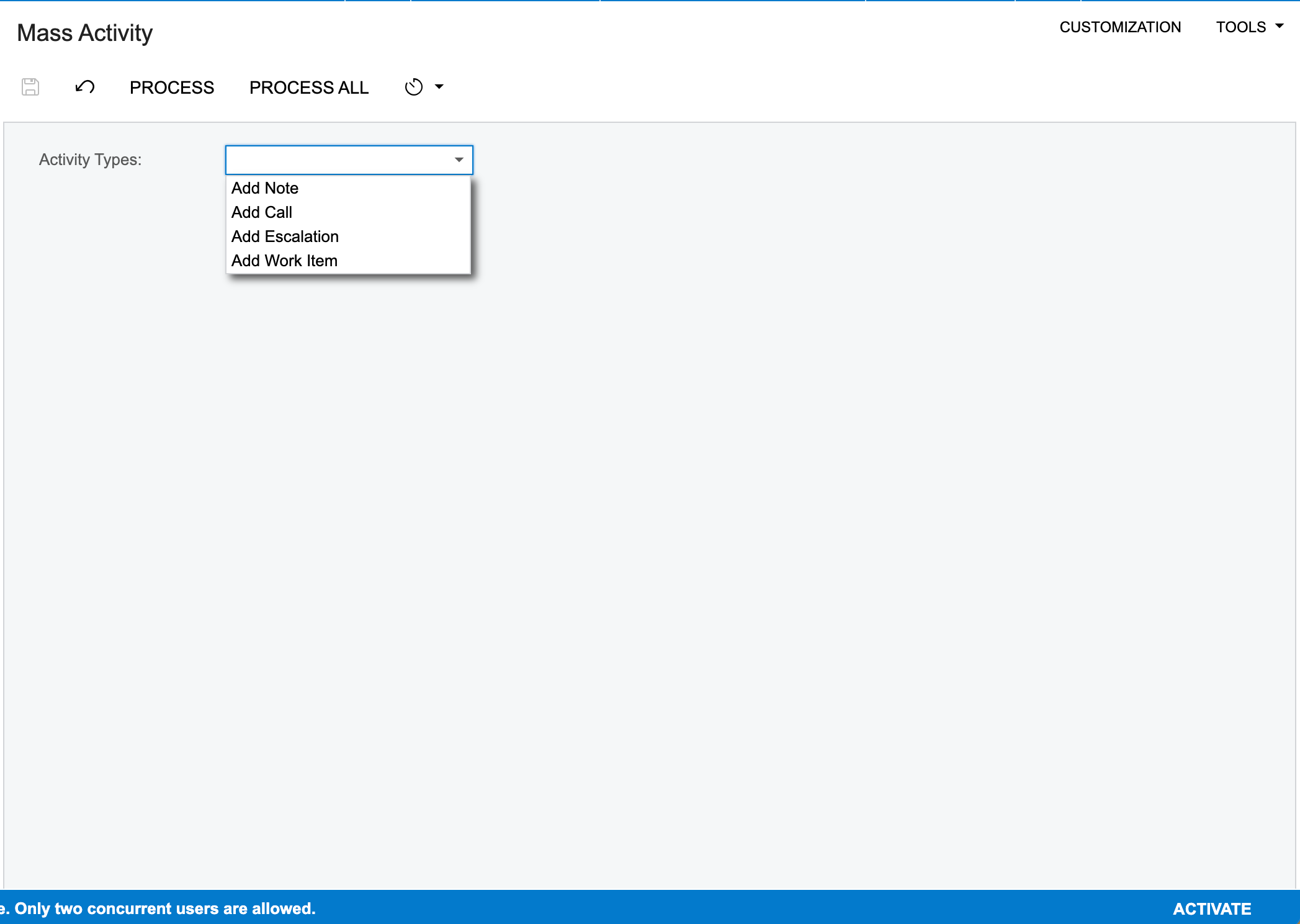
I would like to thank all for your guidance and suggestions on resolving the issue. And would like to update that the issue has been resolved.

Upon setting the Layout Property for this particular field as the below screenshot, 


The required dropdown field got enabled.


Thank you once again for your suggestions.
Harshita Sethia.

12 replies

Shawn Burt
Jr Varsity I
Forum|alt.badge.img+1
  • Jr Varsity I
  • January 7, 2023

I notice you have a pxintlist instead of pxstringlist. Given that your property type is pxdbstring I would switch to pxstringlist. Also make sure the ui control type is right,  you didn't show the aspx so I can't confirm.  


Forum|alt.badge.img+3
  • Author
  • Captain II
  • January 8, 2023

hello @Shawn Burt , below I have attached the code of aspx or the same:


 < %@ Page Language="C#" MasterPageFile="~/MasterPages/FormView.master" AutoEventWireup="true" ValidateRequest="false" CodeFile="HS1830RS.aspx.cs" Inherits="Page_HS1830RS" Title="Untitled Page" %>
 < %@ MasterType VirtualPath="~/MasterPages/FormView.master" % > 

 < asp:Content ID="cont1" ContentPlaceHolderID="phDS" Runat="Server" > 
     < px:PXDataSource ID="ds" runat="server" Visible="True" Width="100%" TypeName="MassCust.MassMaint" PrimaryView="ActivityView" > 
        < CallbackCommands >
        < /CallbackCommands >
    < /px:PXDataSource >
< /asp:Content >

< asp:Content ID="cont2" ContentPlaceHolderID="phF" Runat="Server" >
    < px:PXFormView ID="form" runat="server" DataSourceID="ds" DataMember="ActivityView" Width="100%" AllowAutoHide="false" >
        < Template >
            < px:PXLayoutRule ID="PXLayoutRule1" runat="server" StartRow="True" > < /px:PXLayoutRule >
            < px:PXDropDown LabelWidth="" Enabled="True" CommitChanges="True" runat="server" ID="CstPXDropDown4" DataField="UsrActivityTypes"  >
                < AutoCallBack Enabled="True" / > < /px:PXDropDown > < /Template >
        < AutoSize Container="Window" Enabled="True" MinHeight="200"  > < /AutoSize >
    < /px:PXFormView >
< /asp:Content >


aaghaei
Captain II
Forum|alt.badge.img+10
  • Captain II
  • January 8, 2023

@Harshita

you can use either of the below for your UsrActivityType. I suggest StringList and to pick the first letter of the Description as the stored value in DB for better readability ie “N” for “Note” or “C” for “Call” and so on.

// If you want Int List
#region UsrActivityType
[PXDBInt()]
[PXIntList(new int[] { 0, 1, 2, 3 }, new string[] { "Add Note", "Add Call", "Add Escalation", "Add Work Item" })]
[PXUIField(DisplayName = "Activity Type")]
public virtual int? UsrActivityType { get; set; }
public abstract class usrActivityType : PX.Data.BQL.BqlInt.Field<usrActivityType> { }
#endregion

// If you want String List
#region UsrActivityType
[PXDBString(1, IsUnicode = true)]
[PXStringList(new string[] { "0", "1", "2", "3" }, new string[] { "Add Note", "Add Call", "Add Escalation", "Add Work Item" })]
[PXUIField(DisplayName = "Activity Type")]
public virtual string UsrActivityType { get; set; }
public abstract class usrActivityType : PX.Data.BQL.BqlString.Field<usrActivityType> { }
#endregion


Forum|alt.badge.img+3
  • Author
  • Captain II
  • January 8, 2023

@Harshita

you can use either of the below for your UsrActivityType. I suggest StringList and to pick the first letter of the Description as the stored value in DB for better readability ie “N” for “Note” or “C” for “Call” and so on.

// If you want Int List
#region UsrActivityType
[PXDBInt()]
[PXIntList(new int[] { 0, 1, 2, 3 }, new string[] { "Add Note", "Add Call", "Add Escalation", "Add Work Item" })]
[PXUIField(DisplayName = "Activity Type")]
public virtual int? UsrActivityType { get; set; }
public abstract class usrActivityType : PX.Data.BQL.BqlInt.Field<usrActivityType> { }
#endregion

// If you want String List
#region UsrActivityType
[PXDBString(1, IsUnicode = true)]
[PXStringList(new string[] { "0", "1", "2", "3" }, new string[] { "Add Note", "Add Call", "Add Escalation", "Add Work Item" })]
[PXUIField(DisplayName = "Activity Type")]
public virtual string UsrActivityType { get; set; }
public abstract class usrActivityType : PX.Data.BQL.BqlString.Field<usrActivityType> { }
#endregion


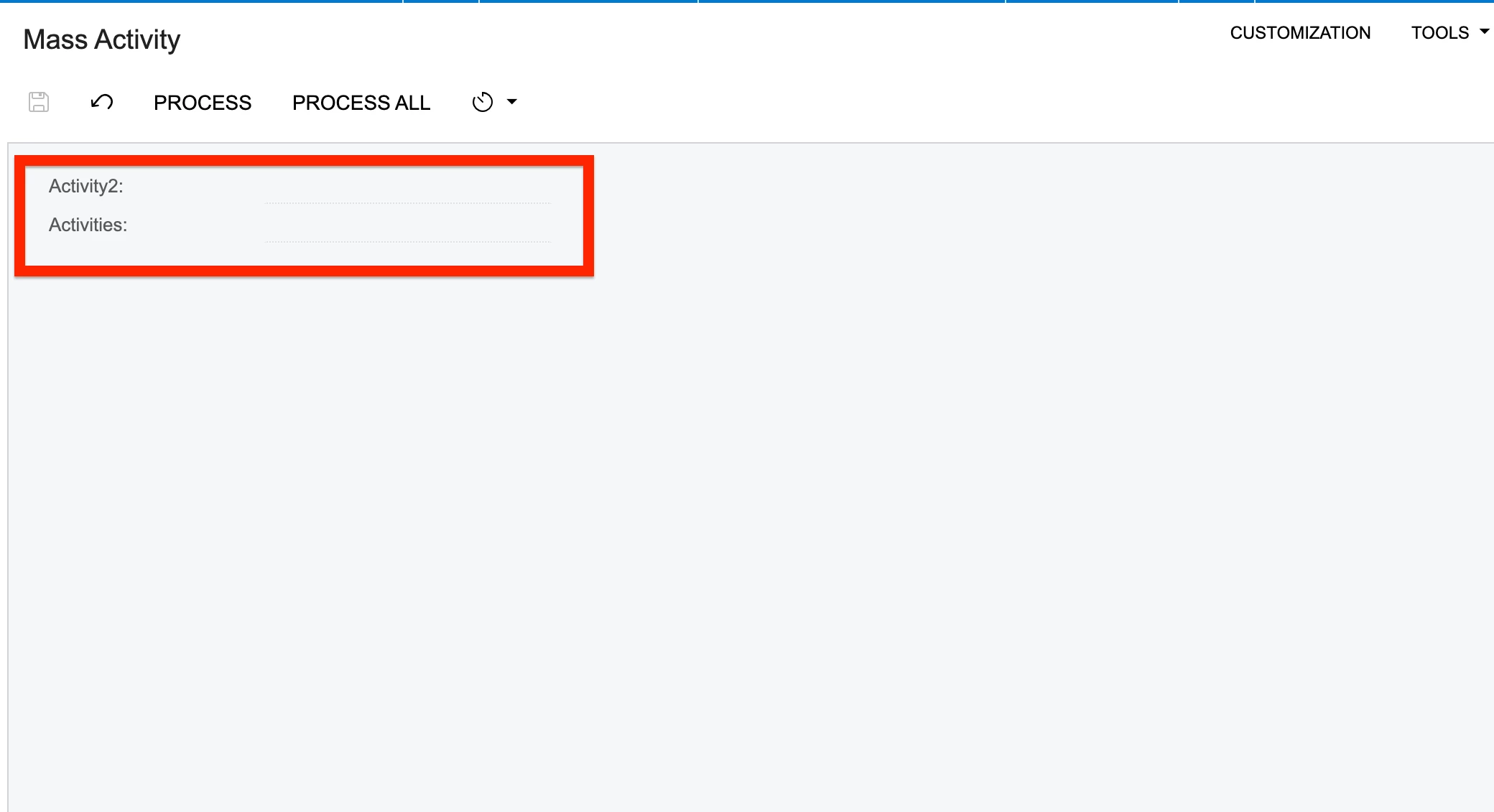
Hello @aaghaei. Thank you for the suggestion. I followed them but still not getting the required result.


DAC codes:
Activity2:

#regionActivity2

[PXDBInt()]
[PXIntList(new int[] {0,1,2,3}, new string[]{"Add Note","Add Call","Add Escalation","Add Work Item"})]
[PXUIField(DisplayName="Activity2")]

public virtual string Activities { get; set; }
    public abstract class Activity2 : PX.Data.BQL.BqlString.Field < Activity2 >  { }
    #endregion


Activities:

#region Activities
    [PXDBString(1, IsUnicode = true)]
    [PXUIField(DisplayName = "Activities")]
    [PXStringList(new string[] {"N","C","E","W"}, new string[]{"Add Note","Add Call","Add Escalation","Add Work Item"})]
    public virtual string Activities { get; set; }
    public abstract class activities : PX.Data.BQL.BqlString.Field < activities >  { }
    #endregion


PS:here I have just changed the field names


aaghaei
Captain II
Forum|alt.badge.img+10
  • Captain II
  • January 8, 2023

@Harshita

you can use either of the below for your UsrActivityType. I suggest StringList and to pick the first letter of the Description as the stored value in DB for better readability ie “N” for “Note” or “C” for “Call” and so on.

// If you want Int List
#region UsrActivityType
[PXDBInt()]
[PXIntList(new int[] { 0, 1, 2, 3 }, new string[] { "Add Note", "Add Call", "Add Escalation", "Add Work Item" })]
[PXUIField(DisplayName = "Activity Type")]
public virtual int? UsrActivityType { get; set; }
public abstract class usrActivityType : PX.Data.BQL.BqlInt.Field<usrActivityType> { }
#endregion

// If you want String List
#region UsrActivityType
[PXDBString(1, IsUnicode = true)]
[PXStringList(new string[] { "0", "1", "2", "3" }, new string[] { "Add Note", "Add Call", "Add Escalation", "Add Work Item" })]
[PXUIField(DisplayName = "Activity Type")]
public virtual string UsrActivityType { get; set; }
public abstract class usrActivityType : PX.Data.BQL.BqlString.Field<usrActivityType> { }
#endregion


Hello @aaghaei. Thank you for the suggestion. I followed them but still not getting the required result.


DAC codes:
Activity2:

#regionActivity2

[PXDBInt()]
[PXIntList(new int[] {0,1,2,3}, new string[]{"Add Note","Add Call","Add Escalation","Add Work Item"})]
[PXUIField(DisplayName="Activity2")]

public virtual string Activities { get; set; }
    public abstract class Activity2 : PX.Data.BQL.BqlString.Field < Activity2 >  { }
    #endregion


Activities:

#region Activities
    [PXDBString(1, IsUnicode = true)]
    [PXUIField(DisplayName = "Activities")]
    [PXStringList(new string[] {"N","C","E","W"}, new string[]{"Add Note","Add Call","Add Escalation","Add Work Item"})]
    public virtual string Activities { get; set; }
    public abstract class activities : PX.Data.BQL.BqlString.Field < activities >  { }
    #endregion


PS:here I have just changed the field names

For the int one I still see you are using BqlString. To me it looks like your screen is readonly. Can you add “Enabled = true” to the PXUIField attribute and try it?

Have you created your page using Acumatica’s Customization Projects or manally?


aaghaei
Captain II
Forum|alt.badge.img+10
  • Captain II
  • January 8, 2023

If you had already created your DB Table as string you also might face some unexpected issues. To Test it out change remove DB from PXDBInt and PXDBString and test it.


Forum|alt.badge.img+1

Hi @Harshita,

It looks like Your DAC Field Name and Data Field name in asp file are not matching.

Please Use the below code:

#region UsrActivityType
    [PXDBString(20, IsUnicode = true, InputMask = "")]
      [PXIntList (new string[] {“0”,”1”,”2”,”3”}, new string[] {"Add Note","Add Call","Add Escalation","Add Work Item"})]
    [PXUIField(DisplayName = "Activity Type")]
    public virtual string UsrActivityType { get; set; }
    public abstract class usrActivityType : PX.Data.BQL.BqlString.Field < usrActivityType >  { }
    #endregion


in Aspx page change the field name “DataField="UsrActivityTypes"  to  “DataField="UsrActivityType”

 Note: Just remove “s” in DataField name.


Hope this may help you!

Moulali Shaik.


Forum|alt.badge.img+3
  • Author
  • Captain II
  • January 9, 2023

Hi @Harshita,

It looks like Your DAC Field Name and Data Field name in asp file are not matching.

Please Use the below code:

#region UsrActivityType
    [PXDBString(20, IsUnicode = true, InputMask = "")]
      [PXIntList (new string[] {“0”,”1”,”2”,”3”}, new string[] {"Add Note","Add Call","Add Escalation","Add Work Item"})]
    [PXUIField(DisplayName = "Activity Type")]
    public virtual string UsrActivityType { get; set; }
    public abstract class usrActivityType : PX.Data.BQL.BqlString.Field < usrActivityType >  { }
    #endregion


in Aspx page change the field name “DataField="UsrActivityTypes"  to  “DataField="UsrActivityType”

 Note: Just remove “s” in DataField name.


Hope this may help you!

Moulali Shaik.


Already checked out. But still not getting displayed.


Forum|alt.badge.img+3
  • Author
  • Captain II
  • January 9, 2023

If you had already created your DB Table as string you also might face some unexpected issues. To Test it out change remove DB from PXDBInt and PXDBString and test it.

Thank you for your suggestion @aaghaei . Tried this out also but still no results.
I did try out to set the Layout Property Enabled=True , but it is still showing the same output.


Forum|alt.badge.img+3
  • Author
  • Captain II
  • January 9, 2023

If you had already created your DB Table as string you also might face some unexpected issues. To Test it out change remove DB from PXDBInt and PXDBString and test it.

Tested. but still the same result.


Forum|alt.badge.img+3
  • Author
  • Captain II
  • Answer
  • January 10, 2023

Hello @aaghaei @MoulaliShaik79 @Shawn Burt,
I would like to thank all for your guidance and suggestions on resolving the issue. And would like to update that the issue has been resolved.

Upon setting the Layout Property for this particular field as the below screenshot, 


The required dropdown field got enabled.


Thank you once again for your suggestions.
Harshita Sethia.


Chris Hackett
Community Manager
Forum|alt.badge.img
  • Acumatica Community Manager
  • January 10, 2023

Thank you for sharing your solution with the community @Harshita !