



I’m customizing the SO301000 screen in Modern UI.
I created a Dialog Panel in the .html file and linked it to the TypeScript class with @viewInfo and createSingle/createCollection.
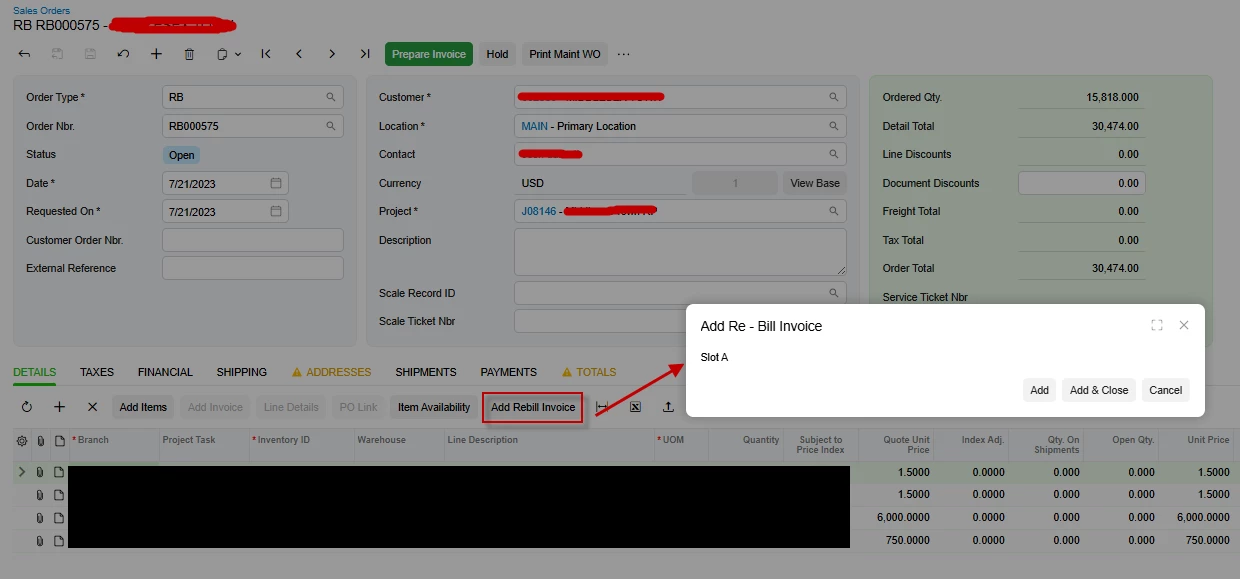
However, the panel does not display when I open the screen.
I’ve attached my .html and .ts files. Can anyone point out what I’m doing wrong or missing in the setup?
.html
import {
GridPreset,
PXActionState,
PXFieldOptions,
PXFieldState,
PXView,
controlConfig,
createCollection,
gridConfig,
columnConfig,
createSingle,
viewInfo
} from "client-controls";
import { SO301000, SOOrderHeader, SOLine } from "src/screens/SO/SO301000/SO301000";
//export interface SO301000_SKModernUICST extends SO301000 { }
export class SO301000_SKModernUICST extends SO301000 {
AddRBInvoiceOK: PXActionState;
@viewInfo({containerName: "addRBinvoicefilter"})
addRBinvoicefilter = createSingle(AddRBInvoiceFilter);
@viewInfo({containerName: "RBinvoicesplits"})
RBinvoicesplits = createCollection(RBInvoiceSplits);
}
export interface SOOrderHeader_SKModernUICST extends SOOrderHeader { }
export class SOOrderHeader_SKModernUICST {
UsrScalRecord: PXFieldState<PXFieldOptions.CommitChanges>;
UsrScalTickNbr: PXFieldState;
//Change Service Number field to be Disabled and linked
@controlConfig({allowEdit: true})
UsrServiceNbr: PXFieldState<PXFieldOptions.Disabled>;
UsrTaxable: PXFieldState<PXFieldOptions.CommitChanges>;
//Conditional CSS fields (if OrderType = "MR")
UsrEquipmentID: PXFieldState;
UsrVIN: PXFieldState;
UsrMileage: PXFieldState;
UsrHours: PXFieldState;
UsrTech1: PXFieldState;
UsrTech2: PXFieldState;
}
export interface SOLine_SKModernUICST extends SOLine { }
export class SOLine_SKModernUICST {
UsrSPriceIndex: PXFieldState;
UsrQuoteUnitPrice: PXFieldState;
UsrIndexAdj: PXFieldState;
//Action on toolbar
AddReBill: PXActionState;
}
export class AddRBInvoiceFilter extends PXView {
DocType: PXFieldState<PXFieldOptions.CommitChanges>;
RefNbr: PXFieldState<PXFieldOptions.CommitChanges>;
}
@gridConfig({
preset: GridPreset.ReadOnly,
syncPosition: true,
adjustPageSize: true
})
export class RBInvoiceSplits extends PXView {
@columnConfig({ allowCheckAll: true })
Selected: PXFieldState<PXFieldOptions.CommitChanges>;
InventoryID: PXFieldState;
TranDesc: PXFieldState;
SiteID: PXFieldState;
LocationID: PXFieldState;
Qty: PXFieldState;
UOM: PXFieldState;
OrderNbrSOLine: PXFieldState;
}
.ts
<template>
<field
after="#fsColumnB-Order FIELD[name='OrderDesc']"
name="Document.UsrScalRecord"
pinned
config-allow-edit.bind="true"></field>
<field after="#fsColumnB-Order FIELD[name='Document.UsrScalRecord']" name="Document.UsrScalTickNbr"></field>
<field
after="#fsColumnC-Order FIELD[name='CuryControlTotal']"
name="Document.UsrTaxable"
pinned
config-allow-edit.bind="true"></field>
<field after="#fsColumnC-Order FIELD[name='CuryControlTotal']" name="Document.UsrServiceNbr"></field>
<qp-template id="formOrderLine2" after="#form-Order" name="1-1-1">
<qp-fieldset id="formConditionalFieldsMR" slot="A" view.bind="Document" class="highlights-section">
<field name="Document.UsrEquipmentID"></field>
<field name="Document.UsrVIN"></field>
<field name="Document.UsrMileage"></field>
<field name="Document.UsrHours"></field>
<field name="Document.UsrTech1"></field>
<field name="Document.UsrTech2"></field>
</qp-fieldset>
</qp-template>
<qp-panel id="RBinvoicesplits" caption="Add Re - Bill Invoice" auto-repaint="true">
<qp-template id="formRebillInvoice" name="17-17-14" class="equal-height" wg-container>
<qp-fieldset id="addRBinvoicefilter_CstPXLayoutRule3_fs0" slot="slotA" view.bind="addRBinvoicefilter" wg-container="addRBinvoicefilter_CstFormView2">
<field name="DocType"></field>
<field name="RefNbr"></field>
</qp-fieldset>
</qp-template>
<qp-grid id="CstPXGrid17" view.bind="RBinvoicesplits" batchUpdate="True"></qp-grid>
<footer>
<qp-button id="CstButton13" state.bind="AddRBInvoiceOK" caption="Add"></qp-button>
<qp-button id="CstButton11" dialog-result="OK" caption="Add & Close"></qp-button>
<qp-button id="CstButton12" dialog-result="Cancel" caption="Cancel"></qp-button>
</footer>
</qp-panel>
</template>



