

Answer

Device hub action code on custom screen

  • June 20, 2025
  • 3 replies
  • 42 views

Forum|alt.badge.img

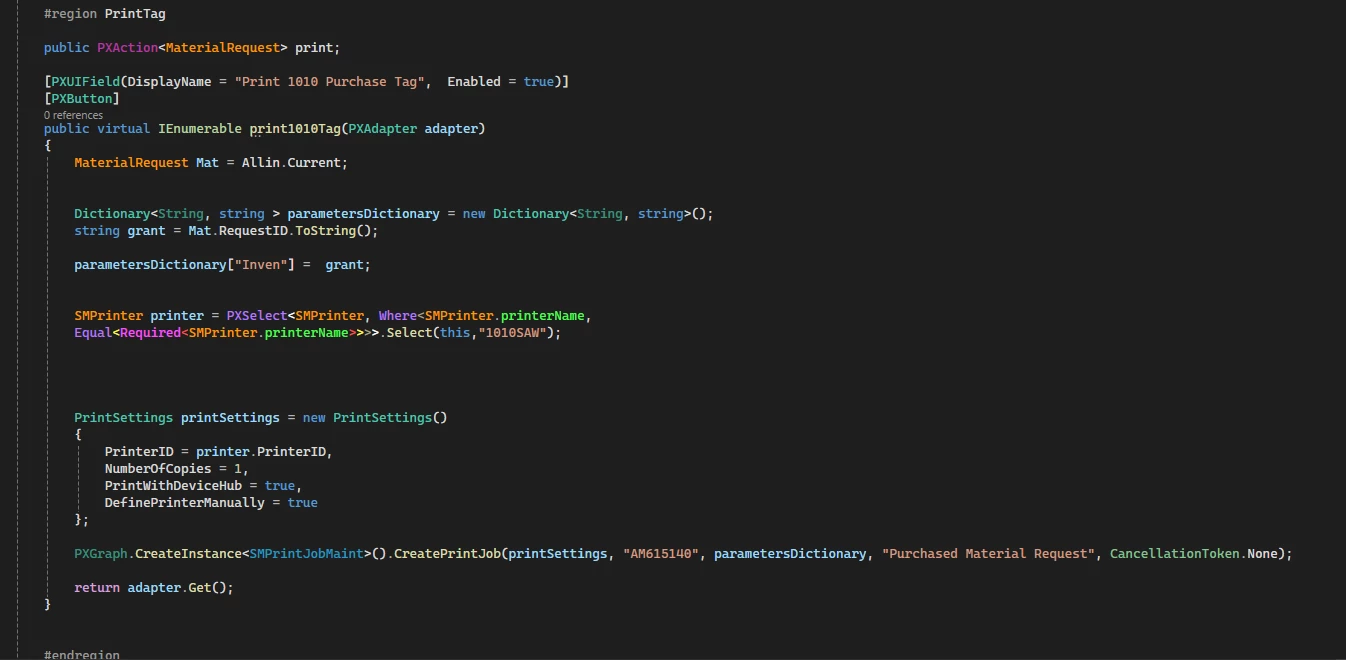
I created a new screen and I want to add a custom action to it for printing via device hub. I have done a couple of actions for device hub on existing screens as graph extensions, but i am having issues with doing it in a custom screen. Below is the code. I pretty much copied the existing ones that i had and changed the information where needed. i dont show any errors, but when i build this, the action doesnt appear on the screen. Did i miss something? I found several examples of device hub on existing screens but i cant find much on adding it into a new screen. Below is the code that i have. Thank you in advance.

 

Best answer by Josiah Lisle

Hi Justen,

The first thing I notice is your PXAction is called print and your method is called print1010Tag. I believe you would want them to have the same name (with upper/lower case on the first letter)

3 replies

Forum|alt.badge.img+1
  • Jr Varsity I
  • Answer
  • June 20, 2025

Hi Justen,

The first thing I notice is your PXAction is called print and your method is called print1010Tag. I believe you would want them to have the same name (with upper/lower case on the first letter)


darylbowman
Captain II
Forum|alt.badge.img+15

In addition to the suggestion above, is MaterialRequest the DAC configured in the Data Source > PrimaryView on your screen? You should use whatever is in there.


Forum|alt.badge.img
  • Author
  • Varsity III
  • June 23, 2025

@josiahl64 That was the Problem. Thank you!

@darylbowman I also changed the view name. Thanks!

