Answer

Default Warehouse in BOM Materials grid

  • November 10, 2021
  • 5 replies
  • 298 views

Forum|alt.badge.img

I am trying to grab the Default Warehouse field in Stock Items screen and insert it to BOM Material grid (Warehouse) as shown below:
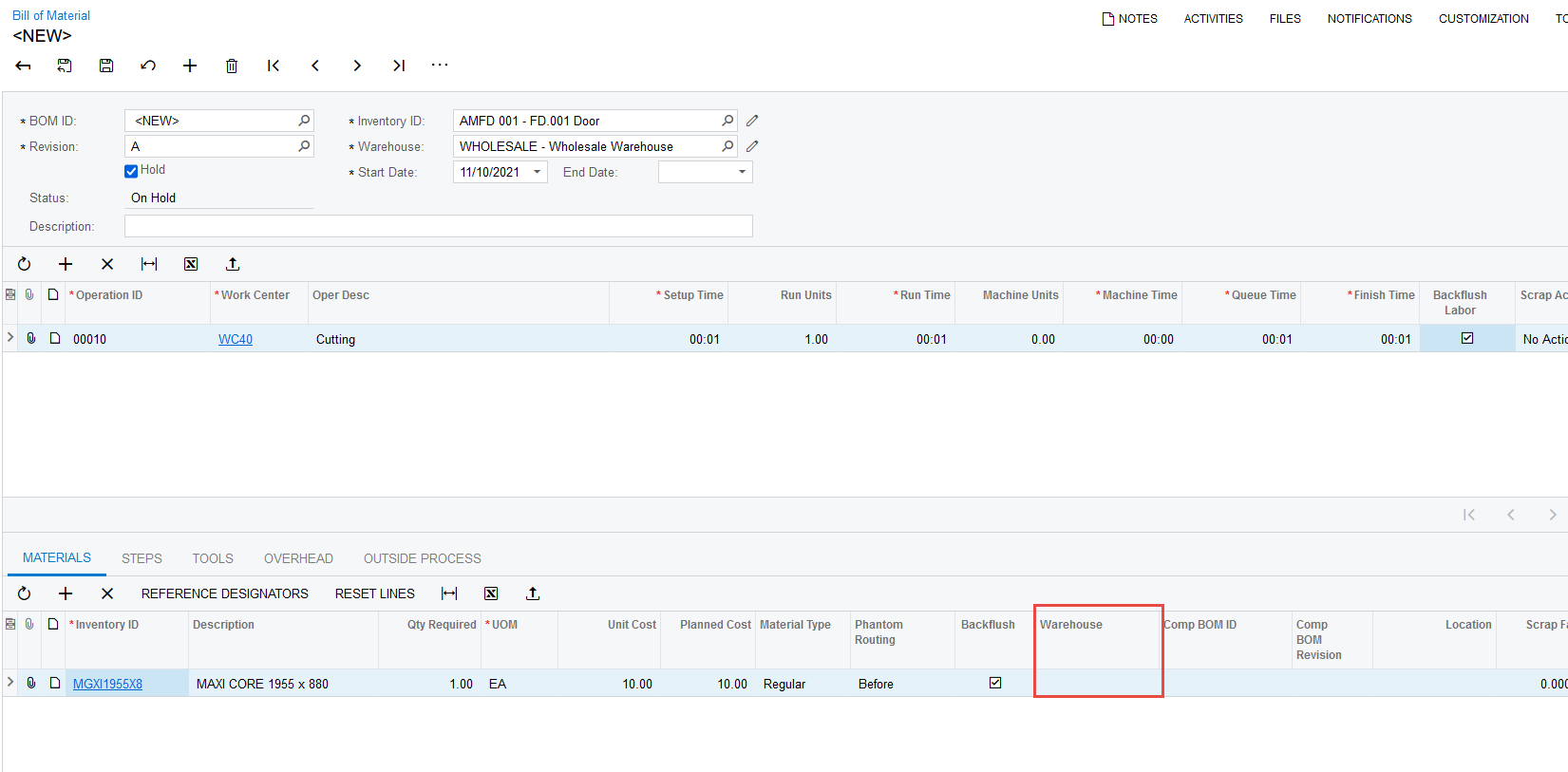
 

I tried overriding the field but failed to get the desired result by inserting the code is as shown below:

using PX.Data.ReferentialIntegrity.Attributes;
using PX.Objects.CM;
using System.Collections;
using PX.Data;
using PX.Objects.IN;
using System;
using System.Collections.Generic;
using System.Linq;
using PX.Objects.AM.Attributes;
using PX.Common;
using PX.Objects.CS;
using PX.Data.WorkflowAPI;
using PX.Objects;
using PX.Objects.AM;

namespace PX.Objects.AM
{
public class BOMMaint_Extension : PXGraphExtension<BOMMaint>
{
#region Event Handlers

[PXDefault(typeof(Search<InventoryItemCurySettings.dfltSiteID, Where<InventoryItem.inventoryID, Equal<Current<AMBomMatl.inventoryID>>>>), PersistingCheck = PXPersistingCheck.Nothing)]
public abstract class siteID : PX.Data.BQL.BqlInt.Field<siteID> { }

protected Int32? _SiteID;
[PXRestrictor(typeof(Where<INSite.active, Equal<True>>), PX.Objects.IN.Messages.InactiveWarehouse, typeof(INSite.siteCD), CacheGlobal = true)]
[Site]
[PXForeignReference(typeof(Field<siteID>.IsRelatedTo<INSite.siteID>))]
public virtual Int32? SiteID
{
get
{
return this._SiteID;
}
set
{
this._SiteID = value;
}
}
protected virtual void AMBomMatl_SiteID_CacheAttached(PXCache cache)
{

}
#endregion
}
}

 

Best answer by mvolshteyn

@ericklasimin61 , I only now noticed that you ry to customize Graph, but declare the field (include class referring to field and also publc property) as if you are customizing a DAC. Also notice that if you decide to customize a DAC, PXDefault attribute should follow the field name class declaration

So, either of two versions should work:

 Customize BLC

public class BOMMaint_Extension : PXGraphExtension<BOMMaint>
{

[PXMergeAttributes(Method = MergeMethod.Append)]

[PXDefault(typeof(Search<InventoryItem.dfltSiteID, Where<InventoryItem.inventoryID, Equal<Current<AMBomMatl.inventoryID>>>>), PersistingCheck = PXPersistingCheck.Nothing)]
protected virtual void AMBomMatl_SiteID_CacheAttached(PXCache cache)
{

}
}

Customize DAC:

public class AMBOmMatlExtensionDefSite : PXCacheExtension<AMBomMatl>
{
#region rederault SiteId

public abstract class siteID : PX.Data.BQL.BqlInt.Field<siteID> { }
protected Int32? _SiteID;
[PXMergeAttributes(Method = MergeMethod.Append)]
[PXDefault(typeof(Search<InventoryItem.dfltSiteID, Where<InventoryItem.inventoryID, Equal<Current<AMBomMatl.inventoryID>>>>),
PersistingCheck = PXPersistingCheck.Nothing)]

public virtual Int32? SiteID
{
get
{
return this._SiteID;
}
set
{
this._SiteID = value;
}
}

#endregion
}


5 replies

mvolshteyn
Acumatica Moderator
Forum|alt.badge.img+3
  • Technical Account Manager in the ISV Team
  • November 10, 2021

@ericklasimin61 , why does the PXDefault attribute search in the InventoryItemCurySettings table?

try using the standard InventoryItem table - the same as in the Where clause:

 Search<InventoryItem.dfltSiteID, Where<InventoryItem.inventoryID, Equal<Current<AMBomMatl.inventoryID>>>>)


Forum|alt.badge.img
  • Author
  • Varsity I
  • November 10, 2021

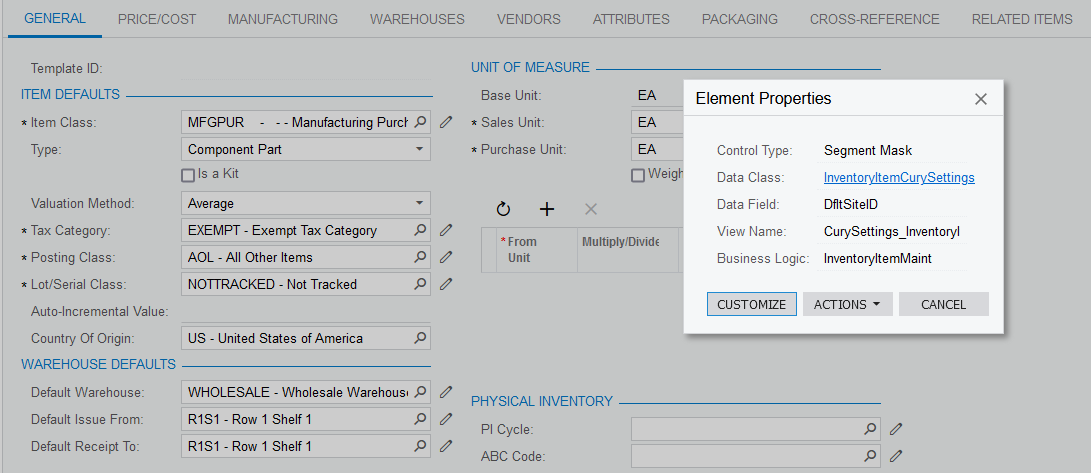
Hi @mvolshteyn , to answer your question, it’s because the data class indicates that as shown below:


On another note, I tried using InventoryItem instead of InventoryItemCurySettings but I failed to get the desired result as well.


mvolshteyn
Acumatica Moderator
Forum|alt.badge.img+3
  • Technical Account Manager in the ISV Team
  • Answer
  • November 11, 2021

@ericklasimin61 , I only now noticed that you ry to customize Graph, but declare the field (include class referring to field and also publc property) as if you are customizing a DAC. Also notice that if you decide to customize a DAC, PXDefault attribute should follow the field name class declaration

So, either of two versions should work:

 Customize BLC

public class BOMMaint_Extension : PXGraphExtension<BOMMaint>
{

[PXMergeAttributes(Method = MergeMethod.Append)]

[PXDefault(typeof(Search<InventoryItem.dfltSiteID, Where<InventoryItem.inventoryID, Equal<Current<AMBomMatl.inventoryID>>>>), PersistingCheck = PXPersistingCheck.Nothing)]
protected virtual void AMBomMatl_SiteID_CacheAttached(PXCache cache)
{

}
}

Customize DAC:

public class AMBOmMatlExtensionDefSite : PXCacheExtension<AMBomMatl>
{
#region rederault SiteId

public abstract class siteID : PX.Data.BQL.BqlInt.Field<siteID> { }
protected Int32? _SiteID;
[PXMergeAttributes(Method = MergeMethod.Append)]
[PXDefault(typeof(Search<InventoryItem.dfltSiteID, Where<InventoryItem.inventoryID, Equal<Current<AMBomMatl.inventoryID>>>>),
PersistingCheck = PXPersistingCheck.Nothing)]

public virtual Int32? SiteID
{
get
{
return this._SiteID;
}
set
{
this._SiteID = value;
}
}

#endregion
}


Forum|alt.badge.img
  • Author
  • Varsity I
  • November 12, 2021

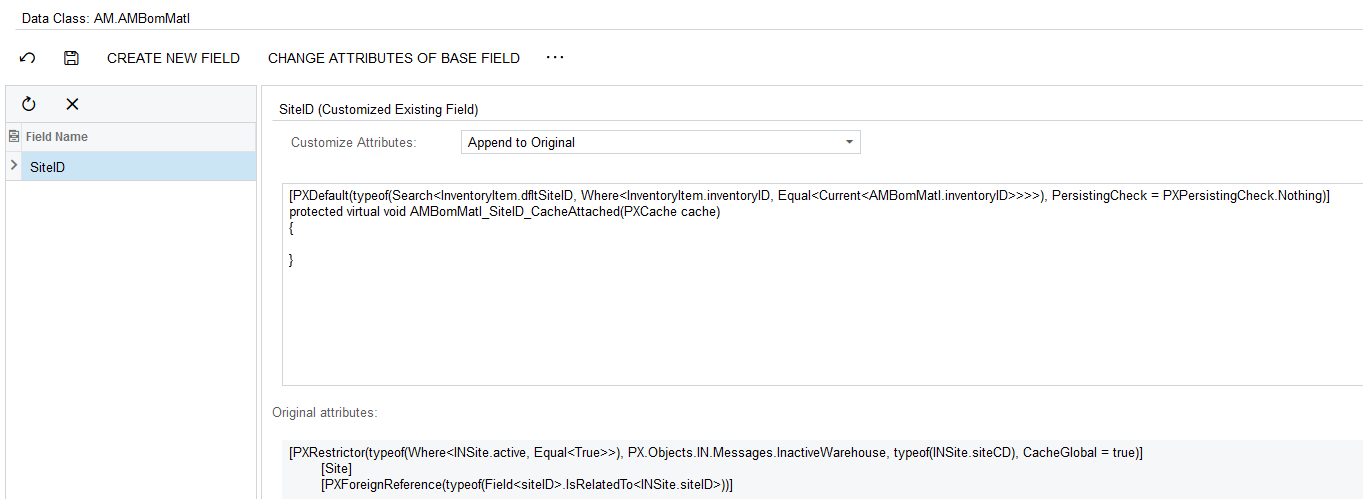
Hi @mvolshteyn , I tried appending the code below to the corresponding field by finding the field and customizing the field itself as shown below, but couldn’t get it to work. Am I doing it wrong?


As for DAC customization, it works perfectly!


mvolshteyn
Acumatica Moderator
Forum|alt.badge.img+3
  • Technical Account Manager in the ISV Team
  • November 12, 2021

@ericklasimin61 , you seem to enter this code in a wrong place

in the left-hand menu of the Customizations screen, you need to select the Code option (you seem to have selected the Data Access)

then click ‘+’ and select either Graph Extension or DAC Extension (which really does not matter, since you only need the correct ‘using’ list from the temptates), then select the corresponding graph/DAC 

in the opening code editor field, replace the public class declaration with either of the code pieces provided