Answer

Customize PXDBDate

  • April 4, 2025
  • 3 replies
  • 114 views

How I have two DatePicker StartDate and EndDate

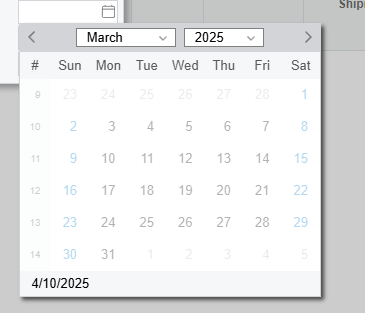
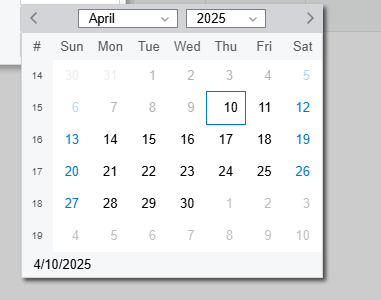
  1. I want the StartDate to be only to start from today, past dates  selection disable
  2. I want the EndDate only be from the Future but always greater then the Start Date
     

        #region StartDate
        [PXDBDate()]
        [PXUIField(DisplayName = "Start Date")]
        public virtual DateTime? StartDate { get; set; }
        public abstract class startDate : PX.Data.BQL.BqlDateTime.Field<startDate> { }
        #endregion

        #region EndDate
        [PXDBDate()]
        [PXUIField(DisplayName = "End Date")]
        public virtual DateTime? EndDate { get; set; }
        public abstract class endDate : PX.Data.BQL.BqlDateTime.Field<endDate> { }
        #endregion

Best answer by harutyungevorgyan

Hello ​@anupusefulbi ,

If you want to disable past dates in the calendar UI of an Acumatica screen, you can do that using JavaScript.
Just paste the following code inside your .aspx page within a <script type="text/javascript"> tag, like so:

<script type="text/javascript">
// Paste the JavaScript code here
(function () {
function disablePastDates() {
const today = new Date();
today.setHours(0, 0, 0, 0);

const yearSelect = document.querySelector('.year-select select');
const monthSelect = document.querySelector('.month-select select');
if (!yearSelect || !monthSelect) return;

const selectedYear = parseInt(yearSelect.value);
const selectedMonth = parseInt(monthSelect.value);

document.querySelectorAll('.qp-calendar td.calendarD').forEach(cell => {
const dayText = cell.textContent.trim();
if (!dayText || isNaN(dayText)) return;

const day = parseInt(dayText);
let cellYear = selectedYear;
let cellMonth = selectedMonth;

if (cell.classList.contains('calendarOMD')) {
if (day > 15) {
cellMonth -= 1;
if (cellMonth < 0) {
cellMonth = 11;
cellYear -= 1;
}
} else {
cellMonth += 1;
if (cellMonth > 11) {
cellMonth = 0;
cellYear += 1;
}
}
}

const cellDate = new Date(cellYear, cellMonth, day);
cellDate.setHours(0, 0, 0, 0);

if (cellDate < today) {
cell.style.pointerEvents = 'none';
cell.style.opacity = '0.3';
cell.style.cursor = 'not-allowed';
cell.title = 'Past date';
} else {
cell.style.pointerEvents = '';
cell.style.opacity = '';
cell.style.cursor = '';
cell.removeAttribute('title');
}
});
}

function setupListeners() {
const calendarRoot = document.querySelector('.qp-calendar');
if (!calendarRoot) return;

disablePastDates();

const monthSelect = document.querySelector('.month-select');
const yearSelect = document.querySelector('.year-select');
if (monthSelect) {
monthSelect.addEventListener('change', () => setTimeout(disablePastDates, 150));
}
if (yearSelect) {
yearSelect.addEventListener('change', () => setTimeout(disablePastDates, 150));
}

const prevArrow = document.querySelector('[ref="prevMonthEle"]');
const nextArrow = document.querySelector('[ref="nextMonthEle"]');
if (prevArrow && nextArrow) {
const observerOptions = {
attributes: true,
attributeFilter: ['tooltip']
};
const tooltipObserver = new MutationObserver(() => setTimeout(disablePastDates, 100));
tooltipObserver.observe(prevArrow, observerOptions);
tooltipObserver.observe(nextArrow, observerOptions);
}
}

document.addEventListener('click', () => {
setTimeout(() => {
const calendar = document.querySelector('.qp-calendar');
if (calendar && !calendar.hasAttribute('data-listeners-set')) {
calendar.setAttribute('data-listeners-set', 'true');
setupListeners();
}
}, 100);
});
})();
</script>

✅ This script automatically disables past days in the calendar:

  • Whether the user clicks the previous or next arrow

  • Selects a different month

  • Or change the year

You can extend the logic based on the current field (StartDate, EndDate, etc.)  with your conditions.


3 replies

jinin
Pro I
Forum|alt.badge.img+11
  • Pro I
  • April 4, 2025

Hi ​@anupusefulbi ,

Would you mind giving this approach a try? I haven't personally tested it—just sharing an idea

#region StartDate
[PXDBDate()]
[PXDefault(typeof(AccessInfo.businessDate))]
[PXUIField(DisplayName = "Start Date")]
[PXUIVerify(typeof(Where<startDate, GreaterEqual<Current<AccessInfo.businessDate>>>),
PXErrorLevel.Error, "Start Date cannot be in the past.")]
public virtual DateTime? StartDate { get; set; }
public abstract class startDate : PX.Data.BQL.BqlDateTime.Field<startDate> { }
#endregion


#region EndDate
[PXDBDate()]
[PXUIField(DisplayName = "End Date")]
[PXUIVerify(typeof(Where<endDate, Greater<Current<startDate>>>),
PXErrorLevel.Error, "End Date must be greater than Start Date.")]
public virtual DateTime? EndDate { get; set; }
public abstract class endDate : PX.Data.BQL.BqlDateTime.Field<endDate> { }
#endregion


Forum|alt.badge.img+5

Hi ​@anupusefulbi,

Restrict StartDate to today or future

protected void _(Events.FieldVerifying<YourDAC, YourDAC.startDate> e)
{
    if (e.NewValue is DateTime newDate)
    {
        if (newDate.Date < PXTimeZoneInfo.Now.Date)
        {
            throw new PXSetPropertyException("Start Date cannot be in the past.");
        }
    }
}
Restrict EndDate to be greater than StartDate

protected void _(Events.FieldVerifying<YourDAC, YourDAC.endDate> e)
{
    var row = e.Row;
    if (row == null || e.NewValue == null) return;


    DateTime? newEndDate = (DateTime?)e.NewValue;
    DateTime? startDate = row.StartDate;


    if (startDate != null && newEndDate <= startDate)
    {
        throw new PXSetPropertyException("End Date must be greater than Start Date.");
    }
}

Hope this helps!


harutyungevorgyan
Jr Varsity I
Forum|alt.badge.img+2

Hello ​@anupusefulbi ,

If you want to disable past dates in the calendar UI of an Acumatica screen, you can do that using JavaScript.
Just paste the following code inside your .aspx page within a <script type="text/javascript"> tag, like so:

<script type="text/javascript">
// Paste the JavaScript code here
(function () {
function disablePastDates() {
const today = new Date();
today.setHours(0, 0, 0, 0);

const yearSelect = document.querySelector('.year-select select');
const monthSelect = document.querySelector('.month-select select');
if (!yearSelect || !monthSelect) return;

const selectedYear = parseInt(yearSelect.value);
const selectedMonth = parseInt(monthSelect.value);

document.querySelectorAll('.qp-calendar td.calendarD').forEach(cell => {
const dayText = cell.textContent.trim();
if (!dayText || isNaN(dayText)) return;

const day = parseInt(dayText);
let cellYear = selectedYear;
let cellMonth = selectedMonth;

if (cell.classList.contains('calendarOMD')) {
if (day > 15) {
cellMonth -= 1;
if (cellMonth < 0) {
cellMonth = 11;
cellYear -= 1;
}
} else {
cellMonth += 1;
if (cellMonth > 11) {
cellMonth = 0;
cellYear += 1;
}
}
}

const cellDate = new Date(cellYear, cellMonth, day);
cellDate.setHours(0, 0, 0, 0);

if (cellDate < today) {
cell.style.pointerEvents = 'none';
cell.style.opacity = '0.3';
cell.style.cursor = 'not-allowed';
cell.title = 'Past date';
} else {
cell.style.pointerEvents = '';
cell.style.opacity = '';
cell.style.cursor = '';
cell.removeAttribute('title');
}
});
}

function setupListeners() {
const calendarRoot = document.querySelector('.qp-calendar');
if (!calendarRoot) return;

disablePastDates();

const monthSelect = document.querySelector('.month-select');
const yearSelect = document.querySelector('.year-select');
if (monthSelect) {
monthSelect.addEventListener('change', () => setTimeout(disablePastDates, 150));
}
if (yearSelect) {
yearSelect.addEventListener('change', () => setTimeout(disablePastDates, 150));
}

const prevArrow = document.querySelector('[ref="prevMonthEle"]');
const nextArrow = document.querySelector('[ref="nextMonthEle"]');
if (prevArrow && nextArrow) {
const observerOptions = {
attributes: true,
attributeFilter: ['tooltip']
};
const tooltipObserver = new MutationObserver(() => setTimeout(disablePastDates, 100));
tooltipObserver.observe(prevArrow, observerOptions);
tooltipObserver.observe(nextArrow, observerOptions);
}
}

document.addEventListener('click', () => {
setTimeout(() => {
const calendar = document.querySelector('.qp-calendar');
if (calendar && !calendar.hasAttribute('data-listeners-set')) {
calendar.setAttribute('data-listeners-set', 'true');
setupListeners();
}
}, 100);
});
})();
</script>

✅ This script automatically disables past days in the calendar:

  • Whether the user clicks the previous or next arrow

  • Selects a different month

  • Or change the year

You can extend the logic based on the current field (StartDate, EndDate, etc.)  with your conditions.