Hi team,
Is it possible to customize file dialog to add new column.
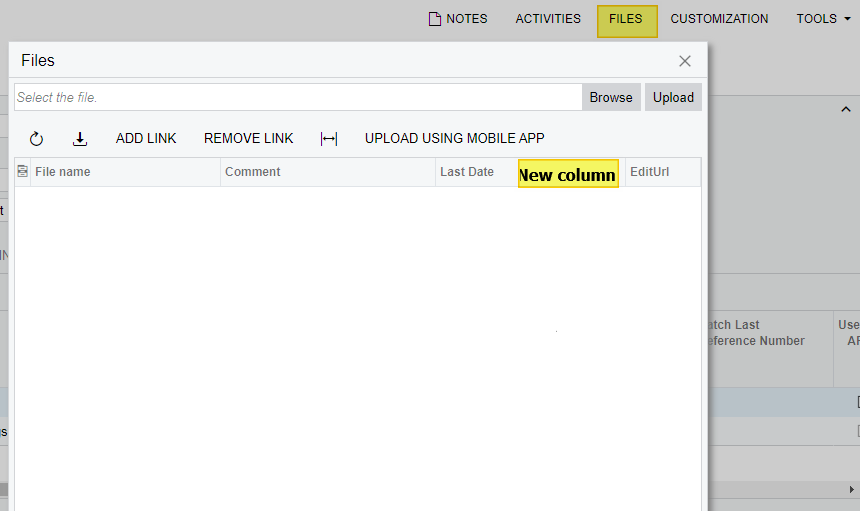
Thanks,
Arun.



Hi team,
Is it possible to customize file dialog to add new column.
Thanks,
Arun.
Best answer by Nayan Vadher
I asked a similar question to Developer support in the past and was told it was either not possible or not practical. I forget which.
Short answer is - not possible.
This dialog is not available for customization, except that one can only add some custom buttons to it. e.g. below:
     public class FilesDialogExtender : IFilesDialogExtender

    {
        public void AddAction(PXGraph graph, string view)
        {
            if ((graph is PXGenericInqGrph) ||
                 (String.IsNullOrEmpty(graph.PrimaryView)) ||
                 (graph.PrimaryItemType == null))
            { return; }

            if (!graph.Actions.Contains("MyButton"))
            {
                PXButtonDelegate uploadFromDemo1 = delegate (PXAdapter adapter)
                {
                    var g = adapter.View.Graph;
                    g.Views[g.PrimaryView].Ask("MyButton", MessageButtons.OK);
                    return adapter.Get();
                };
                PXButtonAttribute buttonAttribute = null;
                {
                    buttonAttribute = PXEventSubscriberAttribute.CreateInstance<PXButtonAttribute>();
                    buttonAttribute.VisibleOnDataSource = false;
                    buttonAttribute.PopupVisible = false;
                }

                PXUIFieldAttribute uiFieldAttribute = null;
                {
                    uiFieldAttribute = PXEventSubscriberAttribute.CreateInstance<PXUIFieldAttribute>();
                    uiFieldAttribute.DisplayName = "My Button";
                    uiFieldAttribute.Visible = true;
                    uiFieldAttribute.MapEnableRights = PXCacheRights.Select;
                    uiFieldAttribute.MapViewRights = PXCacheRights.Select;
                }
                List<PXEventSubscriberAttribute> attribs = new List<PXEventSubscriberAttribute>();
                attribs.Add(buttonAttribute);
                attribs.Add(uiFieldAttribute);
                PXNamedAction.AddAction(graph, graph.PrimaryItemType, "MyButton", "My Button", uploadFromDemo1, attribs.ToArray());
            }
        }

        public IEnumerable<ToolbarButtonDescriptor> GetToolbarButtons(PXGraph graph, string view)
        {
            Type graphType = graph?.GetType();
            if ((graphType != typeof(PXGenericInqGrph)))
            {
                var btn = new ToolbarButtonDescriptor(null, "MyButton", "MyButton");
                btn.CommandArgument = view;

                return new ToolbarButtonDescriptor[] { btn };
            }
            return null;
        }
    }
No account yet? Create an account
Enter your E-mail address. We'll send you an e-mail with instructions to reset your password.