Question

Custom screen shows duplicate record on save?

  • August 5, 2025
  • 9 replies
  • 112 views

Forum|alt.badge.img

Hello Community. I have a custom screen linked to a custom table and numbering sequence. When creating a new record and saving, it updates the primary keys numbering sequence. Upon doing so, it shows a duplicate record which doesn’t actually save, but you need to refresh the page to clear it. The first line in the highlighted screenshot below is the one I added, before hitting save and because it is an auto numbering sequence it shows the one line with “NEW” and then after save, populated and an extra line pops up like below. If I refresh or hit cancel, it removes the duplicate because its not actually saved. 
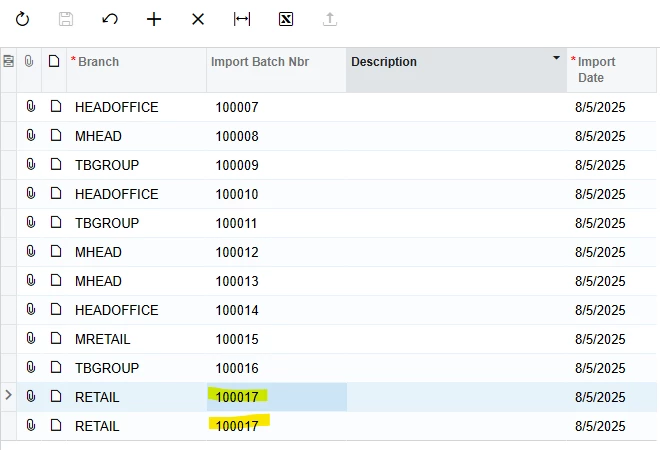
 Below is the graph. The persist method is what I was trying to do to get the duplicate to clear automatically. I’m sure there is a very simple way to fix this but haven’t had any luck.

public class ImportBatchEntry : PXGraph<ImportBatchEntry>
{
public PXSavePerRow<Imports> Save;
public PXCancel<Imports> Cancel;
public PXSelect<Imports> Document;
public PXSetup<SOSetup> Setup;

public override void Persist()
{
base.Persist();
this.Caches.Clear();
this.Document.View.Clear();
this.Actions.PressCancel();
this.Document.View.RequestRefresh();
}
}

Thoughts? Thanks for the help!

Adam

9 replies

MichaelShirk
Captain II
Forum|alt.badge.img+5
  • Captain II
  • August 5, 2025

Hey ​@AJohnson  are you able to share the DAC code? 


Forum|alt.badge.img
  • Author
  • Jr Varsity III
  • August 5, 2025

@MichaelShirk Sure thing, see below. Thanks!

   [Serializable]
[PXCacheName("ArenImports")]
public class ArenImports : PXBqlTable, IBqlTable
{
#region BranchID
public abstract class branchID : PX.Data.BQL.BqlInt.Field<branchID> { }
protected Int32? _BranchID;
[Branch(typeof(AccessInfo.branchID), IsDetail = false, TabOrder = 0)]
public virtual Int32? BranchID
{
get
{
return this._BranchID;
}
set
{
this._BranchID = value;
}
}
#endregion

#region ImportBatchNbr
[PXDBString(15, IsKey = true, IsFixed = true, InputMask = "")]
[PXUIField(DisplayName = "Import Batch Nbr", Visibility = PXUIVisibility.SelectorVisible)]
[PXSelector(typeof(Search<importBatchNbr>), typeof(importDate))]
[PXDefault(PersistingCheck = PXPersistingCheck.NullOrBlank)]
[AutoNumber(typeof(SOSetupExt.usrImportBatch), typeof(ArenImports.createdDateTime))]
public virtual string ImportBatchNbr { get; set; }
public abstract class importBatchNbr : PX.Data.BQL.BqlString.Field<importBatchNbr> { }
#endregion

#region ImportDate
[PXDBDate()]
[PXUIField(DisplayName = "Import Date")]
[PXDefault(typeof(AccessInfo.businessDate))]
public virtual DateTime? ImportDate { get; set; }
public abstract class importDate : PX.Data.BQL.BqlDateTime.Field<importDate> { }
#endregion

#region Description
[PXDBString(100, IsFixed = true, InputMask = "")]
[PXUIField(DisplayName = "Description")]
public virtual string Description { get; set; }
public abstract class description : PX.Data.BQL.BqlString.Field<description> { }
#endregion

#region CreatedByID
[PXDBCreatedByID()]
public virtual Guid? CreatedByID { get; set; }
public abstract class createdByID : PX.Data.BQL.BqlGuid.Field<createdByID> { }
#endregion

#region CreatedByScreenID
[PXDBCreatedByScreenID()]
public virtual string CreatedByScreenID { get; set; }
public abstract class createdByScreenID : PX.Data.BQL.BqlString.Field<createdByScreenID> { }
#endregion

#region CreatedDateTime
[PXDBCreatedDateTime()]
public virtual DateTime? CreatedDateTime { get; set; }
public abstract class createdDateTime : PX.Data.BQL.BqlDateTime.Field<createdDateTime> { }
#endregion

#region LastModifiedByID
[PXDBLastModifiedByID()]
public virtual Guid? LastModifiedByID { get; set; }
public abstract class lastModifiedByID : PX.Data.BQL.BqlGuid.Field<lastModifiedByID> { }
#endregion

#region LastModifiedByScreenID
[PXDBLastModifiedByScreenID()]
public virtual string LastModifiedByScreenID { get; set; }
public abstract class lastModifiedByScreenID : PX.Data.BQL.BqlString.Field<lastModifiedByScreenID> { }
#endregion

#region LastModifiedDateTime
[PXDBLastModifiedDateTime()]
public virtual DateTime? LastModifiedDateTime { get; set; }
public abstract class lastModifiedDateTime : PX.Data.BQL.BqlDateTime.Field<lastModifiedDateTime> { }
#endregion

#region Tstamp
[PXDBTimestamp()]
public virtual byte[] Tstamp { get; set; }
public abstract class tstamp : PX.Data.BQL.BqlByteArray.Field<tstamp> { }
#endregion

#region NoteID
[PXNote()]
public virtual Guid? NoteID { get; set; }
public abstract class noteID : PX.Data.BQL.BqlGuid.Field<noteID> { }
#endregion
}


darylbowman
Captain II
Forum|alt.badge.img+15

Try enabling ‘InitNewRow’ on the data grid’s ‘Mode’ property


Forum|alt.badge.img
  • Author
  • Jr Varsity III
  • August 7, 2025

@darylbowman Thanks, gave that a shot but no luck. I get the same behavior with “InitNewRow” set on the grid ‘Mode’ property. 

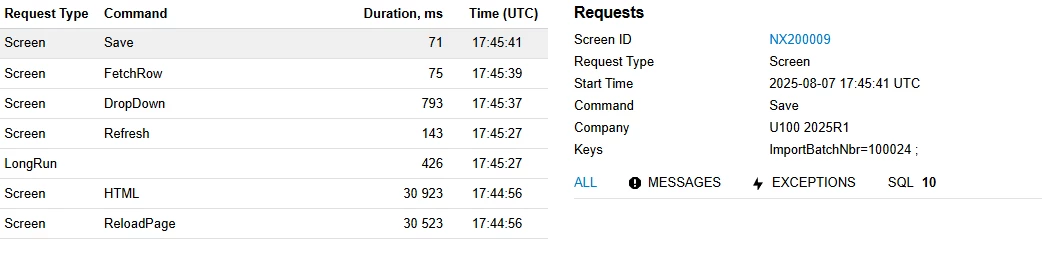
Oddly enough I can’t get any traces to pop up in the persist override either. 

public override void Persist()
{
PXTrace.WriteInformation("Test 1");
base.Persist();
PXTrace.WriteInformation("Test 2");
}

My trace calls the save but never displays the information. 

 Any other ideas I can try? Thanks in advance!


darylbowman
Captain II
Forum|alt.badge.img+15

Do you have CommitChanges enabled for the Import Batch Nbr field?


Forum|alt.badge.img
  • Author
  • Jr Varsity III
  • August 7, 2025

@darylbowman I did. Just tried disabling that to see if I got any difference without any luck. Currently disabled commit changes on Import Batch Nbr. and still have the “InitNewRow” enabled. 

<asp:Content ID="cont1" ContentPlaceHolderID="phDS" runat="Server">
<px:PXDataSource ID="ds" runat="server" Visible="True" Width="100%"
TypeName="Imports.ImportBatchEntry"
PrimaryView="Document">
<CallbackCommands>
<px:PXDSCallbackCommand CommitChanges="True" Name="Save" />
</CallbackCommands>
</px:PXDataSource>
</asp:Content>
<asp:Content ID="Content1" ContentPlaceHolderID="phL" runat="Server">
<px:PXGrid ID="PXGrid1" runat="server" DataSourceID="ds" Height="170px" Width="100%" AdjustPageSize="Auto" AllowPaging="True" AllowSearch="True" SkinID="Primary">
<Levels>
<px:PXGridLevel DataMember="Document">
<Columns>
<px:PXGridColumn CommitChanges="True" DataField="BranchID" Width="140" ></px:PXGridColumn>
<px:PXGridColumn CommitChanges="False" DataField="ImportBatchNbr" Width="140" ></px:PXGridColumn>
<px:PXGridColumn CommitChanges="True" DataField="Description" Width="220" ></px:PXGridColumn>
<px:PXGridColumn CommitChanges="True" DataField="ImportDate" Width="90" ></px:PXGridColumn>
</Columns>
</px:PXGridLevel>
</Levels>
<AutoSize Container="Window" Enabled="True" ></AutoSize>
<Mode InitNewRow="True" AllowUpload="True" ></Mode>
</px:PXGrid>
</asp:Content>

Above is my aspx showing those settings. 


darylbowman
Captain II
Forum|alt.badge.img+15

This may be a limitation of having AutoNumber on an Inquiry form. I can’t recall any OOB screens that do it.

...Just tried disabling that

I was going to suggest enabling it.

One more thing you could try would be to change the callback command to ‘Refresh’. Other than that, I’m out of ideas.


MichaelShirk
Captain II
Forum|alt.badge.img+5
  • Captain II
  • August 7, 2025

@AJohnson Do you wanna share the graph code too? I don’t see any issues with the DAC.


Chris Hackett
Community Manager
Forum|alt.badge.img
  • Acumatica Community Manager
  • September 25, 2025

Hi ​@AJohnson were you able to find a solution? Thank you!