




I have a DAC extension on BAccount, with a few custom fields that I’ve added to the aspx page for display on the Employees screen.
One of these custom fields “AP Vendor”, implements a PXSelector to select a vendor record. The selector popup shows the vendor records, but if I select one, it doesn’t populate the field. If I try to type a value in the field, the list pops up, but still no value is saved when I select it.
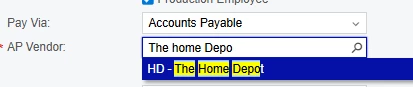
I even inserted a valid BAccountID into the field via database query and it still didn’t display anything on the screen.
Here’s the DAC code.
        #region UsrSWAPVendor
        [PXDBInt()]
        [PXSelector(typeof(SelectFrom<VendorR>.
                Where<VendorR.type.IsNotEqual<BAccountType.employeeType>>.
                SearchFor<VendorR.bAccountID>),
            typeof(VendorR.acctCD),
            typeof(VendorR.acctName),
            typeof(VendorR.classID),
            SubstituteKey = typeof(VendorR.acctCD),
            DescriptionField = typeof(VendorR.acctName))]
        [PXDefault(PersistingCheck = PXPersistingCheck.Nothing)]
        [PXUIRequired(typeof(Where<usrSWPayVia.IsEqual<SWPayViaType.accountsPayable>>))]
        [PXUIEnabled(typeof(Where<usrSWPayVia.IsEqual<SWPayViaType.accountsPayable>>))]
        [PXUIField(DisplayName = "AP Vendor")]
        public int? UsrSWAPVendor { get; set; }
        public abstract class usrSWAPVendor : PX.Data.BQL.BqlInt.Field<usrSWAPVendor> { }
        #endregion
I appreciate any help!