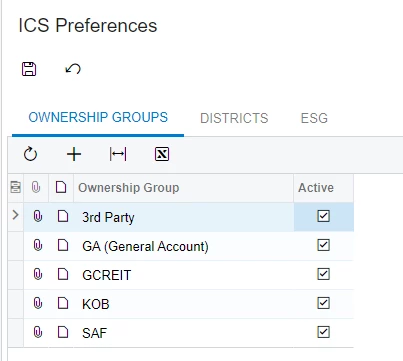
I have a custom screen with 3 tabs. I created it using the Tab (Tab View) template.
The form looks great and displays the data in my 3 tabs, one grid in each tab.
When I change a record in one of the grids, the Save icon becomes enabled, but when I click the Save icon, it does not do anything.
This is Acumatica 101, but I could use help to get this working.
Here is my Graph:
	public class ICSPreferences : PXGraph<ICSPreferences>
	{

		public PXSave<MasterTable> Save;
		public PXCancel<MasterTable> Cancel;

		public PXFilter<MasterTable> MasterView;

		public PXSelect<ICSDistrictsPref> DistrictsView;
		public PXSelect<ICSOwnershipGroupPref> OwnershipGroupView;
		public PXSelect<ICSESGPref> ESGView;


		[Serializable]
		public class MasterTable : IBqlTable
		{

		}
	}
Here is my ASPX:
<%@ Page Language="C#" MasterPageFile="~/MasterPages/TabView.master" AutoEventWireup="true" ValidateRequest="false" CodeFile="IC202070.aspx.cs" Inherits="Page_IC202070" Title="Untitled Page" %>
<%@ MasterType VirtualPath="~/MasterPages/TabView.master" %>

<asp:Content ID="cont1" ContentPlaceHolderID="phDS" Runat="Server">
  <px:PXDataSource ID="ds" runat="server" Visible="True" Width="100%"
        TypeName="MyPlace23R1.ICSPreferences"
        PrimaryView="MasterView"
        >
    <CallbackCommands>

    </CallbackCommands>
  </px:PXDataSource>
</asp:Content>
<asp:Content ID="cont2" ContentPlaceHolderID="phF" Runat="Server">
  <px:PXTab ID="tab" runat="server" DataSourceID="ds" Height="150px" Style="z-index: 100" Width="100%" AllowAutoHide="false">
    <Items>
      <px:PXTabItem Text="Ownership Groups">

        <Template>
          <px:PXGrid Width="100%" AllowAutoHide="false" DataSourceID="ds" Height="150px" SkinID="Details" runat="server" ID="CstOwnershipGrid">
            <Levels>
              <px:PXGridLevel DataMember="OwnershipGroupView" >
                <Columns>
                  <px:PXGridColumn DataField="OwnershipGroup" Width="220" ></px:PXGridColumn>
                  <px:PXGridColumn Type="CheckBox" TextAlign="Center" DataField="IsActive" Width="60" ></px:PXGridColumn></Columns></px:PXGridLevel></Levels>
            <AutoSize Container="Window" ></AutoSize>
            <AutoSize Enabled="True" ></AutoSize>
            <AutoSize MinHeight="150" ></AutoSize>
            <ActionBar>
              <Actions>
                <Delete Enabled="False" /></Actions></ActionBar></px:PXGrid></Template></px:PXTabItem>
      <px:PXTabItem Text="Districts">

        <Template>
          <px:PXGrid Width="100%" AllowAutoHide="false" DataSourceID="ds" Height="150px" SkinID="Details" runat="server" ID="CstDistrictsGrid">
            <Levels>
              <px:PXGridLevel DataMember="DistrictsView" >
                <Columns>
                  <px:PXGridColumn DataField="Districts" Width="220" ></px:PXGridColumn>
                  <px:PXGridColumn TextAlign="Center" Type="CheckBox" DataField="IsActive" Width="60" ></px:PXGridColumn></Columns></px:PXGridLevel></Levels>
            <AutoSize Container="Window" ></AutoSize>
            <AutoSize Enabled="True" ></AutoSize>
            <AutoSize MinHeight="150" ></AutoSize>
            <ActionBar>
              <Actions>
                <Delete Enabled="False" /></Actions></ActionBar></px:PXGrid></Template></px:PXTabItem>
      <px:PXTabItem Text="ESG" >
        <Template>
          <px:PXGrid Width="100%" AllowAutoHide="false" DataSourceID="ds" Height="150px" SkinID="Details" runat="server" ID="CstESGGrid">
            <Levels>
              <px:PXGridLevel DataMember="ESGView" >
                <Columns>
                  <px:PXGridColumn DataField="ESG" Width="220" ></px:PXGridColumn>
                  <px:PXGridColumn Type="CheckBox" TextAlign="Center" DataField="IsActive" Width="60" ></px:PXGridColumn></Columns></px:PXGridLevel></Levels>
            <AutoSize Container="Window" ></AutoSize>
            <AutoSize Enabled="True" ></AutoSize>
            <AutoSize MinHeight="150" ></AutoSize>
            <ActionBar>
              <Actions>
                <Delete Enabled="False" /></Actions></ActionBar></px:PXGrid></Template></px:PXTabItem></Items>
    <AutoSize Container="Window" Enabled="True" MinHeight="200" ></AutoSize>
  </px:PXTab>
</asp:Content>
This is what the screen looks like:
I think it has to do with the PXFilter on an empty Master table, but I don’t know what the solution is.