Answer

Custom field in Sales Order header not showing a value

  • June 3, 2025
  • 11 replies
  • 80 views

Joe Schmucker
Captain II
Forum|alt.badge.img+3

My customer asked me to show the Shipping Address Line 1 and line 2 in a new 4th column in the header of the Sales Order screen.

I created two unbound string fields to store the values from the Addresses tab (shipping address info).

Even using the “nuclear” option of the SOOrder RowSelected handler, the values will not show in the custom fields.

In debug, I can see the values being set correctly in the custom fields, but when the screen displays, they are empty.

I don’t think it is possible to do this using PXUnbound in the DAC extension because I need the custom fields to be updated if the user overrides the address lines in the Addresses tab.

I tried to do the update after the RowSelected handler has been invoked, but that didn’t make any difference.  

Here is my DAC:

public sealed class GTSOOrderExt : PXCacheExtension<PX.Objects.SO.SOOrder>
{
public static bool IsActive() => true;

#region UsrShipAddressLine1
[PXString(50)]
[PXUIField(DisplayName = "Ship Address Line 1", Enabled = false)]
public string UsrShipAddressLine1 { get; set; }
public abstract class usrShipAddressLine1 : PX.Data.BQL.BqlString.Field<usrShipAddressLine1> { }
#endregion

#region UsrShipAddressLine2
[PXString(50)]
[PXUIField(DisplayName = "Ship Address Line 2", Enabled = false)]
public string UsrShipAddressLine2 { get; set; }
public abstract class usrShipAddressLine2 : PX.Data.BQL.BqlString.Field<usrShipAddressLine2> { }
#endregion
}

Here is my graph extension:

protected void SOOrder_RowSelected(PXCache cache, PXRowSelectedEventArgs e, PXRowSelected InvokeBaseHandler)
{
if (InvokeBaseHandler != null)
InvokeBaseHandler(cache, e);
var row = (SOOrder)e.Row;

if (row == null) return;

PXUIFieldAttribute.SetEnabled<GTSOOrderExt.usrShipAddressLine1>(cache, row, false);
PXUIFieldAttribute.SetEnabled<GTSOOrderExt.usrShipAddressLine2>(cache, row, false);

GTSOOrderExt ext = row.GetExtension<GTSOOrderExt>();
if (ext != null)
{
SOShippingAddress shipAddress = Base.Shipping_Address.Current;
if (shipAddress != null)
{
ext.UsrShipAddressLine1 = shipAddress.AddressLine1;
ext.UsrShipAddressLine2 = shipAddress.AddressLine2;
cache.SetValue<GTSOOrderExt.usrShipAddressLine1>(row, shipAddress.AddressLine1);
cache.SetValue<GTSOOrderExt.usrShipAddressLine2>(row, shipAddress.AddressLine2);
}
}
}

Any ideas?

I thought I’d knock this one out in 15 minutes.  

Best answer by Django

Another way to do this is to put a Form in that 4th column. Set the DataMember of the form to use the Shipping_Location view. Set DataSourceID to ds, RenderStyle to either FieldSet or Simple. Give it a meaningful ID to avoid further naming conflicts.

Add a column to the Form and then you should be able to add your Shipping Location fields as per normal. Mark them as Enabled=False.

11 replies

darylbowman
Captain II
Forum|alt.badge.img+15

I don’t think it is possible to do this using PXUnbound in the DAC extension because I need the custom fields to be updated if the user overrides the address lines

If you mean [PXUnboundDefault], you could call SetDefaultExt<GTSOOrderExt.usrShipAddressLine1> (and 2) in an event handler of FieldUpdated for Address.AddressLine1 (and 2) on your DAC fields to cause defaulting to happen any time the address fields are changed.


Joe Schmucker
Captain II
Forum|alt.badge.img+3
  • Author
  • Captain II
  • June 3, 2025

@darylbowman Let me give that a try


darylbowman
Captain II
Forum|alt.badge.img+15

Keep in mind you’re working with caches from several different views. If it doesn’t work, post your code.


Joe Schmucker
Captain II
Forum|alt.badge.img+3
  • Author
  • Captain II
  • June 3, 2025

I might be wrong, but I think fieldupdated only gets called when it is actually updated by the user.  That will work great if they change the value on the UI..  But I think the PXUnboundDefault pulls from the DB.  I will do what I can and after I fail, I will post my code.  FYI, the code I’ve posted is all the code I have so far except about 100 lines of commented out code that I tried that also failed. 


Joe Schmucker
Captain II
Forum|alt.badge.img+3
  • Author
  • Captain II
  • June 3, 2025

I don’t usually have much luck with this approach.  My Search2 looks valid to me.

Here is my attempt at using the PXUnboundDefault in my DAC.  

		#region UsrShipAddressLine1
[PXString(50)]
[PXUIField(DisplayName = "Ship Address Line 1", Enabled = false)]
[PXDBScalar(typeof(Search2<SOShippingAddress.addressLine1,
InnerJoin<SOOrder, On<SOOrder.shipAddressID, Equal<SOShippingAddress.addressID>>>,
Where<SOShippingAddress.addressID, Equal<SOOrder.shipAddressID>>>))]
[PXUnboundDefault(typeof(Search2<SOShippingAddress.addressLine1,
InnerJoin<SOOrder, On<SOOrder.shipAddressID, Equal<SOShippingAddress.addressID>>>,
Where<SOShippingAddress.addressID, Equal<Current<SOOrder.shipAddressID>>>>),
PersistingCheck = PXPersistingCheck.Nothing)]
public string UsrShipAddressLine1 { get; set; }
public abstract class usrShipAddressLine1 : PX.Data.BQL.BqlString.Field<usrShipAddressLine1> { }
#endregion

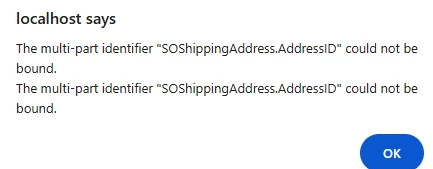
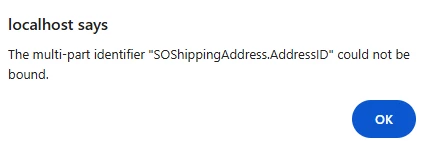
I get a runtime error:

This is the only code in my graph extension right now, but I get debug it due to the run-time error.

		protected void SOShippingAddress_AddressLine1_FieldUpdated(PXCache cache, PXFieldUpdatedEventArgs e)
{
var row = (SOShippingAddress)e.Row;
if (row == null) return;

PXCache soOrderCache = Base.Caches<SOOrder>();

soOrderCache.SetDefaultExt<GTSOOrderExt.usrShipAddressLine1>(row);
}

Sorry for being such a noob.


darylbowman
Captain II
Forum|alt.badge.img+15

Try:

[PXUnboundDefault(typeof(Search<SOShippingAddress.addressLine1, Where<SOShippingAddress.addressID, Equal<Current<SOOrder.shipAddressID>>>>), PersistingCheck = PXPersistingCheck.Nothing)]

and remove the PXDBScalar.


If that doesn’t work, write a FieldDefaulting event handler for the field and set the logic in there instead.


Joe Schmucker
Captain II
Forum|alt.badge.img+3
  • Author
  • Captain II
  • June 3, 2025

I originally tried it your way and thought I was being clever by joining to the SOOrder table.  

I was SO excited… HA!

I will try doing it in a field defaulting handler now.


Joe Schmucker
Captain II
Forum|alt.badge.img+3
  • Author
  • Captain II
  • June 3, 2025

Here is what I tried.  No joy.  In debug, e.NewValue is being set to the address line 1. 

I can only get the FieldDefaulting to fire if I put a line in the SOOrder RowSelected.

If the next thing I try doesn’t work, I am just going to add these two fields to the SOOrder table.

protected void SOOrder_UsrShipAddressLine1_FieldDefaulting(PXCache cache, PXFieldDefaultingEventArgs e)
{
var row = (SOOrder)e.Row;
if (row == null) return;

GTSOOrderExt ext = row.GetExtension<GTSOOrderExt>();
if (ext != null)
{
SOShippingAddress shipAddress = Base.Shipping_Address.Current;
if (shipAddress != null)
{
e.NewValue = shipAddress.AddressLine1;
}
}
}

protected void SOOrder_RowSelected(PXCache cache, PXRowSelectedEventArgs e, PXRowSelected InvokeBaseHandler)
{
if (InvokeBaseHandler != null)
InvokeBaseHandler(cache, e);
var row = (SOOrder)e.Row;

if (row == null) return;

PXUIFieldAttribute.SetEnabled<GTSOOrderExt.usrShipAddressLine1>(cache, row, false);
PXUIFieldAttribute.SetEnabled<GTSOOrderExt.usrShipAddressLine2>(cache, row, false);

cache.SetDefaultExt<GTSOOrderExt.usrShipAddressLine1>(row);

}


darylbowman
Captain II
Forum|alt.badge.img+15

Set e.Cancel = true after setting e.NewValue

The [PXUnboundDefault] should cause the FieldDefaulting event to run during RowSelecting


Forum|alt.badge.img+7
  • Captain II
  • Answer
  • June 4, 2025

Another way to do this is to put a Form in that 4th column. Set the DataMember of the form to use the Shipping_Location view. Set DataSourceID to ds, RenderStyle to either FieldSet or Simple. Give it a meaningful ID to avoid further naming conflicts.

Add a column to the Form and then you should be able to add your Shipping Location fields as per normal. Mark them as Enabled=False.


Joe Schmucker
Captain II
Forum|alt.badge.img+3
  • Author
  • Captain II
  • June 4, 2025

@darylbowman Daryl, thank you so much for you time on this.  

@Django That did the trick.  Thank you for the idea.