


Solved

Custom field filter not working across all pages in Process Order screen

  • January 11, 2026
  • 7 replies
  • 71 views

Forum|alt.badge.img+2

In the Process Order screen, I have added a custom StringList field to the grid. When I apply a filter on this field in the grid level, the filtering works only for the currently loaded page. If I navigate to the next page, the filter then applies only to those page records, not across all pages.

Could you please suggest the correct approach to make the filter work across all pages/records?

 public delegate IEnumerable ordersDelegate();
[PXOverride]
public virtual IEnumerable orders(ordersDelegate basemethod)
{
PXUIFieldAttribute.SetDisplayName<SOOrder.customerID>(Base.Caches[typeof(SOOrder)], Messages.CustomerID);
SOOrderFilter filter = PXCache<SOOrderFilter>.CreateCopy(Base.Filter.Current);
if (filter.Action == PXAutomationMenuAttribute.Undefined)
yield break;
if (_ActionChanged)
Base.Orders.Cache.Clear();
PXSelectBase<SOOrder> cmd = GetSelectCommand(filter);
AddCommonFilters(filter, cmd);

int startRow = PXView.StartRow;
int totalRows = 0;

Dictionary<int?, Dictionary<int?, decimal?>> stockleveldict = new Dictionary<int?, Dictionary<int?, decimal?>>();
foreach (PXResult<SOOrder> res in cmd.View.Select(null, null, PXView.Searches, PXView.SortColumns, PXView.Descendings, PXView.Filters, ref startRow, PXView.MaximumRows, ref totalRows))
{
SOOrder order = res;
SOOrder cached;

if ((cached = (SOOrder)Base.Orders.Cache.Locate(order)) != null)
{
order.Selected = cached.Selected;
}
if (filter?.Action == WellKnownActions.SOOrderScreen.CreateShipment)
{
order = DisplayStatus(order, stockleveldict);
Base.Orders.Cache.Update(order);
}
yield return order;
}
PXView.StartRow = 0;
Base.Orders.Cache.IsDirty = false;
}
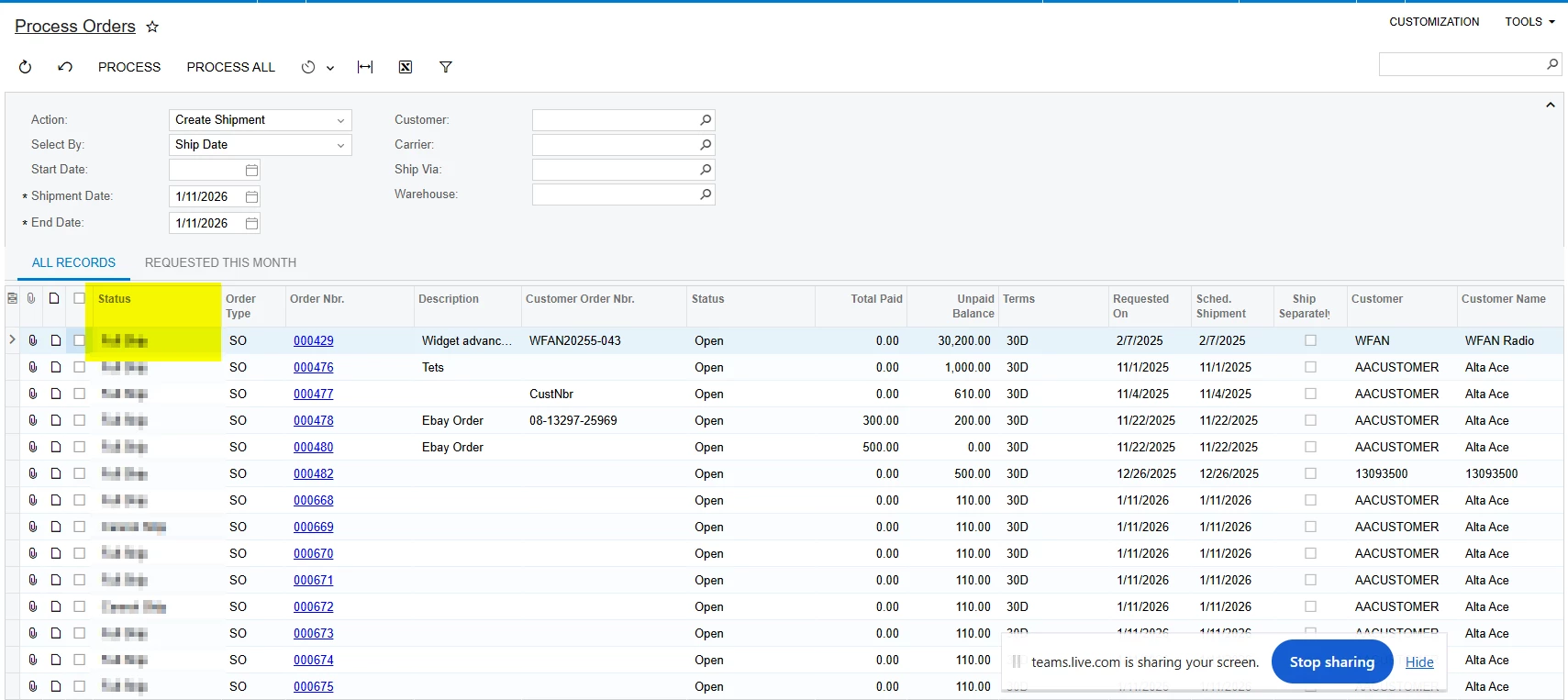
 

Any guidance would be appreciated.

Best answer by npetrosov31

Custom attribute will still have FieldSelecting, which will just work on the attribute level. The thing is that you won’t be able to make it work for all records without working with field selecting. The other solution is to update all records at once which you tried to do, but acumaticas paging won’t let you do that


7 replies

DipakNilkanth
Pro III
Forum|alt.badge.img+14

Hi ​@VSKWAN78

How are you populating the custom field values, and which event handler are you using?

You can try using the FieldSelecting event to derive or display values for the custom field at runtime, especially if the value is calculated or not meant to be persisted in the database.

Here’s a similar topic that you may find helpful and related to what you’re looking for.


Forum|alt.badge.img+2
  • Author
  • Pro II
  • January 12, 2026

@DipakNilkanth 

In the View delegate, I am populating the values in a field.


npetrosov31
Jr Varsity I
Forum|alt.badge.img+1
  • Jr Varsity I
  • January 12, 2026

Hi ​@VSKWAN78,


The approach in this way may not work, as you have overridden the IEnumerable, but it is not called every time on the page change. ​@DipakNilkanth mentioned a better approach, it is to override the FieldSelecting method. It should fix your issue. Also I noticed in the code that you don’t use the baseMethod in IEnumerable, this is also not the best way to approach a problem, as any future changes in the base Acumatica method which was overridden will not work while this customization is published. 


Forum|alt.badge.img+2
  • Author
  • Pro II
  • January 12, 2026

@npetrosov31 ​@DipakNilkanth Thanks for response.

Using FieldSelecting here may cause performance issues, as it is triggered on every row render. The base method was intentionally not called because the entire view logic have overriden, added additional conditions, has been implemented based on requirement.


npetrosov31
Jr Varsity I
Forum|alt.badge.img+1
  • Jr Varsity I
  • January 12, 2026

@VSKWAN78,

In that case you may need to change this:

cmd.View.Select(null, null, PXView.Searches, PXView.SortColumns, PXView.Descendings, PXView.Filters, ref startRow, PXView.MaximumRows, ref totalRows)

When your foreach is working this code returns only one page info. And because you want to pass all the values in one iteration it should go through all records. However that may result into performance issues so it should also not be recommended.

How exactly do you get the value for the field? What is inside DisplayStatus(order, stockleveldict); method? I think the solution may be in moving the status valuation into a custom attribute.


Forum|alt.badge.img+2
  • Author
  • Pro II
  • January 12, 2026

@npetrosov31 Thanks for sharing the details.

DisplayStatus is our custom code to run the logic and populate the custom field. Can you please let me know or elaborate about the approach that you recommended that is related to the Custom Attribute?


npetrosov31
Jr Varsity I
Forum|alt.badge.img+1
  • Jr Varsity I
  • Answer
  • January 12, 2026

Custom attribute will still have FieldSelecting, which will just work on the attribute level. The thing is that you won’t be able to make it work for all records without working with field selecting. The other solution is to update all records at once which you tried to do, but acumaticas paging won’t let you do that
