

Answer

Custom feature switch : Invalid column name

  • June 24, 2025
  • 4 replies
  • 92 views

Forum|alt.badge.img

I'm trying to implement a custom feature switch in the Enable/Disable Features screen (CS101000). 
In my extension library, I added the following code to a new file named FeaturesSetExt.cs:

namespace PX.Objects.CS
{
    public class FeaturesSetExt : PXCacheExtension<PX.Objects.CS.FeaturesSet>
    {
        #region UsrCustomSwitch
        [PXDefault(false, PersistingCheck = PXPersistingCheck.Nothing)]
        [Feature(false, DisplayName = "Custom Feature")]
        public bool? UsrCustomSwitch { get; set; }
        public abstract class usrCustomSwitch : PX.Data.BQL.BqlBool.Field<usrCustomSwitch> { }
        #endregion
    }
}

I also added a new Features.xml file with the following content:

<?xml version="1.0" encoding="utf-8"?>
<Features Type="MyExtLibrary.FeaturesSetExt" Key="0">
    <Feature Name="UsrCustomSwitch">
        <Access ScreenID="SA101000"/>
        <Access ScreenID="SA201000"/>
        <Access ScreenID="SA401000"/>
        <Access ScreenID="SA501000"/>
        <Access ScreenID="SA502000"/>
        <Access ScreenID="SA503000"/>
    </Feature>
</Features>


I set the Build Action of Features.xml to Embedded Resource.

The project builds successfully, and I published the customization project. 
However, when I navigate to the Enable/Disable Features screen, I receive the following error:

Invalid column name '[FeaturesSet].[UsrCustomSwitch]'

Am I did anything wrong? Or missed something ?

any help would be appreciated .

Thank you
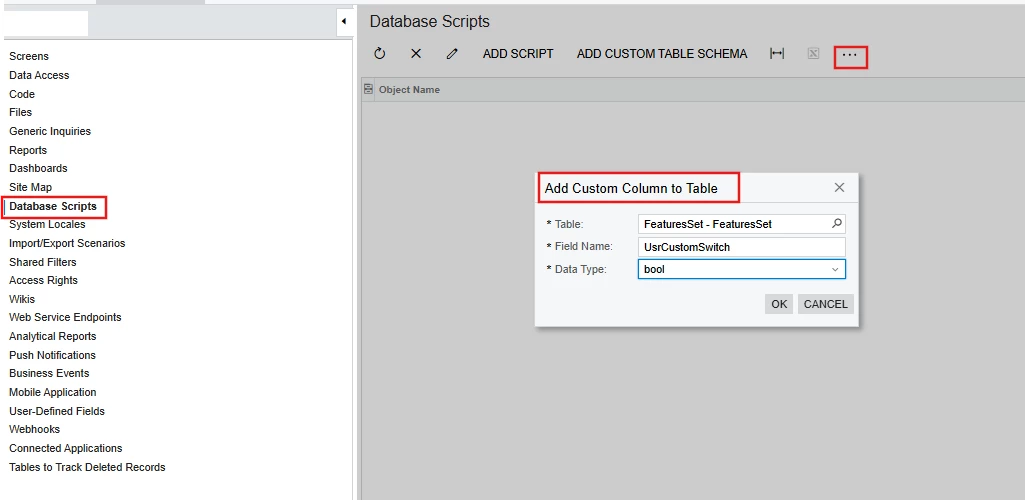
Best answer by DipakNilkanth

Hi ​@PraveenBeo,

  • Go to the Database Scripts section in the Customization Editor.

  • Click on the three dots (...) and select "Add Custom Column to Table".

  • Add your custom field to the FeaturesSet DAC.

  • Publish the Customization project.

Hope, it helps!

4 replies

Forum|alt.badge.img+1

It looks like you didn't do two things:

1. You need to add the UsrCustomSwitch field to the FeaturesSet table.

2. You need to customize the Enable/Disable Features (CS100000) form by adding a check box with the name of the custom feature on it.

Here is a link to the help on this topic.
https://help.acumatica.com/(W(3))/Help?ScreenId=ShowWiki&pageid=8285172e-d3b1-48d9-bcc1-5d20e39cc3f0


Forum|alt.badge.img+1
  • Semi-Pro III
  • June 24, 2025

@PraveenBeo 

The error "Invalid column name" indicates that the corresponding column is missing from the database. Add it and check again.


DipakNilkanth
Pro III
Forum|alt.badge.img+13
  • Pro III
  • Answer
  • June 24, 2025

Hi ​@PraveenBeo,

  • Go to the Database Scripts section in the Customization Editor.

  • Click on the three dots (...) and select "Add Custom Column to Table".

  • Add your custom field to the FeaturesSet DAC.

  • Publish the Customization project.

Hope, it helps!


Dmitrii Naumov
Acumatica Moderator
Forum|alt.badge.img+7
  • Acumatica Moderator
  • June 24, 2025

@PraveenBeo please note that on licensed instance the set of available feature switches also depends on the license. Without your custom feature switch being included in the license, it is not be visible on licensed instances.


