


Answer

Creating a Vendor ID selector, but field shows as TextEdit in project editor

  • May 9, 2025
  • 7 replies
  • 114 views

Joe Schmucker
Captain II
Forum|alt.badge.img+3

I’m adding a Vendor ID selector to the Stock Items screen.  I’m trying to use an existing VendorActive attribute so I don’t have to create the PXSelector from scratch.

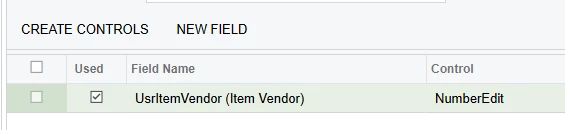
In project editor, the custom field shows a TextEdit, not Selector.  I tried editing the ASPX to make the field a PXSelector, but I get this error when I try to use the field:
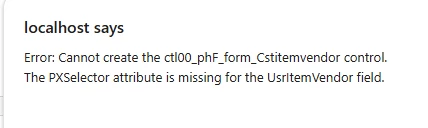
This is my DAC field.  I used the same “technique” as in the Acumatica training course, but does not work.

public sealed class CBInventoryItemExt : PXCacheExtension<PX.Objects.IN.InventoryItem>
{
public static bool IsActive() => true;

#region UsrItemVendor
[VendorActive(DisplayName = "Item Vendor", DescriptionField = typeof(Vendor.acctName))]
public int? UsrItemVendor { get; set; }
public abstract class usrItemVendor : PX.Data.BQL.BqlInt.Field<usrItemVendor> { }
#endregion

}

Nothing is ever easy for me.
Best answer by Joe Schmucker

Steps I took to fix this, even though it doesn’t make sense.

  1. removed the field from project editor
  2. deleted the db script that created the field.
  3. deleted the custom field from the sql table
  4. published
  5. created UsrItemVendor field
  6. deleted the data access code created in project editor
  7. published the project with cleanup to create the db field
  8. unremarked my dac code for the field with the VendorActive attribute and compiled.
  9. added the field to the screen.  

I guess it’s just one of those things.

7 replies

Joe Schmucker
Captain II
Forum|alt.badge.img+3
  • Author
  • Captain II
  • May 9, 2025

Crazy.  It might have nothing to do with using the VendorActive attribute.  I get the same error with this code:

		#region UsrItemVendor
[PXDBInt]
[PXUIField(DisplayName = "Item Vendor")]
[PXSelector(typeof(Search<Vendor.bAccountID>),
typeof(Vendor.acctCD),
typeof(Vendor.acctName),
typeof(Vendor.vendorClassID),
typeof(Vendor.vStatus),
SubstituteKey = typeof(Vendor.acctCD))]

public int? UsrItemVendor { get; set; }
public abstract class usrItemVendor : PX.Data.BQL.BqlInt.Field<usrItemVendor> { }
#endregion

Looks like I have PXSelector to me.

Just for kicks, I added another field and this one works.  Other than the name of the field, I made it unbound.  This one works.  

		#region UsrTest
[PXInt]
[PXUIField(DisplayName = "Item Vendor")]
[PXSelector(typeof(Search<Vendor.bAccountID>),
typeof(Vendor.acctCD),
typeof(Vendor.acctName),
typeof(Vendor.vendorClassID),
typeof(Vendor.vStatus),
SubstituteKey = typeof(Vendor.acctCD))]

public int? UsrTest { get; set; }
public abstract class usrTest : PX.Data.BQL.BqlInt.Field<usrTest> { }
#endregion

This is so frustrating.


Joe Schmucker
Captain II
Forum|alt.badge.img+3
  • Author
  • Captain II
  • Answer
  • May 9, 2025

Steps I took to fix this, even though it doesn’t make sense.

  1. removed the field from project editor
  2. deleted the db script that created the field.
  3. deleted the custom field from the sql table
  4. published
  5. created UsrItemVendor field
  6. deleted the data access code created in project editor
  7. published the project with cleanup to create the db field
  8. unremarked my dac code for the field with the VendorActive attribute and compiled.
  9. added the field to the screen.  

I guess it’s just one of those things.


Naveen Boga
Captain II
Forum|alt.badge.img+19
  • Captain II
  • May 9, 2025

@Joe Schmucker  I don’t see any issue with the below code. From the .aspx page, just remove the field and add again as PXSelector and it shoud work.


public sealed class CBInventoryItemExt : PXCacheExtension<PX.Objects.IN.InventoryItem>
{
public static bool IsActive() => true;

#region UsrItemVendor
[VendorActive(DisplayName = "Item Vendor", DescriptionField = typeof(Vendor.acctName))]
public int? UsrItemVendor { get; set; }
public abstract class usrItemVendor : PX.Data.BQL.BqlInt.Field<usrItemVendor> { }
#endregion

}


Joe Schmucker
Captain II
Forum|alt.badge.img+3
  • Author
  • Captain II
  • May 10, 2025

@Naveen Boga  The problem was that no matter how many times I compiled, when I went to add the field to the screen, it was showing as textedit, not selector.  I even tried adding it and editing the ASPX to change the tag to selector.  5 minutes between compiles, spent about an hour on a simple field.  Was ready to go to the short rope store.


Forum|alt.badge.img+7
  • Captain II
  • May 12, 2025

@Joe Schmucker - as an aside, you should be able to modify the web.config for your Acumatica site to cut down those compile times by about half. This is instance specific so if you’re running multiple installation of Acumatica, you need to repeat this for each one:

Edit the web.config with a text editor.

Add this key if it is not there within the <appSettings> section:
<appSettings>
    <add key="CompilePages" value="False" />

Search for “<compilation”

Modify the compilation parameters
  <system.web>
    <compilation ... batch="False" optimizeCompilations="True" ...>

IIS should likely restart itself when you save your changes but it won’t hurt to force IIS to restart. You should see a big improvement in your compile time cycles.


Joe Schmucker
Captain II
Forum|alt.badge.img+3
  • Author
  • Captain II
  • May 12, 2025

@Django I love you man!  Thank you!  You just increased my productivity by 50%!


Joe Schmucker
Captain II
Forum|alt.badge.img+3
  • Author
  • Captain II
  • May 13, 2025

@Django  FYI, I had known that there were settings in the Web config to make dev faster, but I had no idea how much faster it would make things.  You literally saved me hours a day.  Thank you for giving me that info.  Super fresh...

