

Answer

Creating a Custom Grid on the Customer Screen (AR303000) in Acumatica

  • July 14, 2025
  • 4 replies
  • 101 views

Forum|alt.badge.img

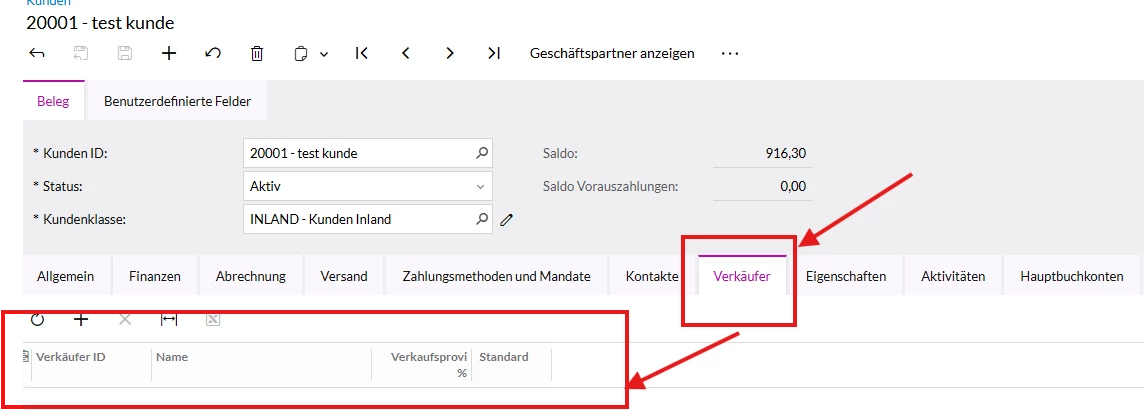
I want to create a grid (similar to the “Salespersons” tab) on the Customer screen (ScreenID: AR303000), but instead of Salespersons, I want to display Employees linked to the customer.

My goal is to display a list of employee records related to the customer in a separate tab using a grid view.

I'm currently trying to create this through a Customization Project (not by writing code), but I haven't been able to set it up correctly.

Has anyone done this before or could help me understand how to create a custom grid with a separate data source and view on the Customer screen?

Any help or example would be greatly appreciated!

Best regards,
Pantea


Best answer by Django

I don’t think you’ll be able to do this without writing code. The view, itself, will have to be written. Once that’s done, the rest can be done without writing anything and just using the designers.

You’ll need to create a graph extension because you’re introducing new business logic to that screen. It won’t be a complicated one but that’s where you’ll introduce the BQL statement view that will be the source of data for your grid. Once you have that in place and it is published, you’ll see the view in the designers and you can then add the various columns that you want to display.

4 replies

Forum|alt.badge.img+7
  • Captain II
  • Answer
  • July 14, 2025

I don’t think you’ll be able to do this without writing code. The view, itself, will have to be written. Once that’s done, the rest can be done without writing anything and just using the designers.

You’ll need to create a graph extension because you’re introducing new business logic to that screen. It won’t be a complicated one but that’s where you’ll introduce the BQL statement view that will be the source of data for your grid. Once you have that in place and it is published, you’ll see the view in the designers and you can then add the various columns that you want to display.


Forum|alt.badge.img
  • Author
  • Jr Varsity III
  • July 16, 2025

Hi ​@Django,
Thanks for the explanation!
Could you  give me an example of a graph extension with such a view?


Forum|alt.badge.img+7
  • Captain II
  • July 16, 2025

Part 3 of the T210 course Customized Forms and Master-Detail Retationship shows all the steps on how to do this type of customization. I’d recommend reading that.

The overview is that you’ll create a Graph Extension for your customer screen.

In the graph extension code, you’ll declare a view that will pull the records from the table or tables where the data is stored and include current customer in the Where clause of the BQL statement.

Publish that.

Then, using the screen designer, you’ll be able to create the new tab and add a grid to that tab. You’ll connect the grid to your new view from the graph extension and that will allow you to add columns from the result set to that grid.

There are some subtitles and settings that aren’t obvious, so I’d use the documentation from the course as your guide. 


Forum|alt.badge.img
  • Author
  • Jr Varsity III
  • September 26, 2025

@Django 
Thank you for your support.
