Solved

Continuous Screen Loading

  • February 9, 2026
  • 5 replies
  • 77 views

Jhon Reeve Penuela
Freshman I
Forum|alt.badge.img

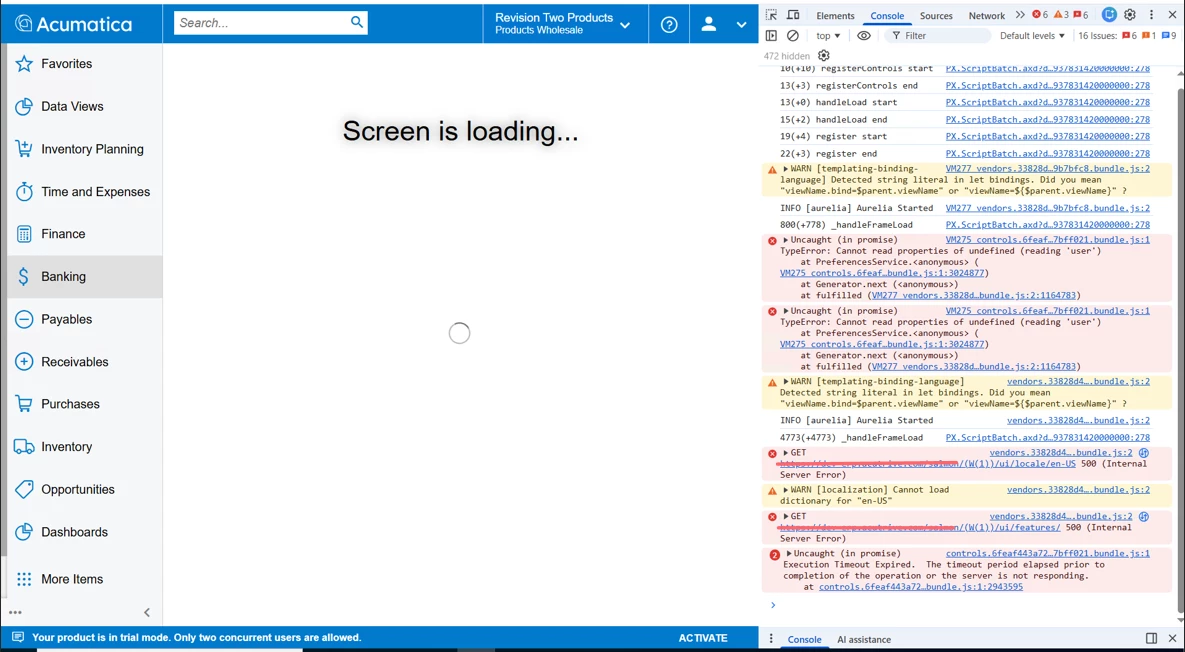
Hi everyone. I have encounter. on my server every time I run the screen ID with PL. e.g. “SO.30.10.PL”. I got this error and continuous loading almost 30 mins but no result and try to stop it.

I hope you can help me.


2025R2

Build 25.200.0248
 

Best answer by premalathan35

@Jhon Reeve Penuela  Rebuilding the Specific screens will help you resolving the issue. 


Ex:  npm run build-dev --- --env screenIds=SO301000

5 replies

Forum|alt.badge.img
  • Varsity I
  • February 9, 2026

Hello ​@Jhon Reeve Penuela 

Have you made any changes to the modern UI and rebuilt it, or is this happening without any modifications?

I encountered this issue myself. I disabled the system in IIS and then re-enabled it, which resolved the problem. However, I still see it for about 2 minutes when building the source code, though it doesn’t happen every time.


Regards,

Vard


Jhon Reeve Penuela
Freshman I
Forum|alt.badge.img

Hi ​@Vard86 .I don't have any modification or customization. Now I can try to restart the IIS but same result. by the way the specification of server is Window Server 2022 standard.


dhuynh75
Freshman I
Forum|alt.badge.img
  • Freshman I
  • February 9, 2026

@Jhon Reeve Penuela check the entry screen of Sales Order, If you get error in entry screen it will keep loading like that. Look like something is corrupted with modern UI. As you mentioned there is no customization I would try to reinstall the Application Site to get it back.


Hello ​@Jhon Reeve Penuela,  this issue is not a server hang, but a Modern UI frontend failure. The continuous loading usually happens when the Modern UI sources for the screen are missing, corrupted, or out of sync with the backend graph.

Root Cause:

Modern UI sources for the screen are not built

  • Screen IDs like SO.30.10.PL (or custom PL screens) require valid Modern UI bundles.

  • If the screen was recently customized, upgraded, or converted, the frontend bundle may be missing

  • If the screen was converted from Classic UI but the generated .ts/.html files were not built or included correctly.

Recommended Fix:

Step 1:Verify the Issue Is Modern UI Only

  • Open the same screen

  • Click Settings → Switch to Classic UI

  • If it opens fine in Classic UI → confirms this is a Modern UI issue

Step 2:Rebuild Modern UI Sources

       The path 

       cd FrontendSources\screen
       npm run build-dev

For specific Screen 

      npm run build-dev --- --env screenIds=SO301000


Step 3: Check Customization Project 

  • Go to Customization Projects (SM204505)

  • Ensure:

    • All Modern UI files (*.ts, *.html) are included

    • No partial or old files remain

  • Republish the customization project


Forum|alt.badge.img
  • Jr Varsity III
  • Answer
  • February 10, 2026

@Jhon Reeve Penuela  Rebuilding the Specific screens will help you resolving the issue. 


Ex:  npm run build-dev --- --env screenIds=SO301000