Answer

Clear Validation Messages

  • November 13, 2023
  • 7 replies
  • 149 views

Forum|alt.badge.img

Hi,

Need to know how to clear existing error and warning messages in the UI. As per my screen example, I set some exception messages based on the logics inside the Verify Vendor Button event. So, I need to clear the existing validation error once it’s filled correctly.
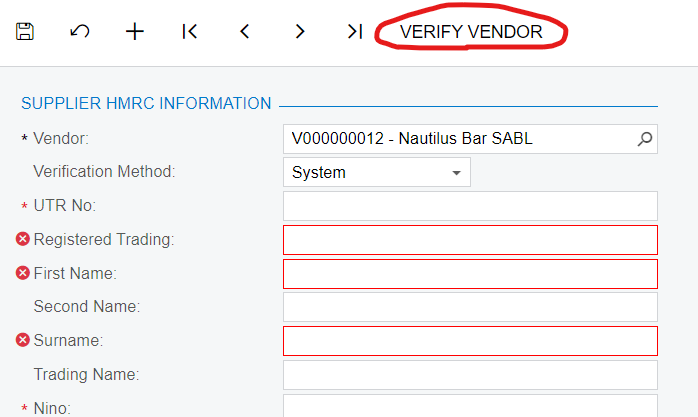
 

Thanks

Best answer by VardanV

it seems that you need to set CommitChanges to True for these fields from the customization editor, which means that the Acumatica will clear error message after filling any data.

7 replies

Naveen Boga
Captain II
Forum|alt.badge.img+19
  • Captain II
  • November 13, 2023

Hi @bhagyat25  Are these DAC fields are decorated with the PXDefault() Attribute?


Forum|alt.badge.img
  • Author
  • Jr Varsity II
  • November 14, 2023

Hi @bhagyat25  Are these DAC fields are decorated with the PXDefault() Attribute?

Hi @Naveen Boga ,

No

#region RegisteredTrading
        [PXDBString(256, IsUnicode = true, InputMask = "")]    
        [PXUIField(DisplayName = "Registered Trading", Required = false)]
        public virtual string Registeredtrading { get; set; }
        public abstract class registeredtrading : PX.Data.BQL.BqlString.Field<registeredtrading> { }
        #endregion

 Any clue to address this?


Naveen Boga
Captain II
Forum|alt.badge.img+19
  • Captain II
  • November 14, 2023

@bhagyat25  The above code looks good. For further verification, can you please share the DAC and Graph code here?


Forum|alt.badge.img
  • Author
  • Jr Varsity II
  • November 14, 2023

@bhagyat25  The above code looks good. For further verification, can you please share the DAC and Graph code here?

@Naveen Boga , Here both 


Naveen Boga
Captain II
Forum|alt.badge.img+19
  • Captain II
  • November 14, 2023

Thanks for sharing the code @bhagyat25  I will check this and let you know if I found anything related to this.


Forum|alt.badge.img
  • Author
  • Jr Varsity II
  • November 14, 2023

Thanks for sharing the code @bhagyat25  I will check this and let you know if I found anything related to this.

Thanks @Naveen Boga 


VardanV
Jr Varsity III
Forum|alt.badge.img+1
  • Jr Varsity III
  • Answer
  • November 14, 2023

it seems that you need to set CommitChanges to True for these fields from the customization editor, which means that the Acumatica will clear error message after filling any data.