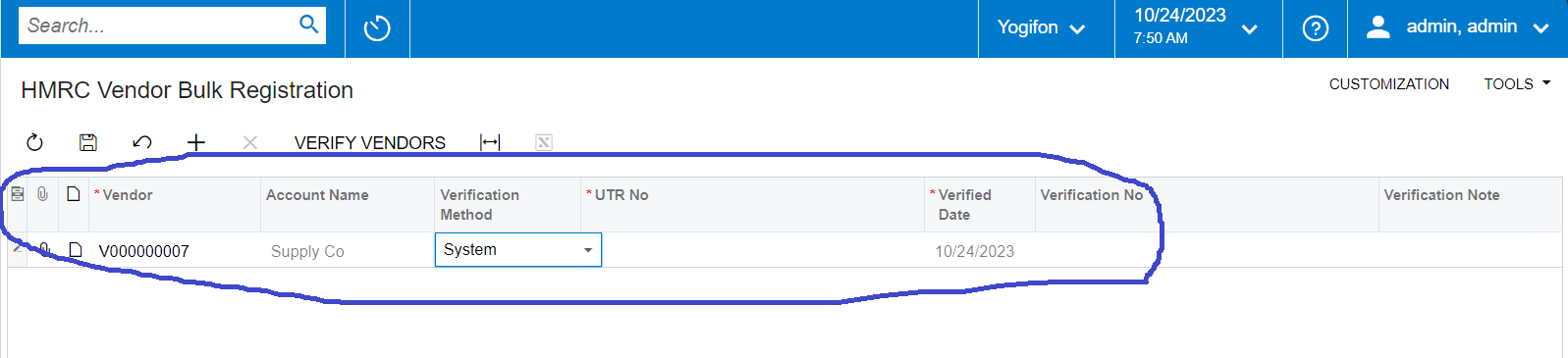
Need to clear the data view in the graph in the beginning. Currently following view returns data from the table. But I need to remove coming data from the view and show the grid empty(As per attached image).
public SelectFrom<HMRCVendorRegisterDetail>.View VendorRegisterDetail_X;
Can someone help me out?
Thanks
Best answer by VardanV
Hi All,
Need to clear the data view in the graph in the beginning. Currently following view returns data from the table. But I need to remove coming data from the view and show the grid empty(As per attached image).
public SelectFrom<HMRCVendorRegisterDetail>.View VendorRegisterDetail_X;
Can someone help me out?
Thanks
When do you expect to display the data in the grid? What data should it display?
Hi @vardan22
After adding new record button then verify the particular record(s) using verify vendor button click event and do the save.
I think you just need to add condition with created date in your view declaration:
public SelectFrom<HMRCVendorRegisterDetail>.Where<HMRCVendorRegisterDetail.createdDateTime.IsGreater<AccessInfo.businessDate.FromCurrent>>.View VendorRegisterDetail_X;
You could use a data view delegate and simply return an empty collection:
public SelectFrom<HMRCVendorRegisterDetail>.View VendorRegisterDetail_X;


public IEnumerable vendorRegisterDetail_X()
{
    var result = new List<HMRCVendorRegisterDetail>();

    return result;
}
Hi @darylbowman ,
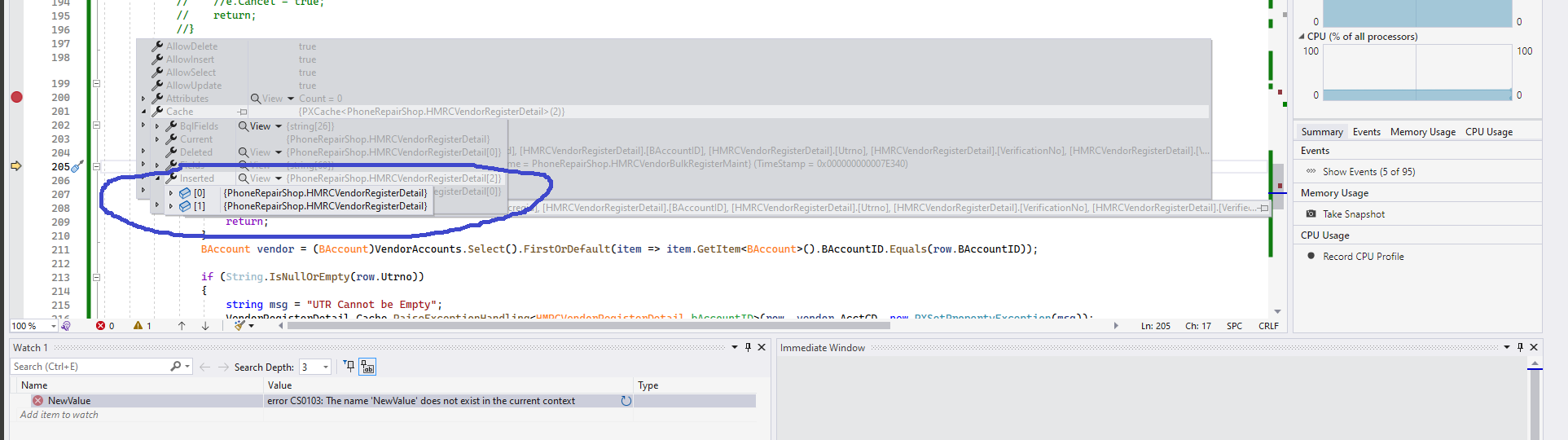
I tried this one too. But the problem is VendorRegisterDetail cache contains two instered cache objects. But in my grid contains only one record at this time. How to remove that unwanted object. I tried following in RowPersisting event but no luck. Please check the screen shots which I’ve provided.
HMRCVendorRegisterDetail row = e.Row; if (row != null) {
You could use a data view delegate and simply return an empty collection:
public SelectFrom<HMRCVendorRegisterDetail>.View VendorRegisterDetail_X;


public IEnumerable vendorRegisterDetail_X()
{
    var result = new List<HMRCVendorRegisterDetail>();

    return result;
}
Hi @darylbowman ,
I tried this one too. But the problem is VendorRegisterDetail cache contains two instered cache objects. But in my grid contains only one record at this time. How to remove that unwanted object. I tried following in RowPersisting event but no luck. Please check the screen shots which I’ve provided.
HMRCVendorRegisterDetail row = e.Row; if (row != null) {
What about adding a field to the DAC/Table that is a flag for whether it is an existing record or not and then have a where clause on the Select to exclude those records. Then somewhere in the process prior to save set that same flag so that it wont show up again later when queried?
This feels like it would be unnecessary, but might help you avoid doing too much Cache manipulation.
You said that you have two records in your cache but you only want one of them displayed. What’s the criteria for that and can you include that criteria in the view?
Or do you have to review each record by a more complicated criteria logic than a view could handle?
Need to clear the data view in the graph in the beginning. Currently following view returns data from the table. But I need to remove coming data from the view and show the grid empty(As per attached image).
public SelectFrom<HMRCVendorRegisterDetail>.View VendorRegisterDetail_X;
Can someone help me out?
Thanks
When do you expect to display the data in the grid? What data should it display?
Need to clear the data view in the graph in the beginning. Currently following view returns data from the table. But I need to remove coming data from the view and show the grid empty(As per attached image).
public SelectFrom<HMRCVendorRegisterDetail>.View VendorRegisterDetail_X;
Can someone help me out?
Thanks
When do you expect to display the data in the grid? What data should it display?
Hi @vardan22
After adding new record button then verify the particular record(s) using verify vendor button click event and do the save.
Need to clear the data view in the graph in the beginning. Currently following view returns data from the table. But I need to remove coming data from the view and show the grid empty(As per attached image).
public SelectFrom<HMRCVendorRegisterDetail>.View VendorRegisterDetail_X;
Can someone help me out?
Thanks
When do you expect to display the data in the grid? What data should it display?
Hi @vardan22
After adding new record button then verify the particular record(s) using verify vendor button click event and do the save.
I think you just need to add condition with created date in your view declaration:
public SelectFrom<HMRCVendorRegisterDetail>.Where<HMRCVendorRegisterDetail.createdDateTime.IsGreater<AccessInfo.businessDate.FromCurrent>>.View VendorRegisterDetail_X;