

Answer

Cannot Debug Base Code - Source Code Different

  • December 14, 2024
  • 4 replies
  • 198 views

Forum|alt.badge.img

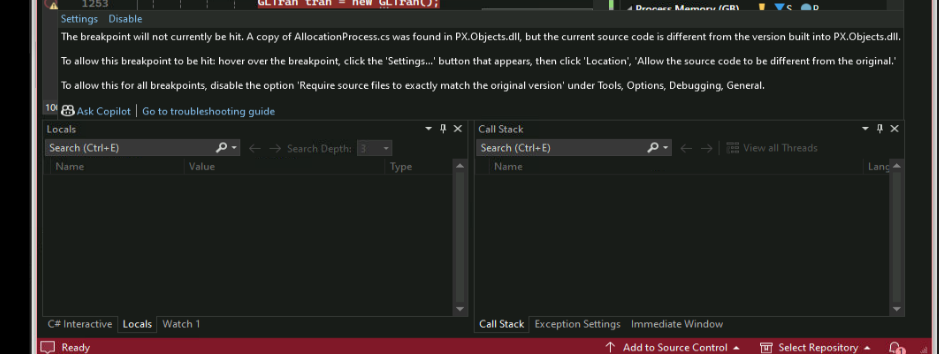
I am attempting to debug some base Acumatica code, but I am receiving a message that the breakpoint won’t be hit because “the current source code is different from the version built into PX.Objects.dll”,. I have seen similar posts for 23r1 versions of Acumatica, but I am on 2023R2 (Build 23.211.0017).

I have copied the PDB files from Files/Bin to my instance folder but without success. Furthermore, if I disable the option to “Require source files to exactly match the original version”, while the breakpoint is hit, I cannot step through the code and the lines do not appear to match (i.e. variables are not present in the “Locals” tab nor available for watching when they should be).

What might the issue be?
 

Best answer by harutyungevorgyan

Hello ​@KellyMarchewa ,

First of all, besides ​@Nilkanth Dipak’s suggestions, add the symbols to your Visual Studio just by giving the path of your Bin folder, also you need to open your Web.config in your Bin folder and look for this debug property to be “true”; it can be the reason for your problem.


In addition, you should check if the .pdb file for the DLL you want to debug is located in your Bin folder, because if not, it will never allow you to debug it.

If you have .pdb files for DLLs and your debug = “True”, the only thing that remains is that there is some problem. I found that there was an issue with debugging in the 23R1 version, but Acumatica mentioned that they fixed it in the release notes:


However, it can be actual for your version as well, so you can ask Acumatica about this exact build issue, and you can check the discussion about 23R1 here :
https://community.acumatica.com/develop%2Dcustomizations%2D288/symbol%2Dfiles%2Dwont%2Dload%2Dwhen%2Dtrying%2Dto%2Ddebug%2Dacumatica%2D23r1%2Dsource%2Dcode%2D16531?tid=16531&fid=288


4 replies

DipakNilkanth
Pro III
Forum|alt.badge.img+13

Hi ​@KellyMarchewa,

To enable debugging for the base Acumatica, follow below steps.

1) Add reference of PX.Objects.dll from your bin folder of your instance.(i.e.C://Program Files/Acumatica ERP/Instance Name/Bin)

2) From the Debug --> Options --> Debugging --> General, Set the check box "Enable Just my code" option to False.

3)Clean and build your code.


Hope it helps!


Forum|alt.badge.img
  • Author
  • Freshman II
  • December 17, 2024

Thanks ​@Dipak Nilkanth , but that did not resolve the issue. To be clear, I used to be able to debug the base code fine. I am not 100% sure when it stopped working (I don’t need to debug the base code that often); probably after an upgrade from an earlier version


  • Freshman II
  • June 4, 2025

Hi ​@KellyMarchewa , I have the same issue.
Did you find any solutions? 


harutyungevorgyan
Jr Varsity I
Forum|alt.badge.img+2

Hello ​@KellyMarchewa ,

First of all, besides ​@Nilkanth Dipak’s suggestions, add the symbols to your Visual Studio just by giving the path of your Bin folder, also you need to open your Web.config in your Bin folder and look for this debug property to be “true”; it can be the reason for your problem.


In addition, you should check if the .pdb file for the DLL you want to debug is located in your Bin folder, because if not, it will never allow you to debug it.

If you have .pdb files for DLLs and your debug = “True”, the only thing that remains is that there is some problem. I found that there was an issue with debugging in the 23R1 version, but Acumatica mentioned that they fixed it in the release notes:


However, it can be actual for your version as well, so you can ask Acumatica about this exact build issue, and you can check the discussion about 23R1 here :
https://community.acumatica.com/develop%2Dcustomizations%2D288/symbol%2Dfiles%2Dwont%2Dload%2Dwhen%2Dtrying%2Dto%2Ddebug%2Dacumatica%2D23r1%2Dsource%2Dcode%2D16531?tid=16531&fid=288



