Answer

Can we have customized button in Richtextbox or can we make Richtexbox control with custom button in Accumatica

  • April 18, 2025
  • 5 replies
  • 114 views

I want a richtexbox control with custom button on that custom button click i wan to perform some  Actions.

Best answer by harutyungevorgyan

Hello ​@bpatidar72 ,

Inheriting PXRichTextEdit and overriding methods won't work because Acumatica creates controls based on the ASPX markup and always uses the standard base classes. Your custom class will not be used because Acumatica doesn't know it exists. Even if you override methods, it will still call the base class, because this is handled by the .NET Framework, not the Acumatica Framework. In .NET, there is no mechanism like PXOverride where Acumatica actively searches for and executes overridden methods. In standard C#/.NET, if you don't explicitly tell the system to use your custom class, it will always use the base class. Your inherited class is ignored unless you manually replace the ASPX control, which Acumatica does not support easily. For this kind of change, you should use JavaScript to modify the toolbar, or simply create a standard button on the screen, which is easy because the Acumatica Framework already supports custom buttons.

5 replies

harutyungevorgyan
Jr Varsity I
Forum|alt.badge.img+2

Hello ​@bpatidar72 ,

In Acumatica, we have the PXRichTextEdit control, which provides the rich text functionality you're looking for.
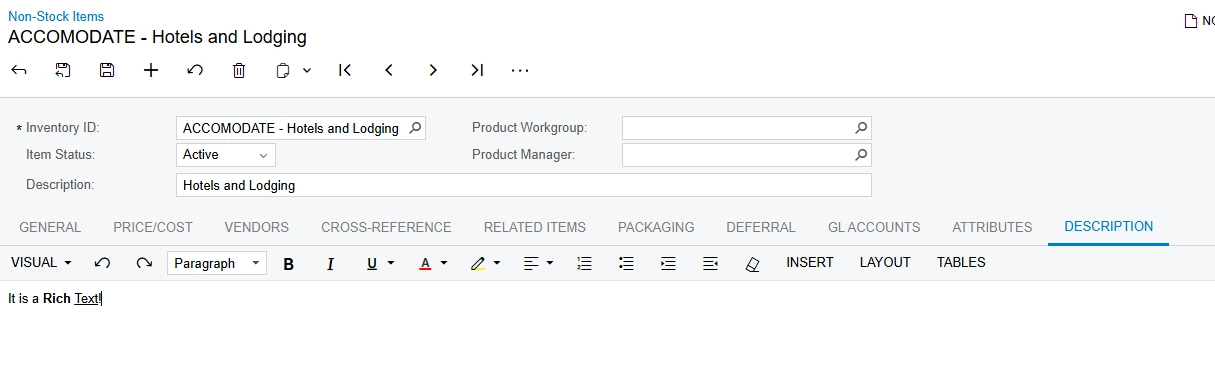
In the screenshot below, you can see how it is used on the Non-Stock Items screen.

On the IN202000.aspx page (Non-Stock Items screen), PXRichTextEdit is used like this:


<px:PXRichTextEdit ID="edBody" runat="server" DataField="Body" Style="border-width: 0px; border-top-width: 1px; width: 100%;"
DatafieldPreviewGraph="PX.Objects.IN.InventoryItemMaint" DatafieldPreviewView="Item"
AllowAttached="true" AllowSearch="true" AllowLoadTemplate="false" AllowSourceMode="true">
<AutoSize Enabled="True" MinHeight="216" />
<LoadTemplate TypeName="PX.SM.SMNotificationMaint" DataMember="Notifications" ViewName="NotificationTemplate" ValueField="notificationID" TextField="Name" DataSourceID="ds" Size="M"/>
</px:PXRichTextEdit>

If I understood your question correctly, once you have a field configured like this, you can easily use its text value in any action or button.
Simply reference the corresponding DataField in your action, and it will return the entered rich text value.


  • Author
  • Freshman I
  • April 19, 2025

Add custom button on Acumatica Rich textbox control, click event not working for custom button


I want to add custom buttons on Acumatica rich textbox control, using below code i have added custom buttons on rich textbox but click event not working.


public class CustomRichTextBox:PXRichTextEdit {   
protected override void OnInit(EventArgs e) {
base.OnInit(e);
AddCustomButton("Add Var", "AddList", "AddList");
}

private void AddCustomButton(string text, string commandName, string commandArgument) {
PXButton button = new PXButton {
Key = "cmd" + commandName,
Text = text,
CommandName = commandName,
CommandArgument = commandArgument,
Target = "ds",
CommandSourceID = "ds",
AutoCallBack = { ActiveBehavior = true, Enabled = true, Command = commandName, Target = "ds", Behavior = { CommitChanges = true }, }

};
button.Click += new EventHandler(CustomButton_Click);
base.Controls.Add(button);
}

public void CustomButton_Click(object sender, EventArgs e) {
Button button = sender as Button;
if(button != null) {
string command = button.CommandName;
}
}
}
}

harutyungevorgyan
Jr Varsity I
Forum|alt.badge.img+2

Hello ​@bpatidar72 ,

Could you please clarify what you mean by saying, “I’ve added custom buttons into the richTextBox”? How exactly did you add these custom buttons to Acumatica’s UI?


  • Author
  • Freshman I
  • April 22, 2025

Hi, I want to create custom control for rich textbox and this rich textbox have some custom button. this custom control I can use in multiple screens.  Acumatica UI, I have not found any solution to add custom button on existing Richt textbox control. So, I have extended PXRichTextEdit class.


harutyungevorgyan
Jr Varsity I
Forum|alt.badge.img+2

Hello ​@bpatidar72 ,

Inheriting PXRichTextEdit and overriding methods won't work because Acumatica creates controls based on the ASPX markup and always uses the standard base classes. Your custom class will not be used because Acumatica doesn't know it exists. Even if you override methods, it will still call the base class, because this is handled by the .NET Framework, not the Acumatica Framework. In .NET, there is no mechanism like PXOverride where Acumatica actively searches for and executes overridden methods. In standard C#/.NET, if you don't explicitly tell the system to use your custom class, it will always use the base class. Your inherited class is ignored unless you manually replace the ASPX control, which Acumatica does not support easily. For this kind of change, you should use JavaScript to modify the toolbar, or simply create a standard button on the screen, which is easy because the Acumatica Framework already supports custom buttons.