Answer

Calculate or return the number of days in a month

  • June 12, 2023
  • 10 replies
  • 572 views

Forum|alt.badge.img

Is there a function in Acumatica similar to C# where I can return the total number of days in a month for a GI Column?

For example, I want to return the number of days for May of 2018.  Using C# I can use the statement below to do that.  Is there a function in Acumatica that I can do the same in a GI? 
This function returns the value of 31.

int days = DateTime.DaysInMonth(2018,05);


Would also be great if I could also determine the weeks in a month returned as an INT.  But I really need the days.

Best answer by miguel80

Hi,

You can use this fórmula: 

=Day(DateAdd('12/31/2022','m',Month(Today())))


Replacing the Today() with the date you want to evaluate. You should send the first date as the last day of the previous year so that it also works on leap years, so it would look like this:


=Day(DateAdd(Concat('12/31','/',CStr(Year(Today())-1)),'m',Month(Today())))


It’s a little too much perhaps but it will get the job done.

10 replies

darylbowman
Captain II
Forum|alt.badge.img+15

You could use DateDiff(‘d’, date1, date2) to find the difference (in days) between two dates. If you could somehow pass the month start and month end into the formula, it should calculate it. I’m not sure if you could use the built-in parameters @MonthStart and @MonthEnd.


miguel80
Semi-Pro III
Forum|alt.badge.img+3
  • Semi-Pro III
  • Answer
  • June 12, 2023

Hi,

You can use this fórmula: 

=Day(DateAdd('12/31/2022','m',Month(Today())))


Replacing the Today() with the date you want to evaluate. You should send the first date as the last day of the previous year so that it also works on leap years, so it would look like this:


=Day(DateAdd(Concat('12/31','/',CStr(Year(Today())-1)),'m',Month(Today())))


It’s a little too much perhaps but it will get the job done.


Forum|alt.badge.img+7
  • Captain II
  • June 12, 2023

I’ll prefix that this might be overkill:

There is the DateInfo table and it might be easier to extend it and add a column for the number of days in the month on each record to let you do a single join for easier reporting formulas.


miguel80
Semi-Pro III
Forum|alt.badge.img+3
  • Semi-Pro III
  • June 12, 2023

Better answer than my last one:

Join to the FinPeriod Table it has a “Length” field and it contains the length in days of each period. As long as your periods match the months you can use that.


Forum|alt.badge.img
  • Author
  • Varsity I
  • June 12, 2023

@miguel80 I like that!  I will try that...I think though I also have to pull the StartDate and EndDate columns, otherwise the Length displays as zero???

I only need to figure out how to link SOLine to FinPeriod then.

Will crack on with that and see if it works.


miguel80
Semi-Pro III
Forum|alt.badge.img+3
  • Semi-Pro III
  • June 12, 2023

Use the date you want to evaluate. It has to be “Greater or equal than” FinPeriod.StartDate and “Less than” (without the equal) FinPeriod.EndDate


Forum|alt.badge.img
  • Author
  • Varsity I
  • June 12, 2023

@miguel80 Well...that worked, but is not really what I needed.  I need to calculate (ie return) the number of days in the current month.  Trying to link the SOLine back to FinPeriod date just does not return the correct number of rows.


Forum|alt.badge.img
  • Author
  • Varsity I
  • June 12, 2023

@darylbowman I have tried a couple of different ways to all @MonthStart and @MonthEnd inside of the DateDiff function of the GI Data Field.  Acumatica simply fails with an error that it cannot find it.  It lets you save that equation, but fails on execution. If Acumatica would let me do it that would be perfect.

= DateDiff( 'd' , @MonthStart, @MonthEnd)


miguel80
Semi-Pro III
Forum|alt.badge.img+3
  • Semi-Pro III
  • June 12, 2023

Use the Today() funtion to join to the FinPeriod table. Then you can use the EndDate or the value. If it’s duplicating te lines let me know, there´s another field you have to filter by but I don’t recall it right now.


Forum|alt.badge.img+1
  • Varsity I
  • June 24, 2025

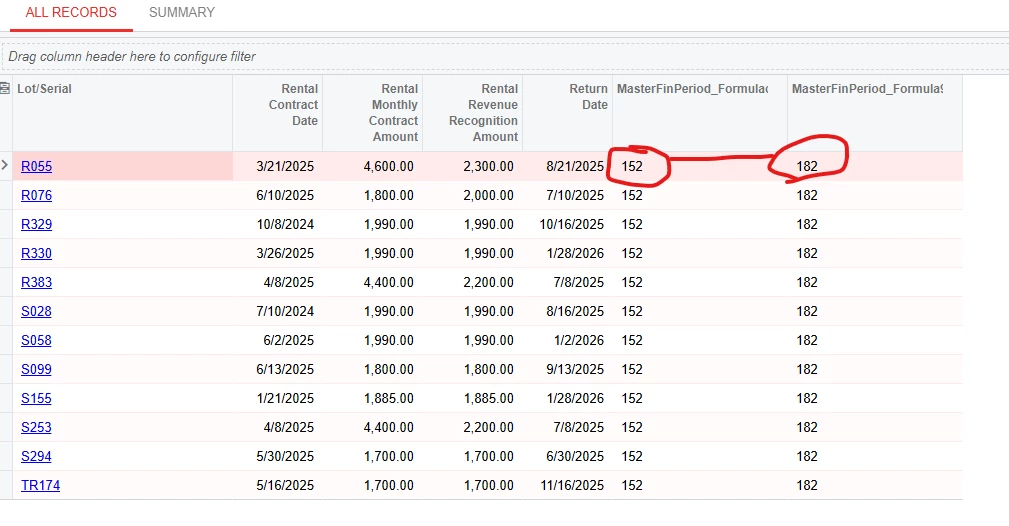
I successfully joined the MasterFinPeriod table to my main table using the Today() function.  I can produce integer values on the Results Grid.  But I can’t figure out how to use integer values in my Conditions.


Attempts on the Conditions tab:

All kinds of variations of the DateDiff fails for me (attempts to convert datetime2 to date then to Int)

Subtraction of integers fails also (attempts to convert datetime2 to date then to Int)

DayOfYear([MasterFinPeriod.EndDate]))-DayOfYear([MasterFinPeriod.StartDate])) fails

CInt(DayOfYear([MasterFinPeriod.EndDate]))-CInt(DayOfYear([MasterFinPeriod.StartDate])) fails


Results Grid successes:

I gave up on calculating Days in Month in my Conditions tab and simply hard coded it to ‘30’ for now. By using this formula in the Result Grid

=DayOfYear([MasterFinPeriod.EndDate]) or =CInt(DayOfYear([MasterFinPeriod.EndDate]))

I can produce integer values on the Results Grid.  All I need to do is subtract these two values and I have Days in Month.  But for some reason this same syntax does not work in the Conditions.

Any suggestions?