Answer

autonumber on new screen not working

  • October 2, 2025
  • 14 replies
  • 127 views

Forum|alt.badge.img

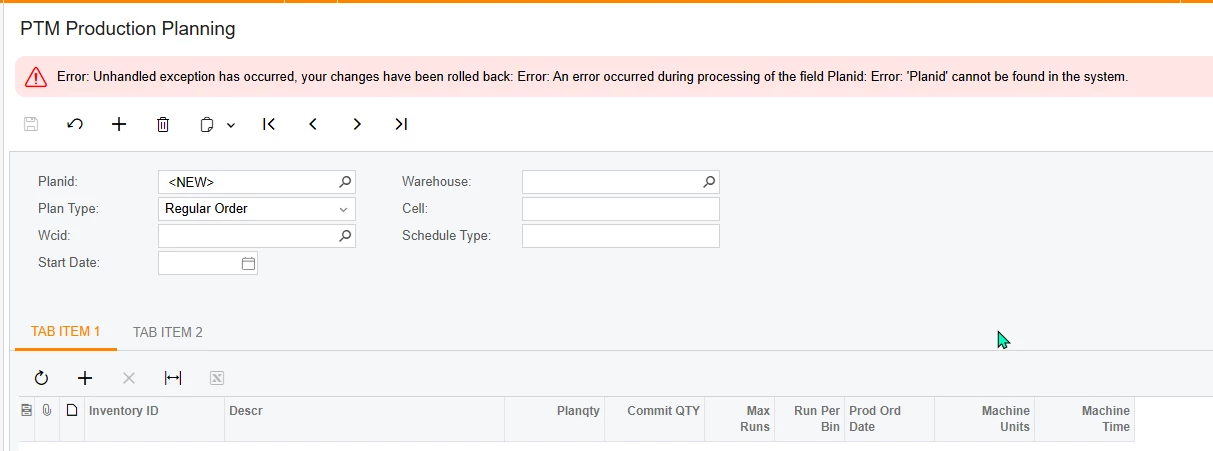
I am creating a new screen and I’m trying to use the autonumber for it. i was following the below post to try to get it working. It fixed the first initial error but I am getting a new one that i cant seem to fix. Does anyone have any ideas on what is wrong with it?  everytime i try to save it, it says that the field “Planid” does not exist. 
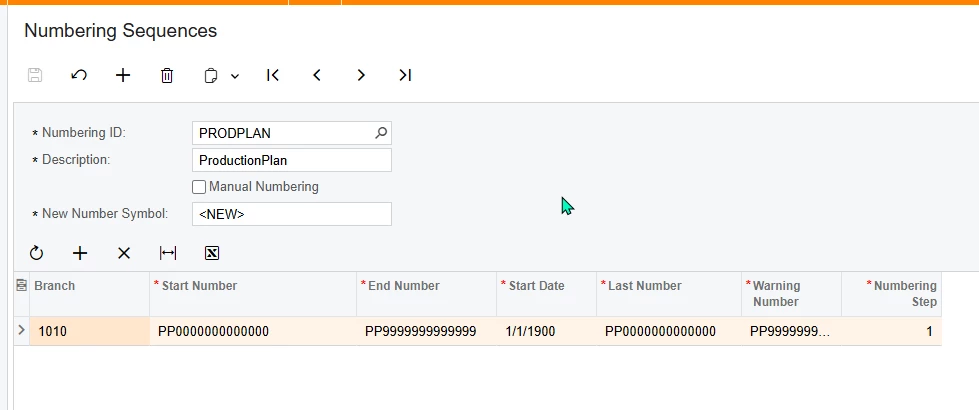
here is where the field should be pulling the autonumber from.
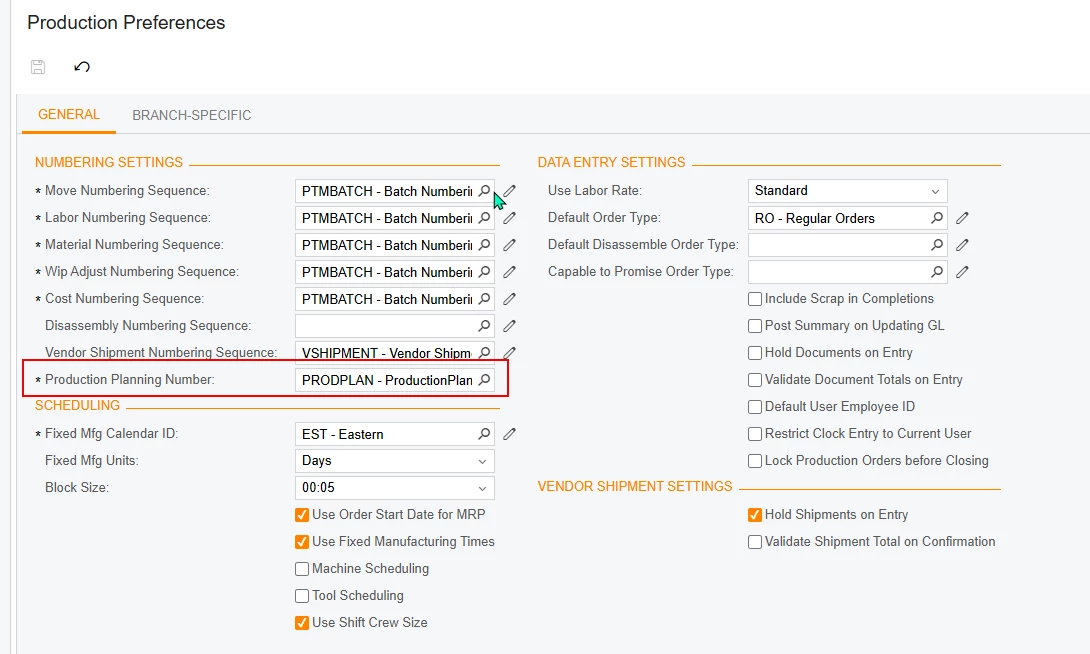
here is the dac extension for that field.

namespace PX.Objects.AM
{
  public class AMPSetupExt : PXCacheExtension<PX.Objects.AM.AMPSetup>
  {
    #region UsrProdPlanNum
    [PXDBString(15, IsUnicode = true, InputMask = "")]
    [PXDefault(PersistingCheck = PXPersistingCheck.NullOrBlank)]
    [PXSelector(typeof(Numbering.numberingID), DescriptionField = typeof(Numbering.descr))]
    [PXUIField(DisplayName="Production Planning Number" , Visibility = PXUIVisibility.Visible)]
   

    public virtual string UsrProdPlanNum { get; set; }
    public abstract class usrProdPlanNum : PX.Data.BQL.BqlString.Field<usrProdPlanNum> { }
    #endregion
  }
}


This is the dac for the field on the new screen.

namespace PTMProductionPlanningScreen
{
  [Serializable]
  [PXCacheName("ProdPlan")]
  public class ProdPlan : PXBqlTable, IBqlTable
  {
    #region Planid
    [PXDBString(15, IsKey = true, IsUnicode = true, InputMask = ">CCCCCCCCCCC")]
    [PXUIField(DisplayName = "Planid" , Visibility = PXUIVisibility.SelectorVisible)]
    [PXDefault(PersistingCheck = PXPersistingCheck.NullOrBlank)]
    [PXSelector(typeof(ProdPlan.planid), typeof(ProdPlan.planid))]
    [AutoNumber(typeof(AMPSetupExt.usrProdPlanNum),typeof(AccessInfo.businessDate))]
    public virtual string Planid { get; set; }
    public abstract class planid : PX.Data.BQL.BqlString.Field<planid> { }
    #endregion

and here is the graph for the new screen.

namespace PTMProductionPlanningScreen
{
  public class PTMProdPlanMaint : PXGraph<PTMProdPlanMaint, ProdPlan>
  {
        public SelectFrom<ProdPlanLine>.LeftJoin<INItemSite>
            .On<ProdPlanLine.inventoryID.IsEqual<INItemSite.inventoryID>
            .And<ProdPlanLine.siteid.IsEqual<INItemSite.siteID>>>.View LineItem;
        public SelectFrom<AMBomOper>.View oper;

        public PXSetup<AMPSetup> AutoNumSetup;


        public PTMProdPlanMaint()
        {
            AMPSetup setup = AutoNumSetup.Current;

        }
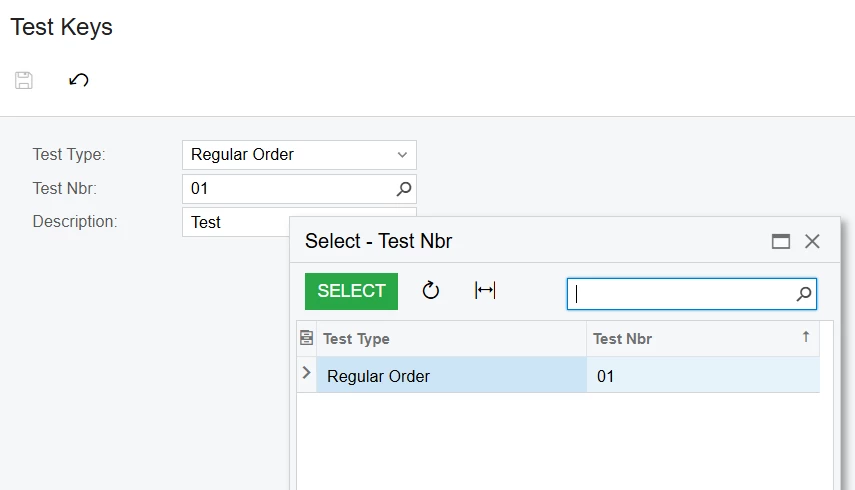
Best answer by darylbowman

I have it working:

Screen:

Graph:

public class DXTestMaint : PXGraph<DXTestMaint>
{
public PXSave<DXTest> Save;
public PXCancel<DXTest> Cancel;

public SelectFrom<DXTest>.View MasterView;
}

DAC:

[Serializable]
[PXCacheName("DXTest")]
public class DXTest : PXBqlTable, IBqlTable
{
#region TestType
[PXDBString(2, IsKey = true, IsFixed = true, IsUnicode = true, InputMask = "")]
[PXStringList(new string[] { "RO" }, new string[] { "Regular Order" })]
[PXDefault]
[PXUIField(DisplayName = "Test Type", Visibility = PXUIVisibility.SelectorVisible)]
public virtual string TestType { get; set; }
public abstract class testType : PX.Data.BQL.BqlString.Field<testType> { }
#endregion

#region TestNbr
[PXDBString(10, IsKey = true, IsUnicode = true, InputMask = "")]
[PXSelector(typeof(SearchFor<DXTest.testNbr>.
In<
SelectFrom<DXTest>.
Where<DXTest.testType.IsEqual<testType.AsOptional>>>))]
[PXUIField(DisplayName = "Test Nbr", Visibility = PXUIVisibility.SelectorVisible)]
public virtual string TestNbr { get; set; }
public abstract class testNbr : PX.Data.BQL.BqlString.Field<testNbr> { }
#endregion

#region Description
[PXDBString(255, IsUnicode = true)]
[PXUIField(DisplayName = "Description")]
public virtual string Description { get; set; }
public abstract class description : BqlString.Field<description> { }
#endregion
}


14 replies

Forum|alt.badge.img
  • Captain I
  • October 2, 2025

Hi ​@justen0351,


There are 3 screens to look into for this. The Numbering Sequences, the Segmented Values, and Segmented Keys. There, you will set if you want to AutoNumber, what the numbers range can be, what letters they can start with, etc. Please look there and let me know if you have any questions.


-RJ


Forum|alt.badge.img
  • Author
  • Varsity III
  • October 2, 2025

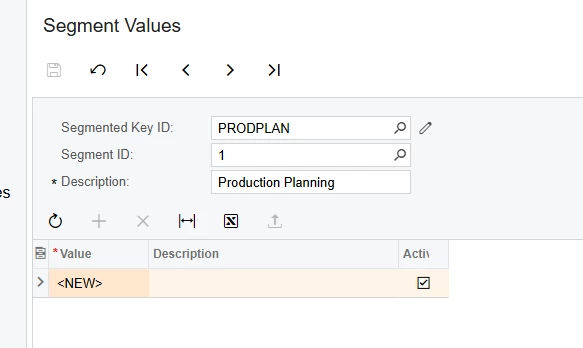
@rkenna i already had the number sequence but not the other two. i filled those out and tried again and i am still getting the error.Does the below look correct? i tried with and without the “Specific module” on the segmented keys.


Forum|alt.badge.img+7
  • Captain II
  • October 2, 2025

Can you show the view declaration for the summary part of your screen?


Forum|alt.badge.img+2

Hello ​@justen0351 I suggest you

  1.  check/confirm that  Number Sequence is created for that Branch (1010) is selected.
check branch name
  1. recreate number sequence, add into preference screen & clear cache & try again.

I hope it helps!


darylbowman
Captain II
Forum|alt.badge.img+15

​​​​There are 3 screens to look into for this. The Numbering Sequences, the Segmented Values, and Segmented Keys. There, you will set if you want to AutoNumber, what the numbers range can be, what letters they can start with, etc. Please look there and let me know if you have any questions.

Auto-numbering and segmented keys are NOT one-and-the-same. You can use segmented keys without auto-numbering. You can use auto-numbering with segmented keys. You can use auto-numbering without segmented keys.

Justen’s field is not a [PXDimensionSelector], therefore, segmented keys are not part of the equation.


darylbowman
Captain II
Forum|alt.badge.img+15

We discussed removing the auto-numbering attribute to see if you can save records without the auto-numbering complication. Have you tried that?


Forum|alt.badge.img
  • Author
  • Varsity III
  • October 2, 2025

@Abhishek Niikam I tried that and i am still getting the error.


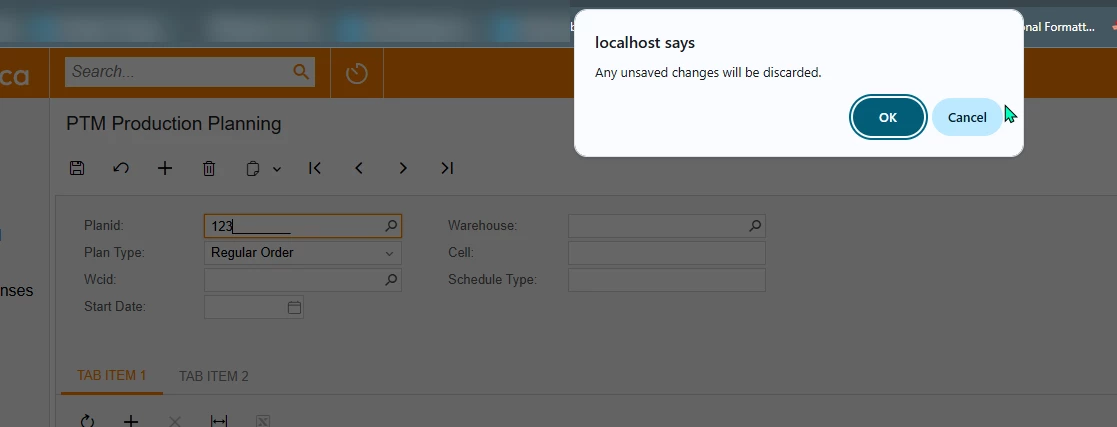
@darylbowman i did remove the autonumber. as soon as i type something in the field, i just get this popup and then it will remove whatever i put in there. i thought it might be the selector that causes that, so i removed it from the dac as well but it errors as soon as i type. would i need to change it in the customization project and in the aspx in order to test that?


darylbowman
Captain II
Forum|alt.badge.img+15

​i just get this popup and then it will remove whatever i put in there.

Then, as I suspected, it’s not an issue with auto-numbering.


Try your selector like this:

[PXSelector(typeof(SearchFor<ProdPlan.planid>.
In<
SelectFrom<ProdPlan>.
Where<ProdPlan.planType.IsEqual<ProdPlan.planType.FromCurrent>>>),
typeof(ProdPlan.planType),
typeof(ProdPlan.planid))]

Make sure ‘PlanType’

  • commits changes
  • has a default value of a valid value

Forum|alt.badge.img
  • Author
  • Varsity III
  • October 2, 2025

@darylbowman that didnt work with or without the numbering included. i got the same errors as before.


darylbowman
Captain II
Forum|alt.badge.img+15

Could you post your updated PlanID and PlanType DAC fields again?


Forum|alt.badge.img+2

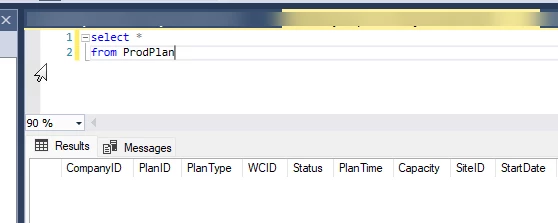
@justen0351 silly question but you have that table (ProdPlan) in DB right? & confirm Planid is exist in DB. (for older error you shared on top)


Forum|alt.badge.img
  • Author
  • Varsity III
  • October 2, 2025

@darylbowman here is the dac. I did change it from the begining a little. i releaized i had put PlanID in the database but had Planid in the dac. i changed it there and that didnt fix it either. i also changed it in the code that you sent before running it.

namespace PTMProductionPlanningScreen
{
[Serializable]
[PXCacheName("ProdPlan")]
public class ProdPlan : PXBqlTable, IBqlTable
{
#region PlanID
[PXDBString(15, IsKey = true, IsUnicode = true, InputMask = ">CCCCCCCCCCC")]
[PXUIField(DisplayName = "Planid" , Visibility = PXUIVisibility.SelectorVisible)]
//[PXDefault(PersistingCheck = PXPersistingCheck.NullOrBlank)]
// [PXSelector(typeof(ProdPlan.planID), typeof(ProdPlan.planID))]
[PXSelector(typeof(SearchFor<ProdPlan.planID>.
In<
SelectFrom<ProdPlan>.
Where<ProdPlan.planType.IsEqual<ProdPlan.planType.FromCurrent>>>),
typeof(ProdPlan.planType),
typeof(ProdPlan.planID))
]
[AutoNumber(typeof(AMPSetupExt.usrProdPlanNum),typeof(AccessInfo.businessDate))]
public virtual string PlanID { get; set; }
public abstract class planID : PX.Data.BQL.BqlString.Field<planID> { }
#endregion

#region PlanType
[PXDBString(2, IsKey = true, IsUnicode = true, InputMask = "")]
[PXUIField(DisplayName = "Plan Type")]
[PXStringList(
new string[] { "RO"} ,
new string[] {"Regular Order"}
)]
public virtual string PlanType { get; set; }
public abstract class planType : PX.Data.BQL.BqlString.Field<planType> { }
#endregion

@Abhishek Niikam it is in the database. I thought maybe it hadnt gone in because it wouldnt let me query it so i restarted and then it shows up in a query. i was still getting the error after that.


darylbowman
Captain II
Forum|alt.badge.img+15
  • Answer
  • October 2, 2025

I have it working:

Screen:

Graph:

public class DXTestMaint : PXGraph<DXTestMaint>
{
public PXSave<DXTest> Save;
public PXCancel<DXTest> Cancel;

public SelectFrom<DXTest>.View MasterView;
}

DAC:

[Serializable]
[PXCacheName("DXTest")]
public class DXTest : PXBqlTable, IBqlTable
{
#region TestType
[PXDBString(2, IsKey = true, IsFixed = true, IsUnicode = true, InputMask = "")]
[PXStringList(new string[] { "RO" }, new string[] { "Regular Order" })]
[PXDefault]
[PXUIField(DisplayName = "Test Type", Visibility = PXUIVisibility.SelectorVisible)]
public virtual string TestType { get; set; }
public abstract class testType : PX.Data.BQL.BqlString.Field<testType> { }
#endregion

#region TestNbr
[PXDBString(10, IsKey = true, IsUnicode = true, InputMask = "")]
[PXSelector(typeof(SearchFor<DXTest.testNbr>.
In<
SelectFrom<DXTest>.
Where<DXTest.testType.IsEqual<testType.AsOptional>>>))]
[PXUIField(DisplayName = "Test Nbr", Visibility = PXUIVisibility.SelectorVisible)]
public virtual string TestNbr { get; set; }
public abstract class testNbr : PX.Data.BQL.BqlString.Field<testNbr> { }
#endregion

#region Description
[PXDBString(255, IsUnicode = true)]
[PXUIField(DisplayName = "Description")]
public virtual string Description { get; set; }
public abstract class description : BqlString.Field<description> { }
#endregion
}


Forum|alt.badge.img
  • Author
  • Varsity III
  • October 2, 2025

@darylbowman That worked. Thank you very much!