Answer

Auto Numbering 'New Number Symbol' not displaying properly

  • April 29, 2025
  • 16 replies
  • 179 views

Forum|alt.badge.img+1

Hello. Having an odd one with AutoNumbering. 

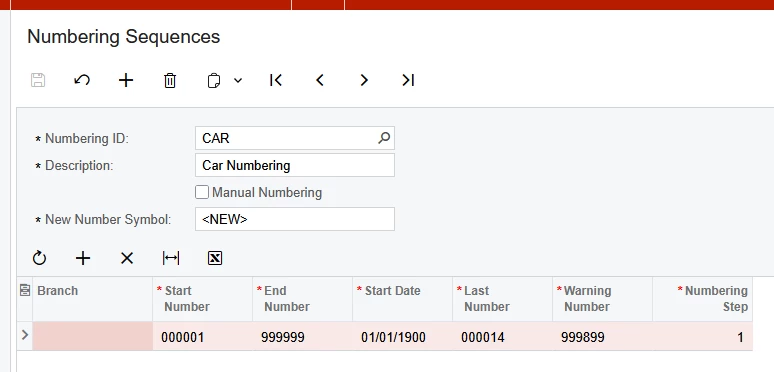
Below is the Numbering Sequence, the New Number Symbol is <NEW> like others. 
 

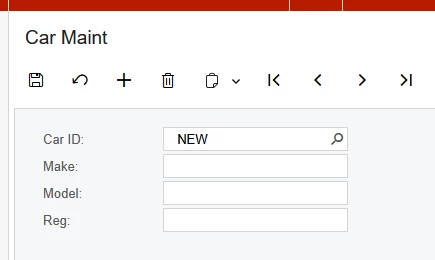
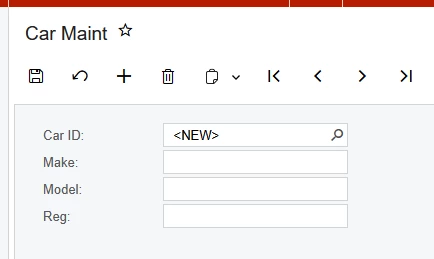
The custom screen is below. When I click add, the Car ID is set to ‘NEW’ not ‘<NEW>’.

There are also 2 spaces before the value NEW.
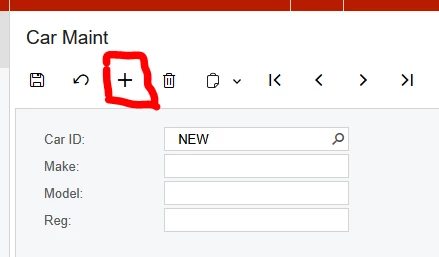
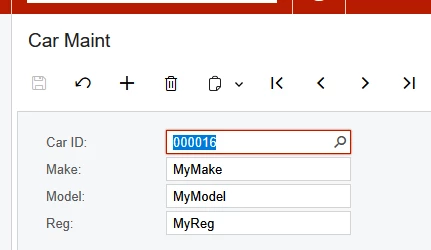
If I enter car details and click save, the auto numbering works. 
 

The DAC is below

[Serializable]
[PXCacheName("PinnCar")]
public class PinnCar : IBqlTable
{
#region Carid
[PXDBString(15, IsKey = true)]
[PXUIField(DisplayName = "Car ID", Visibility = PXUIVisibility.SelectorVisible)]
[PXSelector(typeof(PinnCar.carid), typeof(PinnCar.carid), typeof(PinnCar.make), typeof(PinnCar.model))]
[PXDefault(PersistingCheck = PXPersistingCheck.NullOrBlank)]
[AutoNumber(typeof(INSetupExt.usrCarNumberingSequence), typeof(PinnCar.createdDateTime))]
public virtual string Carid { get; set; }
public abstract class carid : PX.Data.BQL.BqlString.Field<carid> { }
#endregion

//make, model and reg field
//Acumatica fields.
}

The graph code is very simple

public class CarMaint : PXGraph<CarMaint, PinnCar>
{
//getting access to the DAC containing the next number is essential, without this it fails
public PXSetup<INSetup> Setup;
public SelectFrom<PinnCar>.View CarView;
}

Can anyone suggest why the New Number Symbol is displaying incorrectly on the graph?
Best answer by stephenward03

Thanks everyone for your suggestions. 

It is now working as expected!

I’m not completely sure what fixed this in the end as I was trying lots of different ideas. I think it started working after doing one of the following:
I deleted the field from aspx and readded it.
I created a new numbering sequence and used that, but then returned to the original numbering sequence. 

The final DAC field def is below. 

#region Carid
[PXDBString(15, IsKey = true, IsUnicode = true, InputMask = ">CCCCCCCCCCCCCCC")]
[PXUIField(DisplayName = "Car ID", Visibility = PXUIVisibility.SelectorVisible)]
[PXSelector(typeof(PinnCar.carid), typeof(PinnCar.carid), typeof(PinnCar.make), typeof(PinnCar.model))]
[PXDefault(PersistingCheck = PXPersistingCheck.NullOrBlank)]
[AutoNumber(typeof(INSetupExt.usrCarNumberingSequence), typeof(AccessInfo.businessDate))]

public virtual string Carid { get; set; }
public abstract class carid : PX.Data.BQL.BqlString.Field<carid> { }
#endregion


16 replies

Forum|alt.badge.img+8
  • Captain II
  • April 29, 2025

You need a constructor for PXSetup, something like this,

 #region Graph Constructor
public NPDApprovalEntry()
{
ISOSetup setup = Setup.Current;
}
#endregion


Forum|alt.badge.img+1
  • Author
  • Varsity III
  • April 29, 2025

Hi ​@aiwan ,

I’ve done this but it doesn’t seem to have helped. I don’t really understand what is being achieved by assigning a local variable to Setup.Current in the constructor. I can see why this would be useful if you need to apply some settings to the graph based on the Setup.Current record, but I don’t understand what is being achieved here. 


harutyungevorgyan
Jr Varsity I
Forum|alt.badge.img+2

Hello ​@stephenward03 ,

Just add input mask in your PXDBString like this:

[PXDBString(15, IsKey = true, IsUnicode = true, InputMask = ">CCCCCCCCCC")]

So you will be sure you can use the “>” symbol in your text.
Hope it will resolve your issue.


Forum|alt.badge.img+8
  • Captain II
  • April 29, 2025

@stephenward03 


As per documentation, the graph uses the constructor to ensure the setup view is not null, if it is, it returns a specific error with a link to the setup form.

Not quite on topic, but you should also add ValidateValue = false to your selector, it can help in situations, especially when creating new records. This actually may have solved this error for me when I experienced it.


Forum|alt.badge.img+1
  • Author
  • Varsity III
  • April 29, 2025

Hi ​@harutyungevorgyan,

I’ve added the InputMask but I’ve not changed the outcome. I think the InputMask is just saying that the field can contain 10 characters, which will be converted to upper case. 


Forum|alt.badge.img+1
  • Author
  • Varsity III
  • April 29, 2025

Hi ​@aiwan , 

I see what you mean now. It is always good to check that the set up record exists. 

In this case I know the set up record exists because when I press the Save button I get the next number, however, I’ve updated the graph code to check for null. See below.

public class CarMaint : PXGraph<CarMaint, PinnCar>
{
//getting access to the DAC containing the next number is essential, without this it fails
public PXSetup<INSetup> Setup;
public SelectFrom<PinnCar>.View CarView;

public CarMaint()
{
INSetup setup = Setup.Current;
if (setup == null)
{
throw new PXException("set up not found");
}
}
}

Sadly, I get the same result. ‘  NEW’ not ‘<NEW>’


harutyungevorgyan
Jr Varsity I
Forum|alt.badge.img+2

Hi ​@harutyungevorgyan,

I’ve added the InputMask but I’ve not changed the outcome. I think the InputMask is just saying that the field can contain 10 characters, which will be converted to upper case. 

You are right, but did you add IsUnicode = true as I mentioned as well?


Forum|alt.badge.img+1
  • Author
  • Varsity III
  • April 29, 2025

Hi ​@harutyungevorgyan 

Yes, I have this too. The current DAC setup for this field is. 

#region Carid
[PXDBString(15, IsKey = true, IsUnicode = true, InputMask = ">CCCCCCCCCCCCCCC")]
[PXUIField(DisplayName = "Car ID", Visibility = PXUIVisibility.SelectorVisible)]
[PXSelector(typeof(PinnCar.carid), typeof(PinnCar.carid), typeof(PinnCar.make), typeof(PinnCar.model))]
//[PXDefault(PersistingCheck = PXPersistingCheck.NullOrBlank)]
[PXDefault()]
[AutoNumber(typeof(INSetupExt.usrCarNumberingSequence), typeof(AccessInfo.businessDate))]
public virtual string Carid { get; set; }
public abstract class carid : PX.Data.BQL.BqlString.Field<carid> { }
#endregion


harutyungevorgyan
Jr Varsity I
Forum|alt.badge.img+2

Hi ​@harutyungevorgyan 

Yes, I have this too. The current DAC setup for this field is. 

#region Carid
[PXDBString(15, IsKey = true, IsUnicode = true, InputMask = ">CCCCCCCCCCCCCCC")]
[PXUIField(DisplayName = "Car ID", Visibility = PXUIVisibility.SelectorVisible)]
[PXSelector(typeof(PinnCar.carid), typeof(PinnCar.carid), typeof(PinnCar.make), typeof(PinnCar.model))]
//[PXDefault(PersistingCheck = PXPersistingCheck.NullOrBlank)]
[PXDefault()]
[AutoNumber(typeof(INSetupExt.usrCarNumberingSequence), typeof(AccessInfo.businessDate))]
public virtual string Carid { get; set; }
public abstract class carid : PX.Data.BQL.BqlString.Field<carid> { }
#endregion


Could you please share UsrCarNumberingSequence as well?


Forum|alt.badge.img+1
  • Author
  • Varsity III
  • April 29, 2025

The DAC is an extension to INSetup
Shown below.

public class INSetupExt : PXCacheExtension<PX.Objects.IN.INSetup>
{
#region UsrCarNumberingSequence
[PXDBString(15)]
[PXUIField(DisplayName = "CarNumberingSequence", Required = true)]
[PXSelector(typeof(Numbering.numberingID), DescriptionField = typeof(Numbering.descr))]

public virtual string UsrCarNumberingSequence { get; set; }
public abstract class usrCarNumberingSequence : PX.Data.BQL.BqlString.Field<usrCarNumberingSequence> { }
#endregion
}


harutyungevorgyan
Jr Varsity I
Forum|alt.badge.img+2

The DAC is an extension to INSetup
Shown below.

public class INSetupExt : PXCacheExtension<PX.Objects.IN.INSetup>
{
#region UsrCarNumberingSequence
[PXDBString(15)]
[PXUIField(DisplayName = "CarNumberingSequence", Required = true)]
[PXSelector(typeof(Numbering.numberingID), DescriptionField = typeof(Numbering.descr))]

public virtual string UsrCarNumberingSequence { get; set; }
public abstract class usrCarNumberingSequence : PX.Data.BQL.BqlString.Field<usrCarNumberingSequence> { }
#endregion
}


Are you sure you added code with InputMask? Because now I am checking in the Sales Order screen and removing the InputMask property from PXDBString removes the symbols you want to see as well.
You can test it as well, using this Graph extension:

public class SOOrderEntryExt : PXGraphExtension<SOOrderEntry>
{
[PXRemoveBaseAttribute(typeof(PXDBStringAttribute))]
[PXMergeAttributes(Method = MergeMethod.Append)]
[PXDBString(15, IsKey = true, IsUnicode = true)]
public virtual void _(Events.CacheAttached<SOOrder.orderNbr> e) { }
}


Samvel Petrosov
Jr Varsity II
Forum|alt.badge.img+8

The DAC is an extension to INSetup
Shown below.

public class INSetupExt : PXCacheExtension<PX.Objects.IN.INSetup>
{
#region UsrCarNumberingSequence
[PXDBString(15)]
[PXUIField(DisplayName = "CarNumberingSequence", Required = true)]
[PXSelector(typeof(Numbering.numberingID), DescriptionField = typeof(Numbering.descr))]

public virtual string UsrCarNumberingSequence { get; set; }
public abstract class usrCarNumberingSequence : PX.Data.BQL.BqlString.Field<usrCarNumberingSequence> { }
#endregion
}


Try changing the [PXDBString(15)] to [PXDBString(15, IsUnicode = true, IsKey = true, InputMask = ">CCCCCCCCCCCCCCC")].

You may also have to re-add the field to UI.


valentynbeznosiuk
Jr Varsity I
Forum|alt.badge.img+3

Hello ​@stephenward03

I’ve met such an issue several times, and in those cases, deleting and creating a new Numbering Sequence helped.


Forum|alt.badge.img+1
  • Author
  • Varsity III
  • Answer
  • April 30, 2025

Thanks everyone for your suggestions. 

It is now working as expected!

I’m not completely sure what fixed this in the end as I was trying lots of different ideas. I think it started working after doing one of the following:
I deleted the field from aspx and readded it.
I created a new numbering sequence and used that, but then returned to the original numbering sequence. 

The final DAC field def is below. 

#region Carid
[PXDBString(15, IsKey = true, IsUnicode = true, InputMask = ">CCCCCCCCCCCCCCC")]
[PXUIField(DisplayName = "Car ID", Visibility = PXUIVisibility.SelectorVisible)]
[PXSelector(typeof(PinnCar.carid), typeof(PinnCar.carid), typeof(PinnCar.make), typeof(PinnCar.model))]
[PXDefault(PersistingCheck = PXPersistingCheck.NullOrBlank)]
[AutoNumber(typeof(INSetupExt.usrCarNumberingSequence), typeof(AccessInfo.businessDate))]

public virtual string Carid { get; set; }
public abstract class carid : PX.Data.BQL.BqlString.Field<carid> { }
#endregion


harutyungevorgyan
Jr Varsity I
Forum|alt.badge.img+2

Thanks everyone for your suggestions. 

It is now working as expected!

I’m not completely sure what fixed this in the end as I was trying lots of different ideas. I think it started working after doing one of the following:
I deleted the field from aspx and readded it.
I created a new numbering sequence and used that, but then returned to the original numbering sequence. 

The final DAC field def is below. 

#region Carid
[PXDBString(15, IsKey = true, IsUnicode = true, InputMask = ">CCCCCCCCCCCCCCC")]
[PXUIField(DisplayName = "Car ID", Visibility = PXUIVisibility.SelectorVisible)]
[PXSelector(typeof(PinnCar.carid), typeof(PinnCar.carid), typeof(PinnCar.make), typeof(PinnCar.model))]
[PXDefault(PersistingCheck = PXPersistingCheck.NullOrBlank)]
[AutoNumber(typeof(INSetupExt.usrCarNumberingSequence), typeof(AccessInfo.businessDate))]

public virtual string Carid { get; set; }
public abstract class carid : PX.Data.BQL.BqlString.Field<carid> { }
#endregion


As I mentioned earlier and demonstrated with the test Graph Extension, when you remove the InputMask from your field, the system doesn't interpret the “>`” symbol correctly and replaces it with white spaces. I believe that was the root cause of your issue.


Forum|alt.badge.img+1
  • Author
  • Varsity III
  • April 30, 2025

@harutyungevorgyan 

Certainly more to it than just the InputMask. I did make the change when you suggested it but it didn’t work, though perhaps getting the DAC correct before adding the field to the screen may have helped. 

I’ve just removed InputMask from the DAC and field continues to display properly. Go figure.