


Answer

Auto-Number Error - Number cannot be empty when creating a new item

  • April 29, 2022
  • 5 replies
  • 311 views

DewaldH
Jr Varsity II

Hi all,

I have gone through the Acumatica training material a few times on this but cannot find the issue. 

I have created a new screen with the corresponding DACs’ as per the T210 and T220 training material. I have setup the entire DAC with a master-detail relationship setup but get the following error when trying to create a new item.

Error: Inserting  'LTFGItems' record raised at least one error. Please review the errors. Error: 'Batch Nbr' cannot be empty.

This is what the screen looks like:
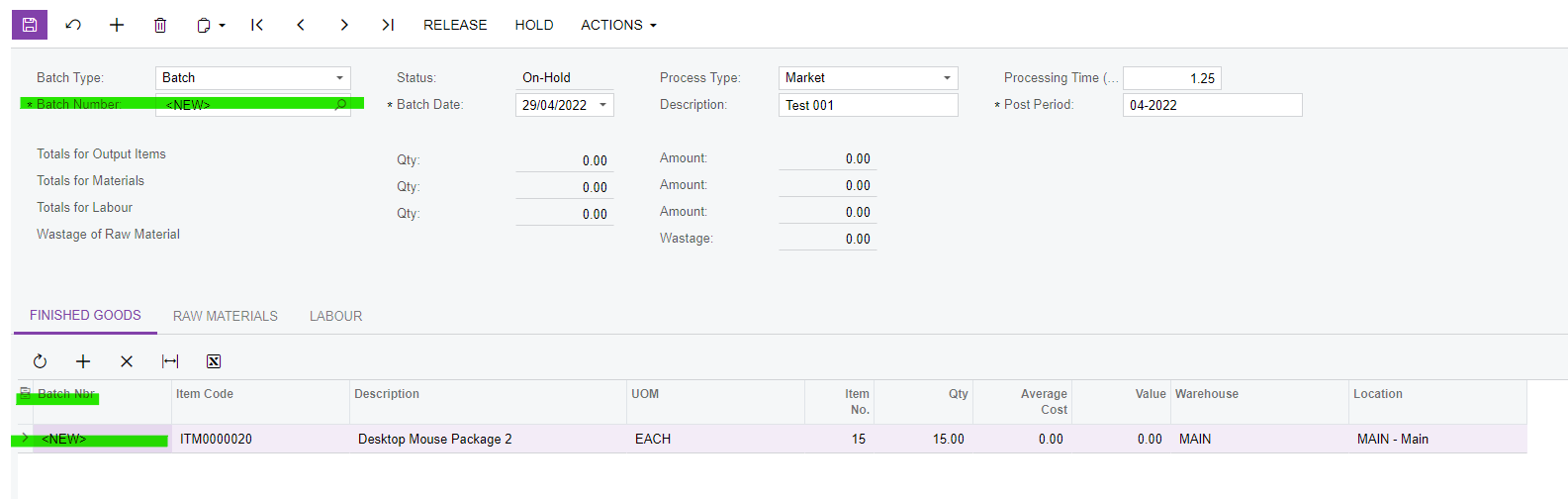
The DACs’ are setup with the LTFGHeader (Parent) and LTFGItems (Child) - I have just added the fields in question for the sake of saving space:

 LTFGHeader

#region BatchNbr
        [PXDBString(15, IsUnicode = true, IsKey = true, InputMask = "")]
        [PXUIField(DisplayName = "Batch Number", 

Required = true, 

Visibility = PXUIVisibility.SelectorVisible)]
        [PXDefault]
        [AutoNumber(typeof(INSetupExt.usrFinGoodsBatchNbr), typeof(LTFGHeader.batchDate))]
        [PXSelector(typeof(Search<LTFGHeader.batchNbr>))]
        public virtual string BatchNbr { get; set; }
        public abstract class batchNbr : PX.Data.BQL.BqlString.Field<batchNbr> { }
        #endregion

 LTFGItem

        #region BatchNbr
        [PXDBString(15, IsUnicode = true, IsKey = true, InputMask = "")]
        [PXUIField(DisplayName = "Batch Nbr")]
        [PXDBDefault(typeof(LTFGHeader.batchNbr))]
        [PXParent(typeof(SelectFrom<LTFGHeader>.

        Where<LTFGHeader.batchNbr.IsEqual<LTFGItems.batchNbr.FromCurrent>>))]
        public virtual string BatchNbr { get; set; }
        public abstract class batchNbr : PX.Data.BQL.BqlString.Field<batchNbr> { }
        #endregion


When I do not enter a Item and just save the header, it works perfectly and a new number is generated. 


Any help, advice or comments will be greatly appreciated. 

Thanks

 

Best answer by jinin

Hi @DewaldH 

The above code looks good. I guess you are not getting the current BatchNbr in the Line details level. The current value is coming as null. Please recheck the aspx.cs and views you created. If possible comment all business logic and review.
 

5 replies

jinin
Pro I
Forum|alt.badge.img+11
  • Pro I
  • April 29, 2022

Hi @DewaldH 

Your Child DAC is correct, but instead of assigning the current Parent table batchNbr, Used the child table. Can you please change the below line code check once?

[PXParent(typeof(SelectFrom<LTFGHeader>.

        Where<LTFGHeader.batchNbr.IsEqual<LTFGHeader.batchNbr.FromCurrent>>))]


DewaldH
Jr Varsity II
  • Author
  • Jr Varsity II
  • April 29, 2022

Hi @jinin 

Thanks for the response, I have tried this, but still get the same error.


jinin
Pro I
Forum|alt.badge.img+11
  • Pro I
  • April 29, 2022

Hi @DewaldH 

The below code working for me. Seems like your code is also the same. Just review and check with this sample once.

Header level
 
 #region RefNbr
        [PXDBString(15, IsKey = true, IsUnicode = true, InputMask = "")]
        [PXUIField(DisplayName = "Ref Nbr", Visibility = PXUIVisibility.SelectorVisible)]
        [RefAutomNumberingSequence.RefAutoNbr(typeof(Search<RefNbr>), DescriptionField = typeof(description), Filterable = true)]
        [RefAutomNumberingSequence.Numbering()]
        [PX.Data.EP.PXFieldDescription]
        public virtual string RefNbr { get; set; }
        public abstract class refNbr : IBqlField { }
        #endregion
        
        
Child Level

 #region RefNbr
        [PXDBString(15, IsKey = true, IsUnicode = true)]
        [PXUIField(DisplayName = "Reg Nbr")]
        [PXDBDefault(typeof(ParentTableName.RefNbr))]
        [PXParent(typeof(Select<ParentTableName, Where<ParentTableName.RefNbr, Equal<Current<RefNbr>>>>))]
        public virtual string RefNbr { get; set; }
        public abstract class refNbr : IBqlField { }
        #endregion


DewaldH
Jr Varsity II
  • Author
  • Jr Varsity II
  • May 3, 2022

Hi @jinin 

Apologies for the delay in my response.

I have re-tested this and even with the code almost matching line for line, I still get this Error: Inserting  'LTFGItems' record raised at least one error. Please review the errors. Error: 'Batch Nbr' cannot be empty.

Here is the latest versions of my DAC:
 

LTFGHeader (Parent)

#region BatchNbr
[PXDBString(15, IsUnicode = true, IsKey = true, InputMask = "")]
[PXUIField(DisplayName = "Batch Number", Required = true, Visibility = PXUIVisibility.SelectorVisible)]
[PXDefault]
[AutoNumber(typeof(INSetupExt.usrFinGoodsBatchNbr), typeof(LTFGHeader.batchDate))]
[PXSelector(typeof(Search<LTFGHeader.batchNbr>))]
public virtual string BatchNbr { get; set; }
public abstract class batchNbr : PX.Data.BQL.BqlString.Field<batchNbr> { }
#endregion
LTFGItems

#region BatchNbr
[PXDBString(15, IsUnicode = true, IsKey = true, InputMask = "")]
[PXUIField(DisplayName = "Batch Nbr")]
[PXDBDefault(typeof(LTFGHeader.batchNbr))]
// Original Version //[PXParent(typeof(SelectFrom<LTFGHeader>.Where<LTFGHeader.batchNbr.IsEqual<LTFGItems.batchNbr.FromCurrent>>))]

// Updated Version
[PXParent(typeof(Select<LTFGHeader, Where<LTFGHeader.batchNbr, Equal<Current<batchNbr>>>>))]
public virtual string BatchNbr { get; set; }
public abstract class batchNbr : PX.Data.BQL.BqlString.Field<batchNbr> { }
#endregion

What on earth can I be doing wrong here? 🤔


jinin
Pro I
Forum|alt.badge.img+11
  • Pro I
  • Answer
  • May 3, 2022

Hi @DewaldH 

The above code looks good. I guess you are not getting the current BatchNbr in the Line details level. The current value is coming as null. Please recheck the aspx.cs and views you created. If possible comment all business logic and review.
