Environment
- Acumatica version: Acumatica 2025 R2,Build 25.200.0248
- SQL Server: Microsoft SQL Server 2022 Express
- Module: Automation Schedules / Scheduling
Error message
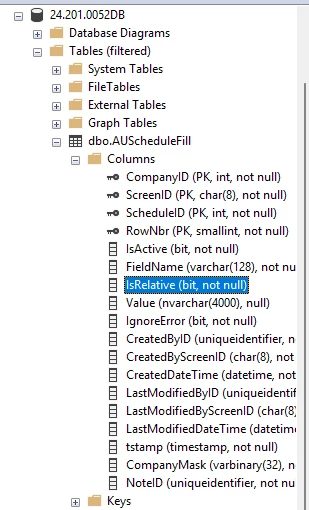
Cannot insert the value NULL into column 'IsRelative', table 'DatabaseName.dbo.AUScheduleFill'; column does not allow nulls. INSERT fails.
When it occurs
Occurs when saving or running an automation schedule that includes entries in the Filter Values tab after recent changes (upgrade, customization deployment, or schema update). The error appears at the moment the system attempts to insert rows into ‘AUScheduleFill’.
---
Steps to reproduce
1. Log in to Acumatica and open Automation Schedules.
2. Create or open a schedule that has a populated Filter Values tab (one or more filter rows).
3. Save the schedule or trigger the schedule run.
4. Observe the SQL/Acumatica error about `IsRelative` being NULL and the INSERT failing.
---
What I have checked and tried
- Confirmed the exact error text in the Acumatica trace and SQL Server error log.
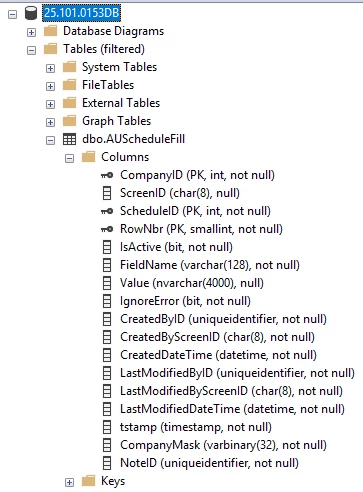
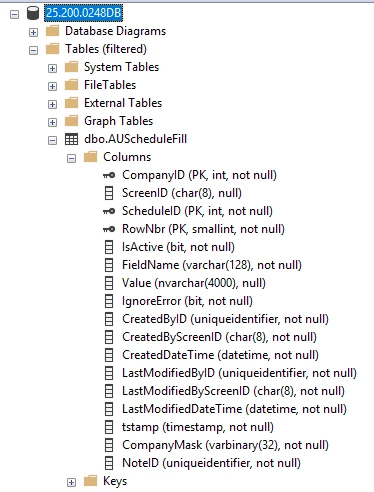
- Inspected the `AUScheduleFill` table schema to confirm `IsRelative` is NOT nullable.
- Searched customizations for references to `IsRelative` (no obvious matches so far).
- Noted recent activity: upgrade to 2025 or deployment of customizations prior to the error.
---
Main question
Does Acumatica add the `IsRelative` column to the `AUScheduleFill` table as part of the core product/schema (for example in a 2025 R1 change), or is this column typically introduced by a customization? If it is core, is there a known upgrade step or patch that populates this column? If it is from a customization, what is the recommended way to identify which customization added it and how to ensure INSERTs supply a non-null value?
---
Helpful diagnostic SQL
Run this to inspect the column definition and extended properties (if any) to help determine origin:
-- Check column definition
SELECT COLUMN_NAME, IS_NULLABLE, DATA_TYPE, COLUMN_DEFAULT
FROM INFORMATION_SCHEMA.COLUMNS
WHERE TABLE_SCHEMA = 'dbo' AND TABLE_NAME = 'AUScheduleFill' AND COLUMN_NAME = 'IsRelative';

-- Check for extended properties that might indicate customization
SELECT ep.name, ep.value
FROM sys.extended_properties ep
JOIN sys.tables t ON ep.major_id = t.object_id
WHERE t.name = 'AUScheduleFill';
---