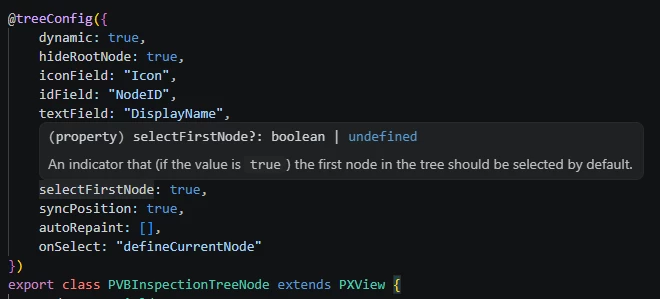
I’m stumped here.
I have a screen with a tree view driving a form and details grid. this was working perfectly in the classic UI but I simply cannot get it functioning in the MUI.
The modern UI displays the tree nodes correctly, but no matter what I do, the grid and form stay empty as if totally disconnected from the tree nodes.
Anyone have suggestions or direction?
The documentation has very few examples, and I also wasn’t able to find any answers by reviewing the front end code for the Configuration Entry screen.
I’m assuming IF the issue is in the front end code, it’s in the “@treeConfig” decorator, but I’ve tried changing so many things and it hasn’t affected the dependent form or grid at all.
I’m left thinking something may need to be changed in the graph.
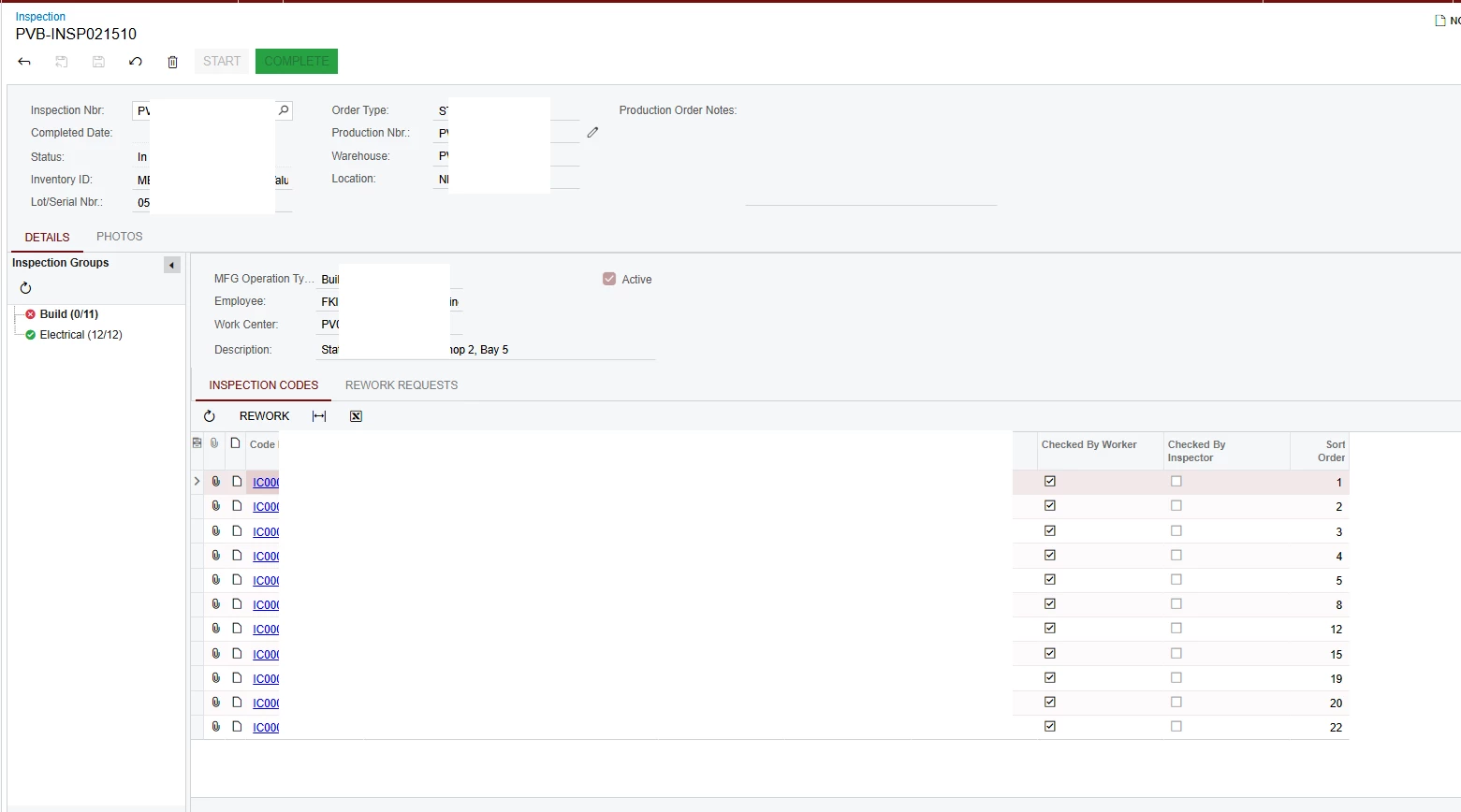
ASPX from Classic UI
<%@ Page Language="C#" MasterPageFile="~/MasterPages/FormTab.master" AutoEventWireup="true" ValidateRequest="false" CodeFile="PV302010.aspx.cs" Inherits="Page_PV302010" Title="Untitled Page" %>
<%@ MasterType VirtualPath="~/MasterPages/FormTab.master" %>

<asp:Content ID="cont1" ContentPlaceHolderID="phDS" Runat="Server">
	<px:PXDataSource ID="ds" runat="server" Visible="True" Width="100%" TypeName="PVBACPInspection.PVBInspectionEntry" PrimaryView="Ticket" AutoCallBack="True">
		<DataTrees>
			<px:PXTreeDataMember TreeView="TreeNode" TreeKeys="NodeID,ParentID"></px:PXTreeDataMember>
		</DataTrees>
		<CallbackCommands>
			<px:PXDSCallbackCommand Name="rework" Visible="False" />
		</CallbackCommands>
	</px:PXDataSource>
</asp:Content>
<asp:Content ID="cont2" ContentPlaceHolderID="phF" Runat="Server">
	<px:PXFormView ID="form" runat="server" DataSourceID="ds" DataMember="Ticket" Width="100%" Height="150px" AllowAutoHide="false">
		<Template>
			<px:PXSelector CommitChanges="True" runat="server" ID="CstPXSelector32" DataField="InspectionNbr" />
			<px:PXDateTimeEdit CommitChanges="True" runat="server" ID="CstPXCompletedDate" DataField="CompletedDate" ></px:PXDateTimeEdit>
			<px:PXDropDown CommitChanges="True" runat="server" ID="CstPXDropDown27" DataField="Status" ></px:PXDropDown>
			<px:PXSegmentMask runat="server" ID="CstPXSegmentMask21" DataField="InventoryID" ></px:PXSegmentMask>
			<px:PXSelector CommitChanges="True" runat="server" ID="CstPXTextEdit23" DataField="LotSerialNbr" ></px:PXSelector>
			<px:PXLayoutRule runat="server" ID="CstPXLayoutRule29" StartColumn="True" ></px:PXLayoutRule>
			<px:PXMaskEdit CommitChanges="True" runat="server" ID="CstPXMaskEdit24" DataField="OrderType" ></px:PXMaskEdit>
			<px:PXSelector AllowEdit="True" AutoRefresh="True" CommitChanges="True" runat="server" ID="CstPXMaskEdit25" DataField="ProdOrdID" ></px:PXSelector>
			<px:PXSegmentMask CommitChanges="True" runat="server" ID="CstPXSegmentMask26" DataField="SiteID" ></px:PXSegmentMask>
			<px:PXSegmentMask CommitChanges="True" runat="server" ID="CstPXSegmentMask22" DataField="LocationID" ></px:PXSegmentMask>
			<px:PXLayoutRule runat="server" ID="CstPXLayoutRule30" StartColumn="True" LabelsWidth="SM" ControlSize="XL" ColumnSpan="3"></px:PXLayoutRule>
			<px:PXTextEdit runat="server" ID="CstPXTextEditM1" DataField="ProdOrderNote" TextMode="MultiLine" Width="300px" Height="125px" ></px:PXTextEdit>
		</Template>
	</px:PXFormView>
</asp:Content>
<asp:Content ID="cont3" ContentPlaceHolderID="phG" Runat="Server">
	<px:PXTab ID="tab" runat="server" Width="100%" Height="150px" DataSourceID="ds" AllowAutoHide="false">
		<Items>
			<px:PXTabItem Text="Details">
				<Template>
					<px:PXSplitContainer runat="server" ID="sp1" SplitterPosition="100">
						<AutoSize Enabled="true" Container="Window" ></AutoSize>
						<Template1>
							<px:PXTreeView BindingDepth="0" Caption="Inspection Groups" SelectFirstNode="True" Height="500px" PopulateOnDemand="True" AllowCollapse="True" AutoRepaint="True" ShowRootNode="False" SyncPosition="True" ID="tree" runat="server" DataSourceID="ds">
								<DataBindings>
									<px:PXTreeItemBinding DataMember="TreeNode" TextField="DisplayName" ValueField="NodeID" ImageUrlField="Icon" ></px:PXTreeItemBinding>
								</DataBindings>
								<AutoSize Container="Window" Enabled="True" ></AutoSize>
								<AutoSize MinHeight="300" ></AutoSize>
								<AutoCallBack Command="DefineCurrentNode" Target="ds"></AutoCallBack>
								<ToolBarItems>
									<px:PXToolBarButton Tooltip="Reload Tree" ImageKey="Refresh">
										<AutoCallBack Target="tree" Command="Refresh" />
									</px:PXToolBarButton>
								</ToolBarItems>
							</px:PXTreeView>
						</Template1>
						<Template2>
							<px:PXFormView SyncPosition="True" Width="100%" DataMember="TicketGroupsFilter" ID="TicketGroupsForm" runat="server" DataSourceID="ds">
								<Template>
									<px:PXLayoutRule runat="server" ID="CstPXLayoutRule8" StartRow="True" ></px:PXLayoutRule>
									<px:PXLayoutRule runat="server" ID="CstPXLayoutRule9" StartColumn="True" ></px:PXLayoutRule>
									<px:PXSelector runat="server" ID="CstPXSelector12" DataField="MFGOperationTypeID" ></px:PXSelector>
									<px:PXSelector runat="server" ID="CstPXSelector67" DataField="EmployeeID" ></px:PXSelector>
									<px:PXTextEdit runat="server" ID="CstPXTextEditWcID" DataField="WcID" ></px:PXTextEdit>
									<px:PXLayoutRule runat="server" ID="CstLayoutRule14" ColumnSpan="2" ></px:PXLayoutRule>
									<px:PXTextEdit runat="server" ID="CstPXTextEdit13" DataField="Descr" ></px:PXTextEdit>
									<px:PXLayoutRule runat="server" ID="CstPXLayoutRule10" StartColumn="True" ></px:PXLayoutRule>
									<px:PXCheckBox runat="server" ID="CstPXCheckBox15" DataField="Active" />
								</Template>
							</px:PXFormView>
							<px:PXTab SyncPosition="True" BindingContext="TicketGroupsForm" DataSourceID="ds" Width="100%" runat="server" ID="CstPXTicketGroupsDetTab">
								<Items>
									<px:PXTabItem RepaintOnDemand="True" LoadOnDemand="False" Text="Inspection Codes">
										<Template>
											<px:PXGrid AdjustPageSize="Auto"  KeepPosition="True" AutoRepaint="True" SyncPositionWithGraph="True" SyncPosition="True" DataSourceID="ds" SkinID="Inquire" AllowPaging="False" Width="100%" runat="server" ID="CstPXTicketGroupsDetGrid">
												<Levels>
													<px:PXGridLevel DataMember="TicketGroupsDet">
														<Columns>
															<px:PXGridColumn DataField="InspectCodeID" Width="70" LinkCommand="redirectToInspectionCode"/>
															<px:PXGridColumn DataField="Descr" Width="350" />
															<px:PXGridColumn DataField="WorkerCheckedDate" Width="150" CommitChanges="True" ></px:PXGridColumn>
															<px:PXGridColumn DataField="WorkerCheckedBy" Width="150" CommitChanges="True" ></px:PXGridColumn>
															<px:PXGridColumn DataField="InspectorCheckedDate" Width="150" CommitChanges="True" ></px:PXGridColumn>
															<px:PXGridColumn Type="CheckBox" DataField="CheckedByWorker" Width="150" CommitChanges="True" ></px:PXGridColumn>
															<px:PXGridColumn Type="CheckBox" DataField="CheckedByInspector" Width="150" CommitChanges="True" ></px:PXGridColumn>
															<px:PXGridColumn Type="CheckBox" DataField="Active" Width="60" ></px:PXGridColumn>
															<px:PXGridColumn DataField="SortOrder" Width="70" />
														</Columns>
													</px:PXGridLevel>
												</Levels>
												<ActionBar>
													<CustomItems>
														<px:PXToolBarButton DependOnGrid="TicketGroupsDet" ><AutoCallBack Command="rework" Target="ds" /></px:PXToolBarButton>
													</CustomItems>
												</ActionBar>
												<AutoSize Container="Parent" ></AutoSize>
												<AutoSize Enabled="True" ></AutoSize>
											</px:PXGrid>
										</Template>
									</px:PXTabItem>
									<px:PXTabItem RepaintOnDemand="True" LoadOnDemand="False" Text="Rework Requests">
										<Template>
											<px:PXGrid AdjustPageSize="Auto"  KeepPosition="True" AutoRepaint="True" SyncPositionWithGraph="True" SyncPosition="True" DataSourceID="ds" SkinID="Inquire" AllowPaging="False" Width="100%" runat="server" ID="CstPXReworkRequetsGrid">
												<Levels>
													<px:PXGridLevel DataMember="ReworkTickets">
														<Columns>
															<px:PXGridColumn DataField="Status" Width="70" />
															<px:PXGridColumn DataField="InspectCodeID" Width="70" />
															<px:PXGridColumn DataField="Descr" Width="200" />
															<px:PXGridColumn DataField="Note" Width="370" />
														</Columns>
													</px:PXGridLevel>
												</Levels>
												<AutoSize Container="Parent" ></AutoSize>
												<AutoSize Enabled="True" ></AutoSize>
											</px:PXGrid>
										</Template>
									</px:PXTabItem>
								</Items>
								<AutoSize Container="Parent" />
								<AutoSize Enabled="True" />
							</px:PXTab>
						</Template2>
						<AutoSize Container="Window" Enabled="True" ></AutoSize>
						<AutoSize Container="Window" ></AutoSize>
						<AutoSize MinHeight="500" ></AutoSize>
					</px:PXSplitContainer>
				</Template>
			</px:PXTabItem>
			<px:PXTabItem Text="Photos">
				<Template>
					<px:PXSplitContainer runat="server" ID="sp2" SplitterPosition="70" SkinID="Transparent" PositionInPercent="true">
						<AutoSize Container="Window" Enabled="true" ></AutoSize>
						<Template1>
							<px:PXGrid
									AutoAdjustColumns="True"
									AllowSearch="True"
									DataSourceID="ds"
									KeepPosition="True"
									NoteIndicator="True"
									FilesIndicator="True"
									SyncPosition="True"
									CaptionVisible="False"
									Width="100%"
									SkinID="Details"
									ShowFilterToolbar="true"
									PreserveSortsAndFilters="True"
									FastFilterFields ="PhotoID,Description,InventoryID,LotSerialNbr,SOOrderNbr,ProdOrdID"
									runat="server"
									ID="CstDetailsPXGrid">
								<Levels>
									<px:PXGridLevel DataMember="PhotoDetails" >
										<Columns>
											<px:PXGridColumn CommitChanges="True" LinkCommand="redirectToShedworksPhoto" DataField="PhotoID" Width="70" ></px:PXGridColumn>
											<px:PXGridColumn DataField="PhotoType" Width="100" ></px:PXGridColumn>
											<px:PXGridColumn DataField="Description" Width="280" ></px:PXGridColumn>
											<px:PXGridColumn DataField="InventoryID" Width="100" ></px:PXGridColumn>
											<px:PXGridColumn DataField="LotSerialNbr" Width="120" ></px:PXGridColumn>
											<px:PXGridColumn DataField="SOOrderNbr" Width="100" ></px:PXGridColumn>
											<px:PXGridColumn DataField="ProdOrdID" Width="100" ></px:PXGridColumn>
											<px:PXGridColumn DataField="IsPrimaryPhoto" Width="70" Type="CheckBox"></px:PXGridColumn>
										</Columns>
										<RowTemplate></RowTemplate>
									</px:PXGridLevel>
								</Levels>
								<ActionBar>
									<CustomItems>
										<px:PXToolBarButton Text="Add New" CommandName="addNewPhoto" CommandSourceID="ds" ></px:PXToolBarButton>
									</CustomItems>
								</ActionBar>
								<AutoSize Enabled="True" ></AutoSize>
								<Mode AllowFormEdit="False" ></Mode>
								<AutoCallBack Target="PhotosForm" Command="Refresh"></AutoCallBack>
							</px:PXGrid>
						</Template1>
						<Template2>
							<px:PXFormView ID="PhotosForm" runat="server" DataSourceID="ds" DataMember="Photos" Width="100%" AllowAutoHide="false">
								<Template>
									<px:PXLayoutRule runat="server" StartColumn="True" LabelsWidth="S" ControlSize="M" />
                                    <px:PXImageView ID="edCustImgUrl" runat="server" DataField="ImgUrl" Style="position: absolute; max-height: 550px; max-width: 600px;"/>
								</Template>
								<AutoSize Container="Window" Enabled="True" MinHeight="120" ></AutoSize>
							</px:PXFormView>
						</Template2>
					</px:PXSplitContainer>
				</Template>
			</px:PXTabItem>
		</Items>
		<AutoSize Container="Window" Enabled="True" MinHeight="150" />
	</px:PXTab>
	<px:PXSmartPanel Key="ReworkNoteFilter" Width="500" LoadOnDemand="True" ShowAfterLoad="True" AutoReload="True" AutoRepaint="True" CaptionVisible="True" Caption="Rework Request" Position="CenterWindow" AllowResize="False" runat="server" ID="CstReworkNoteFilterSmartPanel">
		<px:PXFormView Width="100%" SkinID="Transparent" DataSourceID="ds" DataMember="ReworkNoteFilter" runat="server" ID="CstReworkNoteFilterFormView">
			<Template>
				<px:PXLayoutRule runat="server" ID="CstReworkNoteFilterPXLayoutRuleStartRow" StartRow="True" ></px:PXLayoutRule>
				<px:PXLayoutRule GroupCaption="Note" ControlSize="XM" LabelsWidth="XM" runat="server" ID="CstReworkNoteFilterPXLayoutRuleGroup" StartGroup="True" ></px:PXLayoutRule>
				<px:PXTextEdit runat="server" ID="CstPXTextEdit75" SuppressLabel="True" Placeholder="Notes" DataField="Note" TextMode="MultiLine"  Width="400px" Height="250px" TextAlign="Left" />
			</Template>
		</px:PXFormView>
		<px:PXPanel SkinID="Buttons" runat="server" ID="CstPanel98651">
			<px:PXButton DialogResult="OK" Text="Create" runat="server" ID="CstButtonSave12490" ></px:PXButton>
			<px:PXButton DialogResult="Cancel" Text="Cancel" runat="server" ID="CstButtonCancel32124" ></px:PXButton>
		</px:PXPanel>
	</px:PXSmartPanel>
	<px:PXUploadDialog  RenderImportOptions="False"
						IgnoreSize="False"
						AutoSaveFile="False"
						RenderLink="False"
						AllowedFileTypes=".png;.jpeg;.jpg;.gif;.bmp"
						Caption="Upload Image"
						Key="ReworkTickets"
						Width="400px"
						Height="120px"
						RenderCheckIn="False"
						RenderComment="False"
						SessionKey="FileImportSessionKey"
						ID="dlgUploadFile"
						runat="server"  >
	</px:PXUploadDialog>
</asp:Content>
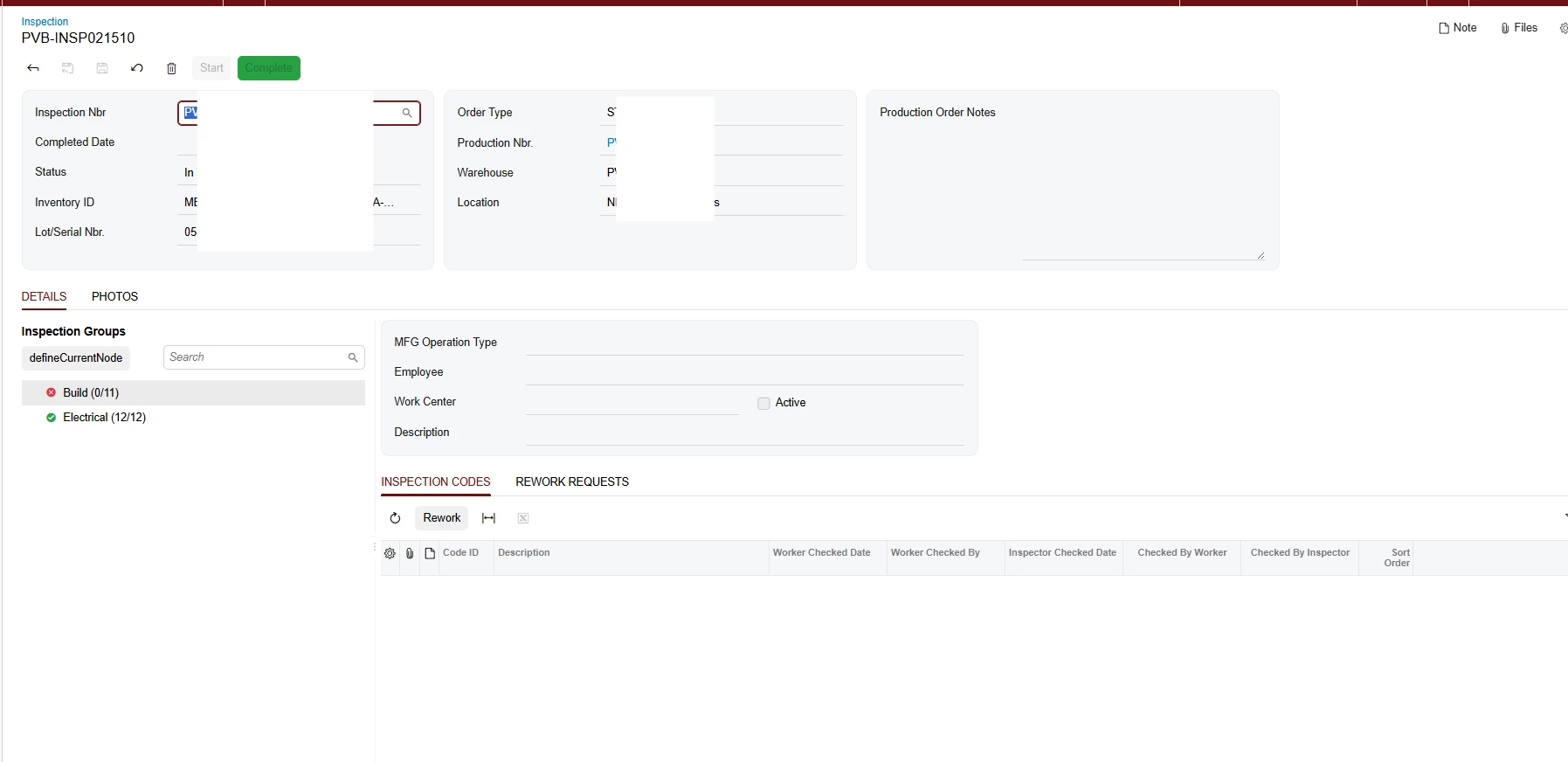
HTML and TypeScript from Modern UI
<template>

	<qp-template id="form_div0" name="1-1-1" qp-collapsible class="equal-height">
		<qp-fieldset id="Ticket_form0_fs" wg-container="Ticket_form" view.bind="Ticket" slot="A">
			<field name="InspectionNbr"></field>
			<field name="CompletedDate"></field>
			<field name="Status"></field>
			<field name="InventoryID"></field>
			<field name="LotSerialNbr"></field>
		</qp-fieldset>

		<qp-fieldset id="Ticket_CstPXLayoutRule29_fs" wg-container="Ticket_form" view.bind="Ticket" slot="B">
			<field name="OrderType"></field>
			<field name="ProdOrdID" config-allow-edit.bind="true"></field>
			<field name="SiteID"></field>
			<field name="LocationID"></field>
		</qp-fieldset>

		<qp-fieldset id="Ticket_CstPXLayoutRule30_fs" wg-container="Ticket_form" view.bind="Ticket" slot="C">
			<field name="ProdOrderNote"></field>
		</qp-fieldset>


	</qp-template>
	<qp-tabbar id="tab">
		<qp-tab id="tabDetails" caption="Details">
			<qp-splitter id="Ticket_sp1" initial-split="50">
				<split-pane>
					<div>
						<qp-tree id="TreeNode_tree" caption="Inspection Groups" wg-container view.bind="TreeNode"></qp-tree>
					</div>
				</split-pane>
				<split-pane>

					<qp-template id="TicketGroupsFilter_CstPXLayoutRule8_div0" name="1-1">
						<qp-fieldset id="TicketGroupsFilter_CstPXLayoutRule9_fs"
							wg-container="TicketGroupsFilter_TicketGroupsForm" view.bind="TicketGroupsFilter" slot="A">
							<field name="MFGOperationTypeID"></field>
							<field name="EmployeeID"></field>
							<field name="WcID">
								<qp-field class="no-label" control-state.bind="TicketGroupsFilter.Active"></qp-field>
							</field>
							<field name="Descr"></field>
						</qp-fieldset>


					</qp-template>

					<qp-tabbar id="Ticket_CstPXTicketGroupsDetTab">
						<qp-tab id="CstPXTicketGroupsDetTabInspectionCodes" caption="Inspection Codes">
							<qp-grid id="CstPXTicketGroupsDetGrid" view.bind="TicketGroupsDet"></qp-grid>

						</qp-tab>
						<qp-tab id="CstPXTicketGroupsDetTabReworkRequests" caption="Rework Requests">
							<qp-grid id="CstPXReworkRequetsGrid" view.bind="ReworkTickets"></qp-grid>

						</qp-tab>
					</qp-tabbar>
				</split-pane>
			</qp-splitter>

		</qp-tab>
		<qp-tab id="tabPhotos" caption="Photos">
			<qp-splitter id="Ticket_sp2" initial-split="80">
				<split-pane>
					<qp-grid id="CstDetailsPXGrid" view.bind="PhotoDetails"></qp-grid>
				</split-pane>
				<split-pane>

					<qp-template id="Ticket_PhotosForm_div0" name="1">

						<div id="divColumnC-Img" slot="A">
							<qp-image-view id="ImageUrl" state.bind="Photos.ImgUrl" width="100%" height="100%" caption="Image">
							</qp-image-view>
						</div>

					</qp-template>


				</split-pane>
			</qp-splitter>

		</qp-tab>
	</qp-tabbar>
	<qp-panel id="ReworkNoteFilter" caption="Rework Request" auto-repaint="true">
		<qp-fieldset id="ReworkNoteFilter_CstReworkNoteFilterPXLayoutRuleGroup_fs"
			wg-container="ReworkNoteFilter_CstReworkNoteFilterFormView" view.bind="ReworkNoteFilter" caption="Note">
			<field name="Note" class="no-label"></field>
		</qp-fieldset>


		<footer>
			<qp-button id="CstButtonSave12490" caption="Create" dialog-result="OK"></qp-button>
			<qp-button id="CstButtonCancel32124" caption="Cancel" dialog-result="Cancel"></qp-button>

		</footer>
	</qp-panel>

</template>
import { Messages as SysMessages } from "client-controls/services/messages";
import { createCollection, createSingle, PXScreen, graphInfo, PXActionState, viewInfo, handleEvent, CustomEventType, actionConfig, RowSelectedHandlerArgs, PXViewCollection, PXPageLoadBehavior, ControlParameter } from "client-controls";
import { PVBInspectionTicket, PVBInspectionTreeNode, SWInspectionTicketDetFilter, PVBInspectionTicketGroupsDet, PVBReworkTicket, SWLotSerialNbrPhoto, SWLotSerialNbrPhoto2, PVBReworkNote } from "./views";
import { create } from "domain";
@graphInfo({graphType: "PVBACPInspection.PVBInspectionEntry", primaryView: "Ticket", })
export class PV302010 extends PXScreen {
rework: PXActionState;
addNewPhoto: PXActionState;
Ticket = createSingle(PVBInspectionTicket);
@viewInfo ({containerName: "Inspection Groups"})
TreeNode = createCollection(PVBInspectionTreeNode);
@viewInfo ({containerName: "Details"})
TicketGroupsFilter = createSingle(SWInspectionTicketDetFilter);
@viewInfo ({containerName: "Inspection Codes"})
TicketGroupsDet = createCollection(PVBInspectionTicketGroupsDet);
@viewInfo ({containerName: "Rework Requests"})
ReworkTickets = createCollection(PVBReworkTicket);
@viewInfo ({containerName: "Photos"})
PhotoDetails = createCollection(SWLotSerialNbrPhoto);
@viewInfo ({containerName: "Photos"})
Photos = createSingle(SWLotSerialNbrPhoto2);
@viewInfo ({containerName: "Rework Request"})
ReworkNoteFilter = createSingle(PVBReworkNote);
}
import { PXView, PXFieldState, gridConfig, treeConfig, fieldConfig, controlConfig, actionConfig, headerDescription, ICurrencyInfo, disabled, PXFieldOptions, linkCommand, columnConfig, GridColumnShowHideMode, GridColumnType, PXActionState, TextAlign, GridPreset, GridFilterBarVisibility, GridFastFilterVisibility, ISelectorControlConfig, ControlParameter } from "client-controls";
import { PV302010 } from "./PV302010";


// Views

export class PVBInspectionTicket extends PXView {
	InspectionNbr: PXFieldState<PXFieldOptions.CommitChanges>;
	CompletedDate: PXFieldState<PXFieldOptions.CommitChanges>;
	Status: PXFieldState<PXFieldOptions.CommitChanges>;
	InventoryID: PXFieldState;
	LotSerialNbr: PXFieldState<PXFieldOptions.CommitChanges>;
	OrderType: PXFieldState<PXFieldOptions.CommitChanges>;
	@controlConfig({ allowEdit: true, parameters: null })
	ProdOrdID: PXFieldState<PXFieldOptions.CommitChanges>;
	SiteID: PXFieldState<PXFieldOptions.CommitChanges>;
	LocationID: PXFieldState<PXFieldOptions.CommitChanges>;
	@controlConfig({rows: 12})
	ProdOrderNote: PXFieldState<PXFieldOptions.Multiline>;
}

@treeConfig({
	dynamic: true,
	hideRootNode: true,
	iconField: "Icon",
	idField: [ "NodeID", "ParentID" ],
	valueField: "NodeID",
	textField: "DisplayName",
	modifiable: false,
	mode: "single",
	singleClickSelect: true,
	selectFirstNode: true,
	syncPosition: true,
	autoRepaint: ["TicketGroupsFilter", "TicketGroupsDet", "ReworkTickets"],
	onSelect: "defineCurrentNode"
})
export class PVBInspectionTreeNode extends PXView {
	@actionConfig({displayIconAndText: false})
	defineCurrentNode : PXActionState;
	NodeID: PXFieldState;
	ParentID: PXFieldState;
	Icon: PXFieldState;
	DisplayName: PXFieldState;
}

export class SWInspectionTicketDetFilter extends PXView {
	MFGOperationTypeID: PXFieldState;
	EmployeeID: PXFieldState;
	WcID: PXFieldState;
	Descr: PXFieldState;
	Active: PXFieldState;
}

@gridConfig({
	syncPosition: true,
	showFastFilter: GridFastFilterVisibility.False,
	preset: GridPreset.ReadOnly,
	topBarItems: {
		rework: { index: 0, config: { commandName: "rework", text: "Rework" } },
	}
})
export class PVBInspectionTicketGroupsDet extends PXView {
	rework: PXActionState;
	@columnConfig({
		editorConfig: {
			linkCommand: "redirectToInspectionCode"
		},
		width: 70
	})
	InspectCodeID: PXFieldState;
	@columnConfig({
		width: 350
	})
	Descr: PXFieldState;
	@columnConfig({
		width: 150
	})
	WorkerCheckedDate: PXFieldState<PXFieldOptions.CommitChanges>;
	@columnConfig({
		width: 150
	})
	WorkerCheckedBy: PXFieldState<PXFieldOptions.CommitChanges>;
	@columnConfig({
		width: 150
	})
	InspectorCheckedDate: PXFieldState<PXFieldOptions.CommitChanges>;
	@columnConfig({
		width: 150
	})
	CheckedByWorker: PXFieldState<PXFieldOptions.CommitChanges>;
	@columnConfig({
		width: 150
	})
	CheckedByInspector: PXFieldState<PXFieldOptions.CommitChanges>;
	@columnConfig({
		width: 60
	})
	Active: PXFieldState;
	@columnConfig({
		width: 70
	})
	SortOrder: PXFieldState;
}

@gridConfig({
	syncPosition: true,
	showFastFilter: GridFastFilterVisibility.False,
	preset: GridPreset.ReadOnly
})
export class PVBReworkTicket extends PXView {
	@columnConfig({
		width: 70
	})
	Status: PXFieldState;
	@columnConfig({
		width: 70
	})
	InspectCodeID: PXFieldState;
	@columnConfig({
		width: 200
	})
	Descr: PXFieldState;
	@columnConfig({
		width: 370
	})
	Note: PXFieldState;
}

@gridConfig({
	syncPosition: true,
	allowUpdate: false,
	autoAdjustColumns: true,
	preset: GridPreset.Details,
	topBarItems: {
		addNewPhoto: { index: 0, config: { commandName: "addNewPhoto", text: "Add New" } },
	}
})
export class SWLotSerialNbrPhoto extends PXView {
	addNewPhoto: PXActionState;
	@columnConfig({
		editorConfig: {
			linkCommand: "redirectToShedworksPhoto"
		},
		width: 100,
	})
	PhotoID: PXFieldState<PXFieldOptions.CommitChanges>;
	@columnConfig({
		width: 90
	})
	PhotoType: PXFieldState;
	@columnConfig({
		width: 250,
	})
	Description: PXFieldState;
	@columnConfig({
		width: 175,
	})
	InventoryID: PXFieldState;
	@columnConfig({
		width: 110,
	})
	LotSerialNbr: PXFieldState;
	@columnConfig({
		width: 100,
	})
	SOOrderNbr: PXFieldState;
	@columnConfig({
		width: 100,
	})
	ProdOrdID: PXFieldState;
	@columnConfig({
		width: 60
	})
	IsPrimaryPhoto: PXFieldState;
}

export class SWLotSerialNbrPhoto2 extends PXView {
	ImgUrl: PXFieldState;
}

export class PVBReworkNote extends PXView {
	Note: PXFieldState;
}
Any help is appreciated!