


Answer

'AllowEdit = True' but getting 'Specified Cast is not Valid' error in trace

  • November 19, 2024
  • 9 replies
  • 121 views

Forum|alt.badge.img+8

Hi Guys,


Im having a little issue with redirections.

I receive these errors:
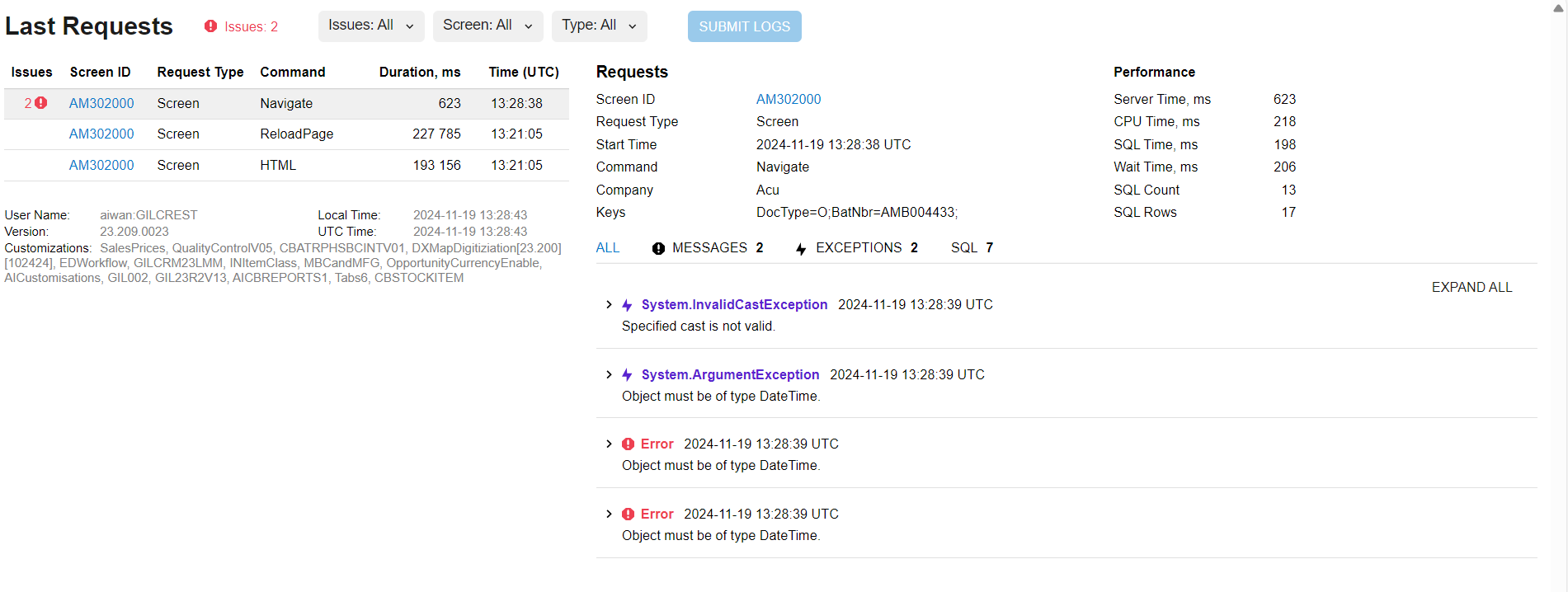
After I attempt redirection from here:
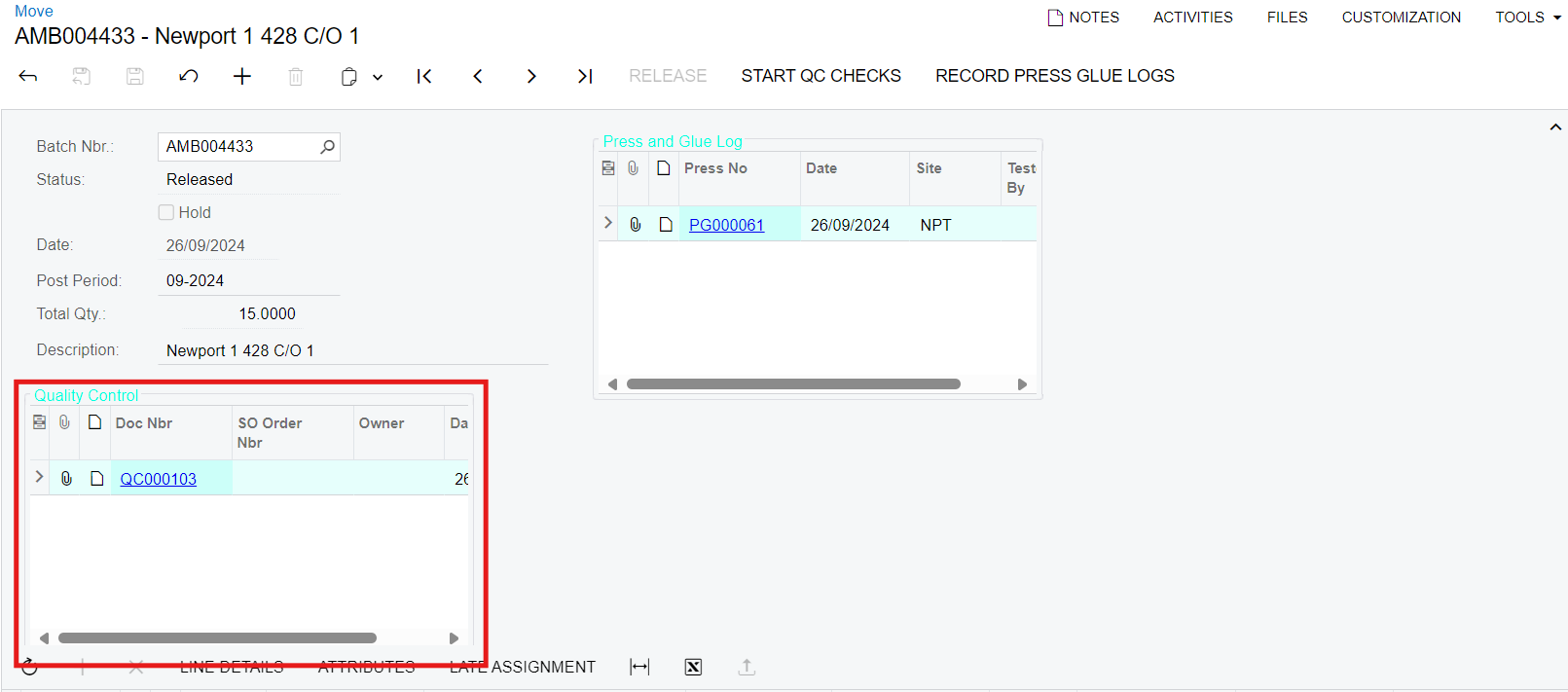
The ‘Press and Glue Log’ works fine…

My DAC key fields:

 #region DocNbr
public abstract class docNbr : BqlString.Field<docNbr> { }
[PXDBString(15, IsKey = true, IsUnicode = true)]
[AutoNumber(typeof(ISOSetup.autoNumberingQC),
typeof(GCQCRecord.date))]
[PXSelector(typeof(GCQCRecord.docNbr),
typeof(GCQCRecord.batchNbr),
typeof(GCQCRecord.date),
typeof(GCQCRecord.sOOrderNbr),
typeof(GCQCRecord.status),
ValidateValue = false)]
[PXUIField(DisplayName = "Doc Nbr", Enabled = false)]
public virtual string DocNbr
{
get;
set;
}
#endregion


#region BatchNbr
public abstract class batchNbr : BqlString.Field<batchNbr> { }
[PXDBString(15, IsKey = true, IsUnicode = true)]
[PXSelector(typeof(AMBatch.batNbr),
typeof(AMBatch.docType))]
[PXRestrictor(typeof(Where<AMBatch.docType.IsEqual<Messages.move>>), Messages.MoveNotFound, typeof(AMBatch.docType))]
[PXUIField(DisplayName = "Batch Nbr")]
public virtual string BatchNbr
{
get;
set;
}
#endregion

#region Date
public abstract class date : BqlDateTime.Field<date> { }
[PXDBDate(IsKey = true, UseSmallDateTime = true)]
[PXDefault(typeof(AccessInfo.businessDate), PersistingCheck = PXPersistingCheck.Nothing)]
[PXUIField(DisplayName = "Date")]
public virtual DateTime? Date
{
get;
set;
}
#endregion

My DB:
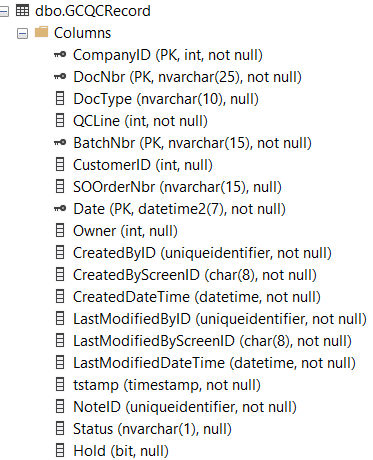
Has this happened to anyone/does anyone know how to fix this?


Aleks

Best answer by darylbowman

Unfortunately, this just gave me an object reference not set to an instance of an object error.

What did? I’m 99% sure that’s why you’re getting the errors in your trace.


...I know there is a way to link an action to a field, do you know what article talks about this?

https://stackoverflow.com/a/34190669/3718361

9 replies

darylbowman
Captain II
Forum|alt.badge.img+15

Your DAC specifies the Date field as a nullable object (DateTime?, [which is correct]) but your data table specifies ‘not null’


Forum|alt.badge.img+8
  • Author
  • Captain II
  • November 19, 2024

Thanks ​@darylbowman 


Unfortunately, this just gave me an object reference not set to an instance of an object error.


I already have this as a customisation live, I know there is a way to link an action to a field, do you know what article talks about this?


Aleks


darylbowman
Captain II
Forum|alt.badge.img+15
  • Answer
  • November 19, 2024

Unfortunately, this just gave me an object reference not set to an instance of an object error.

What did? I’m 99% sure that’s why you’re getting the errors in your trace.


...I know there is a way to link an action to a field, do you know what article talks about this?

https://stackoverflow.com/a/34190669/3718361


Forum|alt.badge.img+8
  • Author
  • Captain II
  • November 19, 2024

Forgot to mention, the object type must be DateTime error still occurs.


Forum|alt.badge.img+8
  • Author
  • Captain II
  • November 19, 2024

Changing from DateTime? to DateTime DAC declaration.


Thank you!


darylbowman
Captain II
Forum|alt.badge.img+15

I would change the SQL field to be nullable instead:

ALTER TABLE GCQCRecord ALTER COLUMN Date datetime2 null


Make sure to reload your customization script so it doesn’t erase your table next time you publish.


Forum|alt.badge.img+8
  • Author
  • Captain II
  • November 19, 2024

I was about to say i tried that but i tried changing the data type to datetime instead of datetime2 which is what it currently is.


I’ll try changing it to null and removing it from the PK.


Forum|alt.badge.img+8
  • Author
  • Captain II
  • November 19, 2024

And sorry if i wasnt clear enough, this issue isn’t happening on a live environment, only on my local while i have been testing the addition of those panels to the move screen.


Forum|alt.badge.img+8
  • Author
  • Captain II
  • November 20, 2024

I resorted to using the stack overflow post you shared ​@darylbowman and adding the link command to the field.