


Answer

Adding New Headers but Not Reaching Desired Outcome

  • October 11, 2023
  • 5 replies
  • 75 views

Forum|alt.badge.img+8

Hello all,


I hope you’re having a great day!


I have added a customisation to add some fields to our Business account screen so we can more easily identify top end users etc etc.


After publishing the customisation I have had an undesired effect where in the data fields aren’t displaying the same as they were in the customisation project editor, please see below for reference:
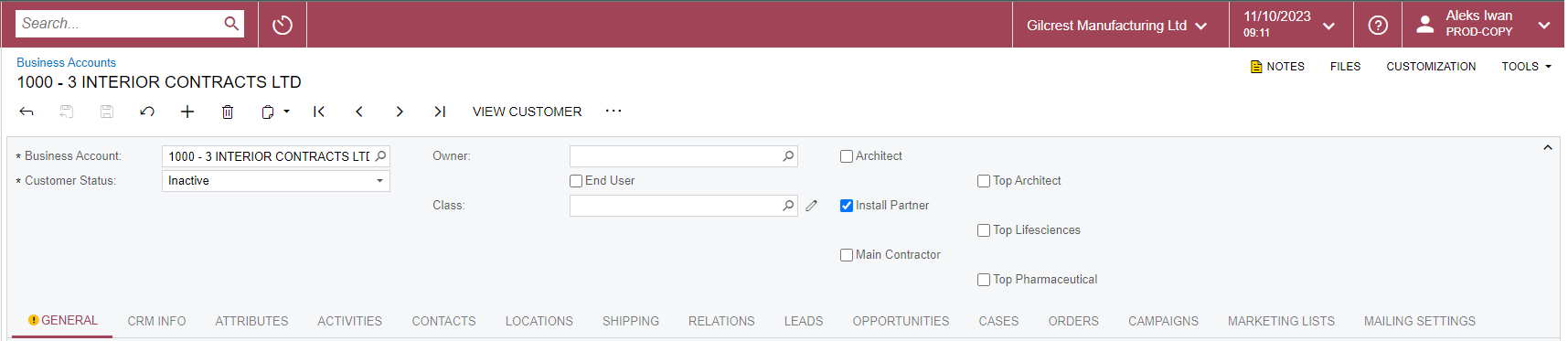
I have also put a photo of how it is laid out in the customisation project editor:
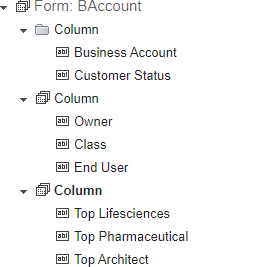
Not sure if the different icon for the first column means anything?


Any advice on this will be greatly appreciated!!


Many thanks in advance,


Aleks

Best answer by jinin

Hi @aiwan ,

I just added the aspx (Without creating fields) and checked. the UI looks good. Are the fields not included in your customization package?


5 replies

jinin
Pro I
Forum|alt.badge.img+11
  • Pro I
  • October 11, 2023

Hi @aiwan ,

Can you please share the aspx code for the header(form) section?


Forum|alt.badge.img+8
  • Author
  • Captain II
  • October 11, 2023

Hi @jinin

aspx code below:

<px:PXFormView ID="form" runat="server" Width="100%" Caption="Account Summary" DataMember="BAccount" DataSourceID="ds" NoteIndicator="True" LinkIndicator="True" BPEventsIndicator="True" FilesIndicator="True" DefaultControlID="edAcctCD"> <Template>

<px:PXSegmentMask ID="edAcctCD" runat="server" DataField="AcctCD" AutoRefresh="True" FilterByAllFields="True" ></px:PXSegmentMask>

<px:PXDropDown ID="edStatus" runat="server" DataField="Status" ></px:PXDropDown>

<px:PXLayoutRule runat="server" StartColumn="True" LabelsWidth="SM" ControlSize="XM" ></px:PXLayoutRule>

<px:PXSelector ID="OwnerID" runat="server" DataField="OwnerID" TextMode="Search" DisplayMode="Text" FilterByAllFields="True" AutoRefresh="True" ></px:PXSelector>

<px:PXSelector ID="ClassID" runat="server" CommitChanges="True" DataField="ClassID" AllowEdit="true" FilterByAllFields="True" TextMode="Search" DisplayMode="Hint" AutoRefresh="True" ></px:PXSelector>

<px:PXCheckBox runat="server" ID="CstPXCheckBox1" DataField="UsrEndUser" />

<px:PXLayoutRule runat="server" StartColumn="True" LabelsWidth="SM" ControlSize="XM" ></px:PXLayoutRule>

<px:PXCheckBox runat="server" ID="CstPXCheckBox3" DataField="UsrTopLifesciences" /> <px:PXCheckBox runat="server" ID="CstPXCheckBox4" DataField="UsrTopPharma" /> <px:PXCheckBox runat="server" ID="CstPXCheckBox2" DataField="UsrTopArchitect" /></Template> </px:PXFormView>.


Forum|alt.badge.img+8
  • Author
  • Captain II
  • October 11, 2023

I believe i have found the issue, I am not using the original customisation which added the bools Architect, Install Partner, and Main Contractor.


Could anyone please confirm whether this could be the root cause?


jinin
Pro I
Forum|alt.badge.img+11
  • Pro I
  • Answer
  • October 11, 2023

Hi @aiwan ,

I just added the aspx (Without creating fields) and checked. the UI looks good. Are the fields not included in your customization package?


Forum|alt.badge.img+8
  • Author
  • Captain II
  • October 16, 2023

hi @jinin ,


There were other fields on the screen which were customised and not on my customisation project therefore they were causing issues with placement.
