




I need to add a field to Business Accounts header. I've extended the view responsible. I am trying to add the field in my html extension file. According to the help(step 4), I should structure it like this:
<template>
  <field
    after="#fsItemDefaults-General [name='ItemType']"
    name="UsrRepairItem"
  ></field>
</template>
Here is the CR303000.ts file for BAccount header:
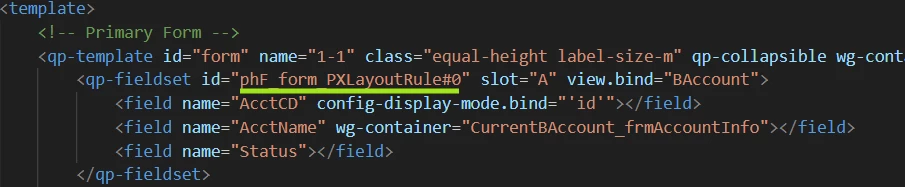
I would like to add my field after ‘Status’.
Here’s my attempt:
<template>
  <field // Here is my 'selector' statement
    after="#phF_form_PXLayoutRule#0 [name='Status']"
    name="XServices"
  ></field>
</template>
Attempting to build results in: SyntaxError: '#phF_form_PXLayoutRule#0 [name='Status']' is not a valid selector
I’m wondering if the ‘id’ containing ‘#’ (like the ‘selector’ statements starts with) is causing this error.

