Question

Adding files to learn how to add a tab

  • September 28, 2026
  • 8 replies
  • 32 views

Forum|alt.badge.img

I’m trying to add a new tab to the purchase order screen and add a placeholder fieldset that spans the entire width of the tab that someone can add user defined fields too.

Before I can begin to explore the typescript and html side of things I can’t even upload files from my computer to the customization after extending the Purchase Order screen. (The Files or Modern UI files I don’t see an upload widget)

I see the typescript and html from the purchase order screen am I supposed to edit that or upload my own?

The other forum threads I’ve seen show typescript samples but no instructions on how they got that far.


8 replies

Forum|alt.badge.img+8
  • Captain II
  • September 28, 2026

Do you have access to the Customization Projects screen (SM204505)?


Forum|alt.badge.img
  • Author
  • Freshman II
  • September 28, 2026

Yes I installed acumatica 2025r2 service pack 1 locally I’m a local admin, but my live server I don’t have filesystem access like I do locally.

On live I have the system administrator role. I’ve created simple customizations on pre-modern ui that added basic fields and tabs.


Forum|alt.badge.img+8
  • Captain II
  • September 28, 2026

So you’ll create a new customization project and that customization project will contain the MUI files. When you’re satisfied with the changes, export your customization project from your local environment, and bring it into your production environment. Then publish.

Now, I’ve grossly simplified the process but since you’ve created customizations before then the general process should be familiar to you.


Forum|alt.badge.img
  • Author
  • Freshman II
  • September 28, 2026

I see when I edit the typescript of the purchase order screen it created a (Modern Ui Files) entry with a path. The “Reload Original Html” button does not work for some reason.

It looks like it did a diff of my entry and created a new file. My Modern Ui Files still doesn’t have an upload widget. Even though I do have file system access locally I’m not sure where to place my files but this new one the system generated gives me a hint.

Do I even need typescript if I just want to add a tab with a placeholder/empty fieldset that I will use the screen configurator to add a user defined field too?


Forum|alt.badge.img+8
  • Captain II
  • September 28, 2026

​

In order for the customization project to see the files to be able to include them, they have to be in a specific folder. 

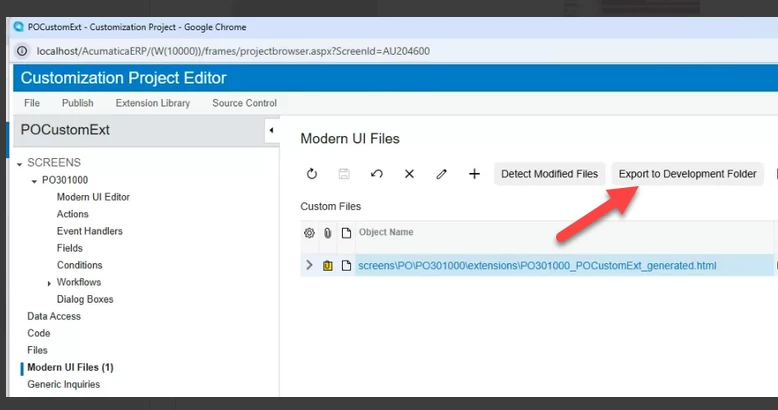
One quick way to locate that path is to click the “Export to Development Folder”.

Then look for the PO301000_POCustomExt_generated.html file under your local site folder. It will be something like:

C:\<wherever>\<your site>\<folder is>\FrontendSources\screen\src\development\screens

You’ll see a PO sub-folder and then PO301000 and then extensions. That extensions folder is where the .html file (and .ts file) will need to be.

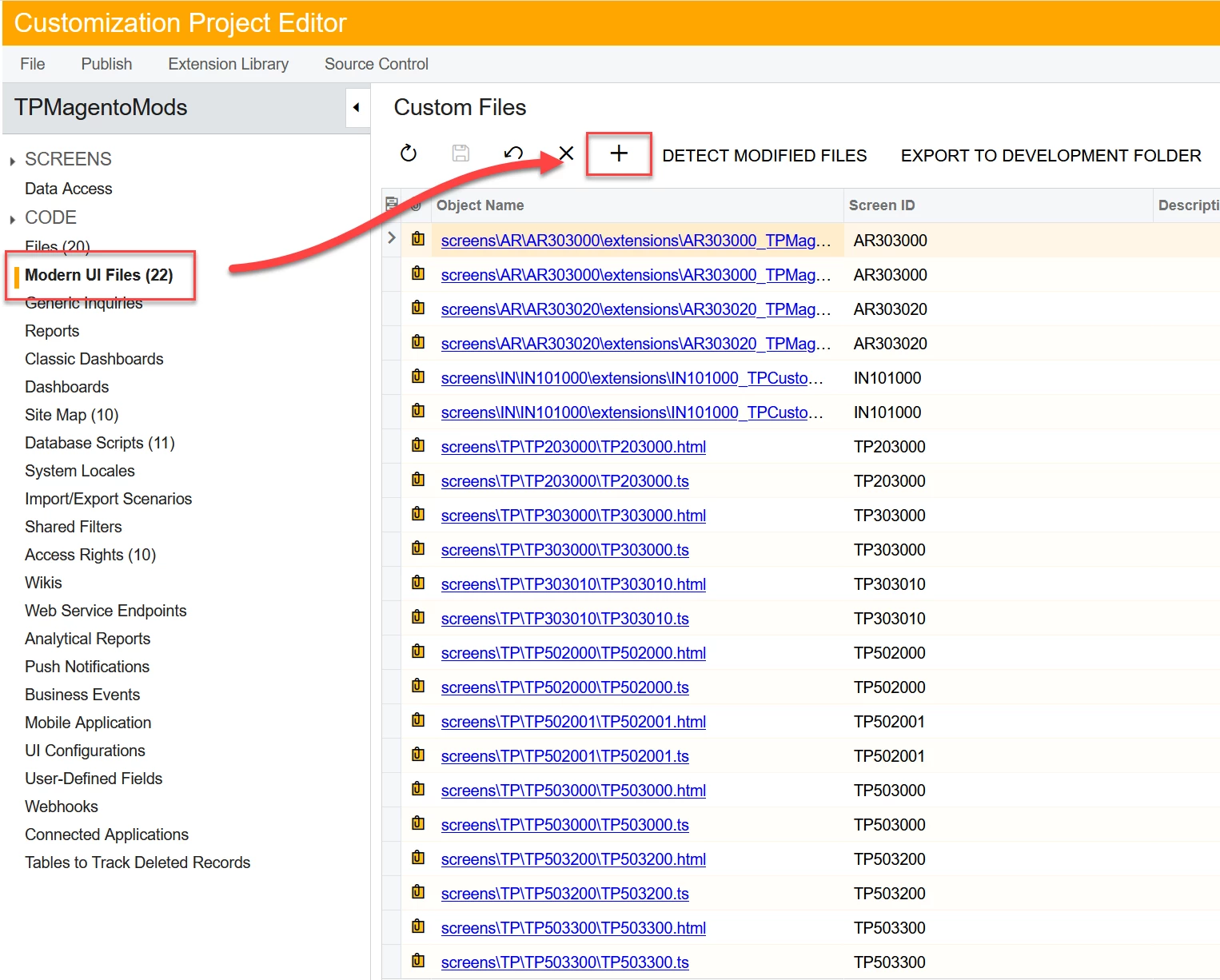
Files that you place in that folder will appear in the file listing when you click the ‘+’ button on the Modern UI Files screen, above.

If you want to restart your customization of the MUI because you’ve made an error, you can make a copy of the Modern UI Files and then delete them from the customization project. When you publish, you’ll got back to “default” and you can start again.

There are a few more steps involved if you need to do some trial and error with your .html changes (and .ts changes) that will allow you to avoid a full publish to see those changes.

​


Forum|alt.badge.img+8
  • Captain II
  • September 28, 2026

Do I even need typescript if I just want to add a tab with a placeholder/empty fieldset that I will use the screen configurator to add a user defined field too?


Yes.

And empty fieldsets will be ignored/not rendered, so just put something/anything in it.


Forum|alt.badge.img
  • Author
  • Freshman II
  • September 28, 2026

How is someone supposed to do this without a local install of acumatica or no access to their live/sandbox fileystem?

The steps I had to do for my custom tab in modern ui with a placeholder fieldset to add user defined fields was as follows.

Step 1) I needed the customization to auto generate the "Modern UI Files" so I added my html to Modern UI editor after extending the screen. If my html was bad I just deleted the customization and started over because the reload original html button didn't work.

Step 2) I needed the "Export to Development Folder" button to create the file in "C:\Program Files\Acumatica ERP\AcumaticaERP\FrontendSources\screen\src\customizationScreens\Company\screens\PO\PO301000\extensions"

Step 3) It wouldn't compile Install node

```
[2026-09-28 19:31:50.547] npm run build failed with output:

screen@0.1.0 build
cross-env node --max_old_space_size=6144 --optimize_for_size --stack_size=6144 --trace-warnings ./node_modules/webpack/bin/webpack -- --env production --env tenant=Company screenIds=PO301000

Publishing customization FAILED
```

I had to install node by adding "C:\Program Files\AcumaticaTools\NodeJS\node-v22.11.0-win-x64" to the System variables Path under sysdm.cpl

Step 4) It wouldn't compile install the modules

```
'cross-env' is not recognized as an internal or external command,
operable program or batch file.
```
Go up one directory and run the getmodules
C:\Program Files\Acumatica ERP\AcumaticaERP\FrontendSources>npm run getmodules

Step 5) After node and the modules installed finally run the compile command

C:\Program Files\Acumatica ERP\AcumaticaERP\FrontendSources\screen>npm run build-dev -- --env screenIds=PO301000

Step 6) After the node install getmodules and build Acumatica will finally let me publish my customization would be nice to get an error message like “HEY INSTALL NODE AND THE PACKAGES”

My final two files under (Modern UI Files) are below:

screens\PO\PO301000\extensions\PO301000_POCustomExt_generated.html
```
<template>
  <qp-tab id="tab-CustomExt" caption="Custom Ext" after="#tab-Other">
    <qp-fieldset id="fsUserFields-CustomExt" view.bind="Document" caption="Dates">
      <field name="OrderNbr" config-enabled.bind="false" show.bind="false"></field>
    </qp-fieldset>
  </qp-tab>
</template>
```

screens\PO\PO301000\extensions\PO301000_POCustomExt_generated.ts
```
import { PO301000 } from "src/screens/PO/PO301000/PO301000"

export interface PO301000_CustomExt extends PO301000 { }
export class PO301000_CustomExt { }
```

I had to add a field that is not bind and shown for my tab to actually display in the modern ui


Forum|alt.badge.img+8
  • Captain II
  • September 28, 2026

Unfortunately it’s not a 1-to-1 swap over to work with Modern UI like you’ve found. You can stay completely within the customization project editor but it’s just harder to do than using a local install. And it’s very easy to botch something and have to start over from scratch. I would hazard that all of us doing Modern UI stuff are doing it on a local dev environment so we can leverage UI with auto-complete and the ability to quickly test our changes

Having to do a full compile to test adding a simple field would not be a good use of your time and sanity. :)