Answer

adding custom field to selector column in SO

  • August 22, 2022
  • 14 replies
  • 1621 views

Forum|alt.badge.img

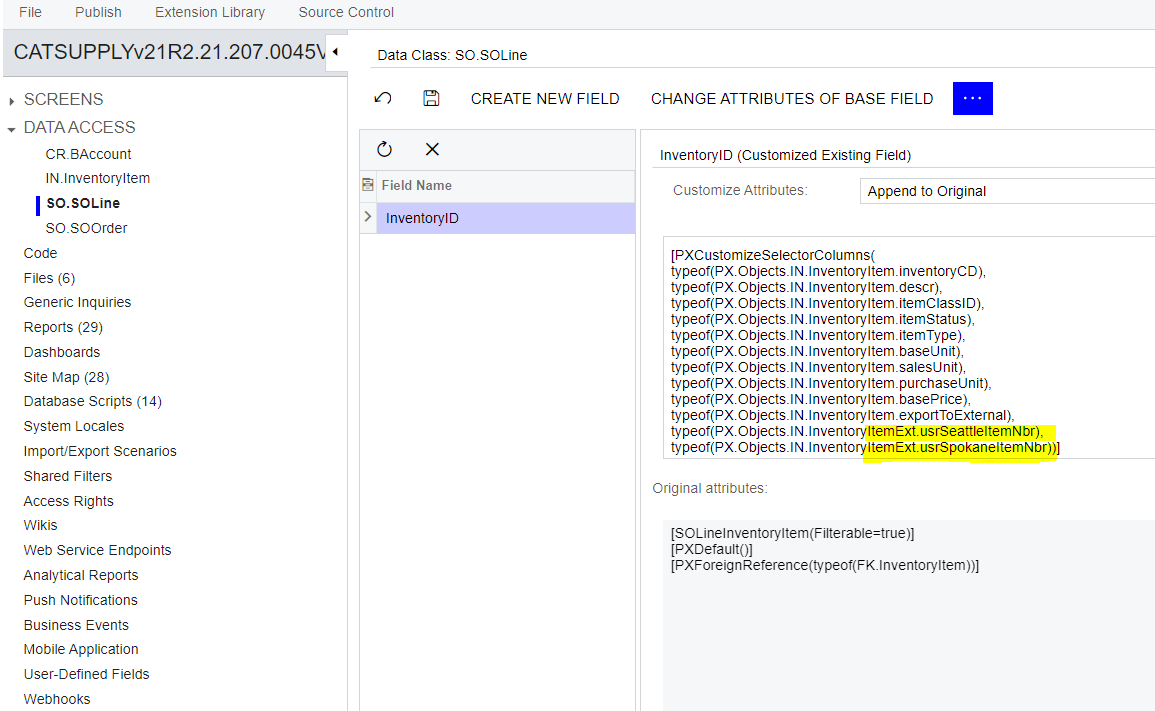
I am trying to add this field to the inventory lookup in SO.Line PX.Objects.IN.InventoryItem.usrSeattleItemNbr


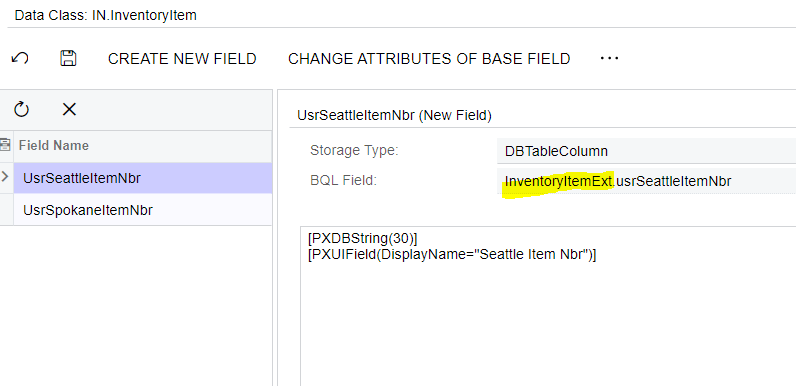
However, when I add the column the attribute adds the following path...note the EXT.

typeof(PX.Objects.IN.InventoryItemExt.usrSeattleItemNbr)


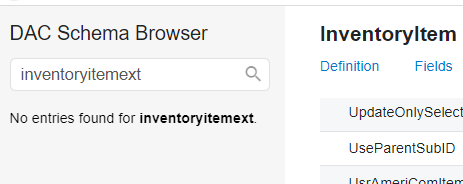
There is no InventoryItemExt

Selector column in SO Details does not show my added fields

If I edit the attribute to InventoryItem.usrSeattleItemNbr it fails validation.


Any ideas to troubleshoot would be appreciated...thanks.


Best answer by dgross54

FYI, turns out there is a conflict with the customization I was working in.  Something in that customization is preventing any changes to the selector.  I have development looking at it.  Sorry and thanks for the responses.  Can this thread be deleted?  I don’t want to confuse anyone else.

14 replies

Dioris Aguilar
Jr Varsity I
Forum|alt.badge.img+2

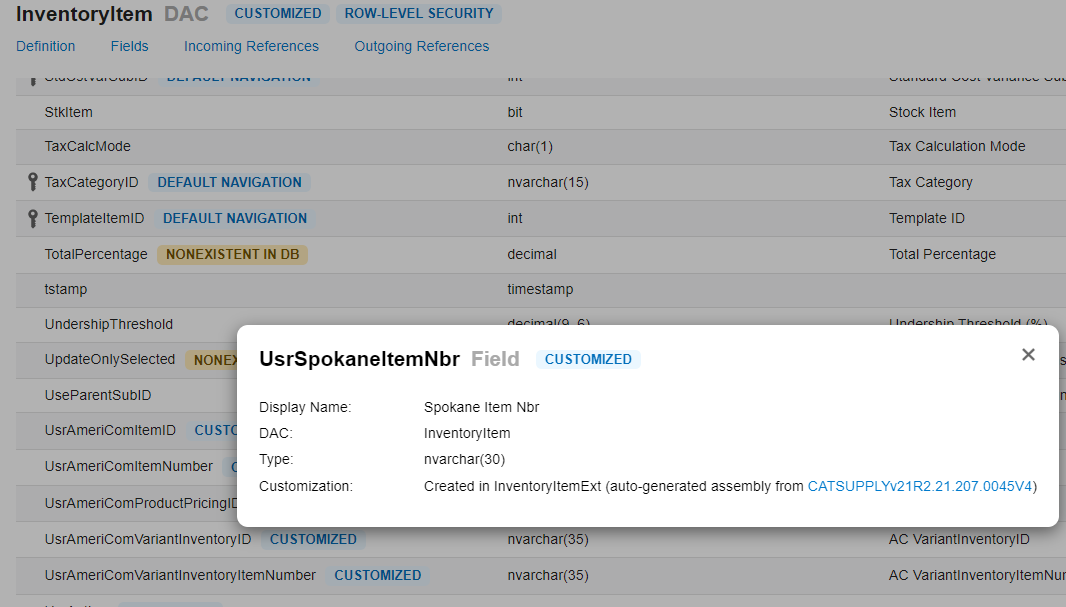
@dgross54 Could you share the definition of the custom field in InventoryItem DAC? 


Your approach should work.


Naveen Boga
Captain II
Forum|alt.badge.img+19
  • Captain II
  • August 22, 2022

Hi @dgross54  It seems you have not given the right extended DAC name, hence it is not populating.

As above requested, please share the code of the Inventory Extended DAC.


Here is the links for reference.

https://www.info-sourcing.com/how-to-add-fields-to-acumatica-selector-lookup-no-coding/


Forum|alt.badge.img
  • Author
  • Jr Varsity III
  • August 22, 2022

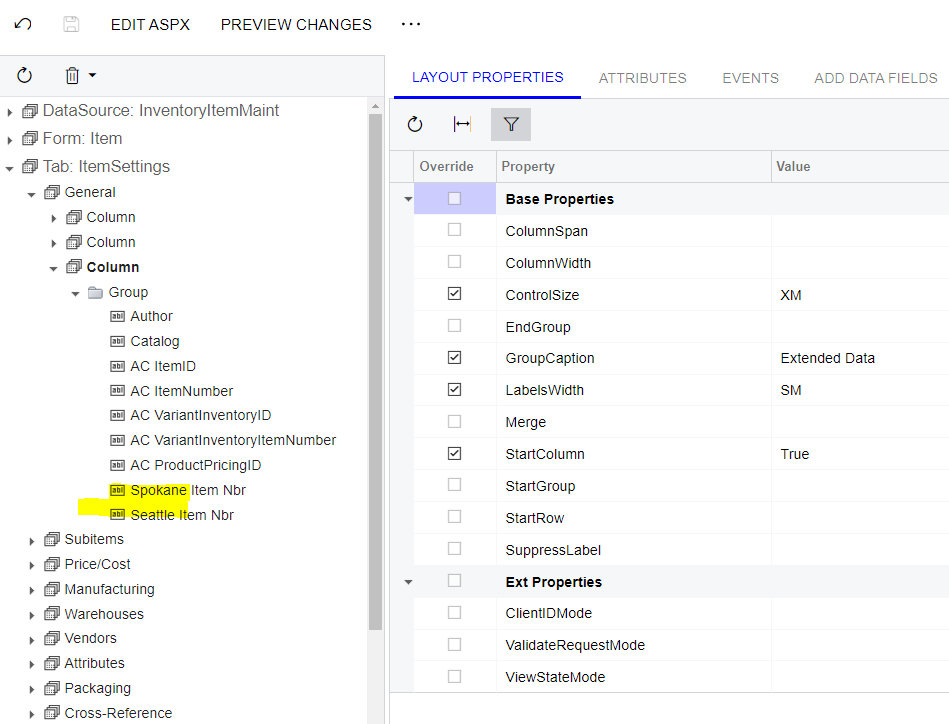
I am not sure where I would go to get the definitions you are referring to.  I wonder if my issue isn’t related to the fact that I had to borrow another customization project so I could add these fields to a group that already existed, and by doing so I added the fields in another data source?  


Naveen Boga
Captain II
Forum|alt.badge.img+19
  • Captain II
  • August 22, 2022

Hi, @dgross54  You might need to add these fields to your customization as part of the DAC Extension fields and then provide these fields in the CustomizeSelectorColumns instead of access from the different customization packages.

CustomizeSelectorColumns will not recognize the fields if they are part of another customization package.


Dioris Aguilar
Jr Varsity I
Forum|alt.badge.img+2

@dgross54 @Naveen Boga Another approach is to set an appropiate Level to the customization to access the fields from other projects and set the corresponding namespace name when calling the custom fields in the PXCustomizeSelectorColumns attribute. It’s probably the custom fields are not defined under PX.Objects.IN and that might explain why they are not found.


Forum|alt.badge.img
  • Author
  • Jr Varsity III
  • Answer
  • August 26, 2022

FYI, turns out there is a conflict with the customization I was working in.  Something in that customization is preventing any changes to the selector.  I have development looking at it.  Sorry and thanks for the responses.  Can this thread be deleted?  I don’t want to confuse anyone else.


Chris Hackett
Community Manager
Forum|alt.badge.img
  • Acumatica Community Manager
  • August 26, 2022

Hi @dgross54 - I'm glad you found the issue! We don't delete user content unless it goes against Terms and Conditions. It's OK to leave this post as you gave the explanation. Thank you!


Isharam
Freshman I
Forum|alt.badge.img
  • Freshman I
  • July 18, 2025

@Naveen Boga Hi Naveen,


we are working in Sales Quotes (CR304500), we need to add Warehouse and available qty to Inventory selector pop up. is there any guide that we can refer to?


thank you in advance!


DipakNilkanth
Pro III
Forum|alt.badge.img+13

Hi ​@Isharam,
It depends on your requirement.
If you need to display the default warehouse, you can add it directly from the Customization Editor by using the Edit Selector Columns option.

For the Available Quantity, you will need to fetch it into a custom field within the same DAC Extension. Once added, this custom field will appear under the Custom section in the selector configuration popup (as shown in the image). You can then select this custom field and display it in the Inventory Lookup.

Hope, it helps!


Isharam
Freshman I
Forum|alt.badge.img
  • Freshman I
  • July 18, 2025

Thank you ​@Nilkanth Dipak!

yes we are trying to add Warehouse and Available qty. also we understand that would duplicate inventory ID’s by each warehouse and we are fine with it. if you can share any guide that we can refer onto that would be great! 


Naveen Boga
Captain II
Forum|alt.badge.img+19
  • Captain II
  • July 18, 2025

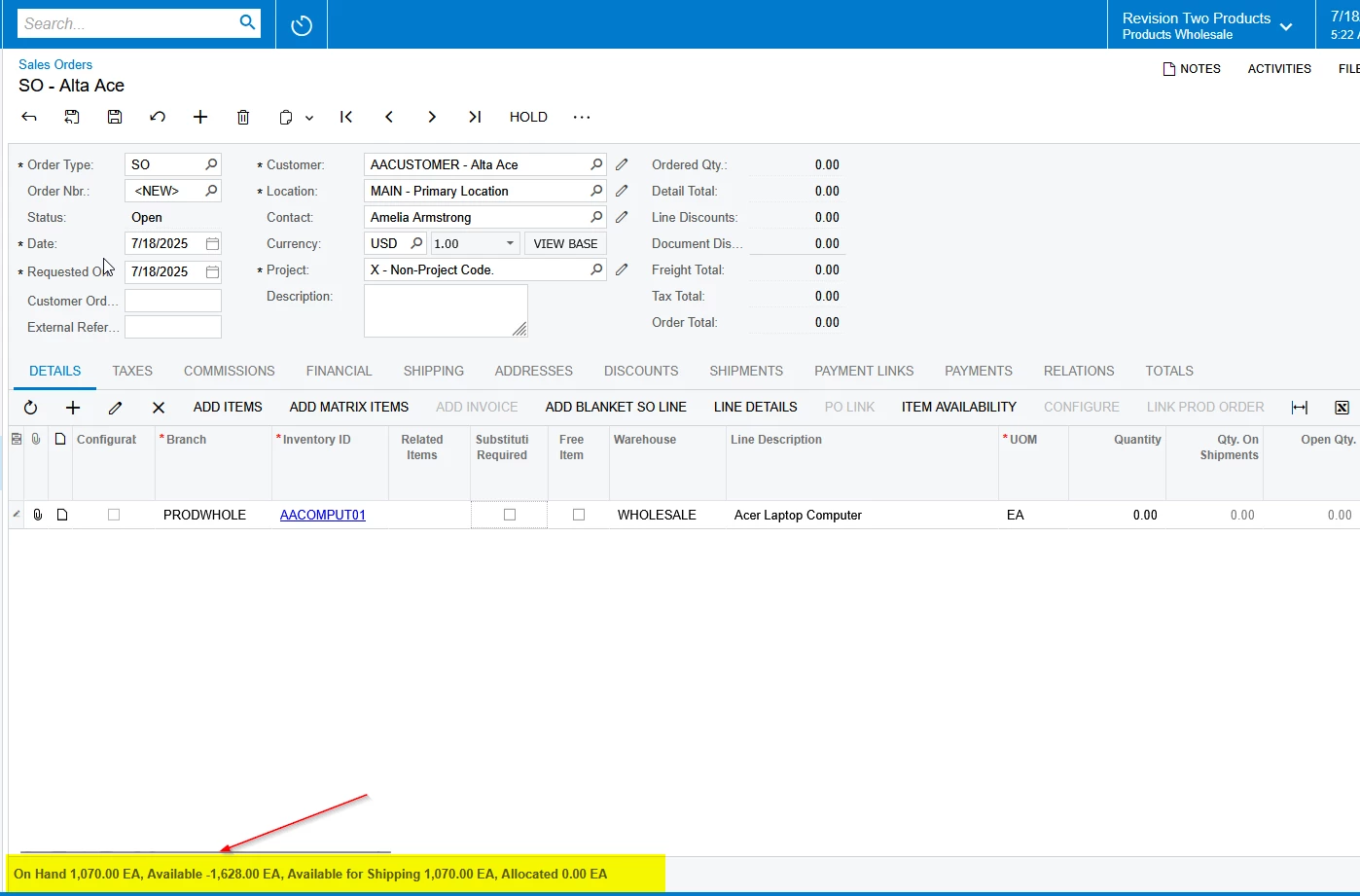
@Isharam  Instead of customizing the Inventory field selector, I recommend same as default Acumatica Sales Orders screen, where you can display the Qty Available, Qty OnHand, Qty Available for Shipping using the FieldSelecting event like below at footer level in the Sales Quotes screen.  Hope this helps!


Isharam
Freshman I
Forum|alt.badge.img
  • Freshman I
  • July 18, 2025

@Naveen Boga This is great. if you have any guide on this that would be great!


Naveen Boga
Captain II
Forum|alt.badge.img+19
  • Captain II
  • July 18, 2025

Isharam
Freshman I
Forum|alt.badge.img
  • Freshman I
  • July 21, 2025

Thank you Naveen! i tried following the process but I am getting errors on both DAC and graph extension. 

using PX.Data;
using PX.Objects.CR;
using System;

namespace PX.Objects.CR
{
    [Serializable]
    public class CROpportunityProductsExt : PXCacheExtension<CROpportunityProducts>
    {
        #region MyAvailability
        [PXString(IsUnicode = true)]
        [PXUIField(DisplayName = "Product Availability", Enabled = false)]
        public virtual string MyAvailability { get; set; }
        public abstract class myAvailability : PX.Data.BQL.BqlString.Field<myAvailability> { }
        #endregion
    }
}


and 

using PX.Data;
using PX.Objects.CR;
using PX.Objects.IN;
using PX.Objects.CS;
using System;

namespace PX.Objects.CR
{
    public class OpportunityMaint_Ext : PXGraphExtension<OpportunityMaint>
    {
        protected void _(Events.FieldSelecting<CROpportunityProducts, CROpportunityProductsExt.myAvailability> e)
        {
            var row = (CROpportunityProducts)e.Row;
            if (row == null || row.InventoryID == null)
            {
                e.ReturnValue = string.Empty;
                return;
            }

            var status = PXSelectGroupBy<
                INLocationStatus,
                Where<
                    INLocationStatus.inventoryID, Equal<Required<INLocationStatus.inventoryID>>,
                    And2<
                        Where<INLocationStatus.subItemID, Equal<Required<INLocationStatus.subItemID>>,
                            Or<Not<FeatureInstalled<FeaturesSet.subItem>>>>,
                        And<
                            Where<INLocationStatus.siteID, Equal<Required<INLocationStatus.siteID>>,
                            Or<Required<INLocationStatus.siteID>, IsNull>>>>>,
                Aggregate<
                    Sum<INLocationStatus.qtyOnHand>,
                    Sum<INLocationStatus.qtyAvail>>>
                .Select(Base, row.InventoryID, row.SubItemID, row.SiteID, row.SiteID);

            var location = (INLocationStatus)status;

            decimal? qtyOnHand = location?.QtyOnHand ?? 0;
            decimal? qtyAvail = location?.QtyAvail ?? 0;

            e.ReturnValue = $"On Hand: {qtyOnHand}, Available: {qtyAvail}";
        }
    }
}