Answer

Add Password Mask in Modern UI

  • March 5, 2025
  • 6 replies
  • 147 views

epetruncio
Jr Varsity II

I am trying to adjust a field so that the input is masked like a password field. I have it in my classic UI customization, but I am unable to find any resources for implementing this in the modern UI.

The field in question is a base field on an Acumatica page. The field is the “Header Value” field in the “Push Notifications” page SM302000. 

I have two questions:

The first is what and where do I add modifications to adjust this field to be masked as a password? Do I adjust the DAC definition for the modern UI, do I adjust the view definition of this field in an extension .ts file, and/or do I create an html extension field that modifies it?

The second question is what would that syntax look like? What specifically do I need to add to create the password masking?

I did try to look for examples within the provided Acumatica code, but was unable to find any examples.

Best answer by epetruncio

Hi ​@epetruncio were you able to find a solution? Thank you!

I have not, but I do not believe I will need to pursue this anyway. 

The first solution presented hashed the value in the DB. I did not want or need the value hashed. Instead, I needed the value stored in plain text because it was being used by an API for external validation to another server and there was no way for me to un-hash the value before sending. I just wanted to mask on the UI. 

I do not believe we are pursuing this route anymore anyway.

6 replies

Forum|alt.badge.img+7
  • Captain II
  • March 5, 2025

You can use the following attribute on the field:

[PXRSACryptString(512, IsUnicode = true)]


This community post has some more information on it.


epetruncio
Jr Varsity II
  • Author
  • Jr Varsity II
  • March 5, 2025

Thanks Django, that appears to have worked, and that was exactly what I was looking for.


epetruncio
Jr Varsity II
  • Author
  • Jr Varsity II
  • March 26, 2025

I need to re-open this query and unmark the original answer sadly. 

I did not realize in the linked topic that you posted that it states specifically that these values cannot be sent via API/Web Endpoints decrypted. The only thing I need is to hide the value on the UI. The value itself can be stored in the DB without encryption because we will need to fetch that value via API. The customer just does not want workers being able to see the value who also do not have access to the DB.

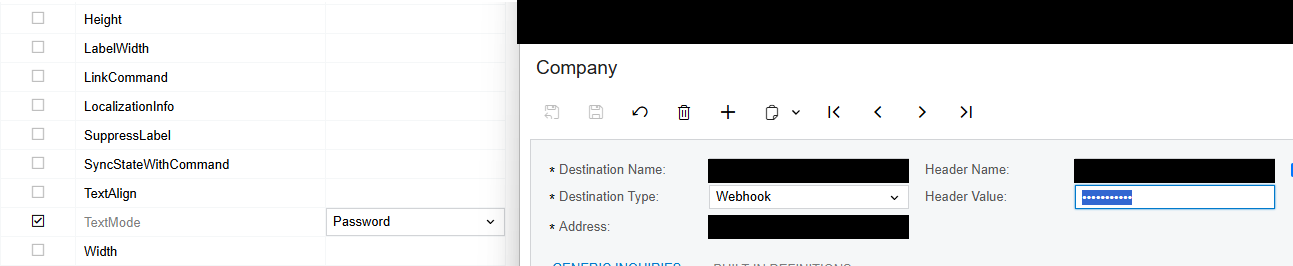
Is there a way to just hide the value in the UI only, again specifically for the modern UI, as I already have the solution for this in the classic UI?

To be clear, this is what I’m looking to do in the Modern UI:


Chris Hackett
Community Manager
Forum|alt.badge.img
  • Acumatica Community Manager
  • June 17, 2025

Hi ​@epetruncio were you able to find a solution? Thank you!


epetruncio
Jr Varsity II
  • Author
  • Jr Varsity II
  • Answer
  • June 18, 2025

Hi ​@epetruncio were you able to find a solution? Thank you!

I have not, but I do not believe I will need to pursue this anyway. 

The first solution presented hashed the value in the DB. I did not want or need the value hashed. Instead, I needed the value stored in plain text because it was being used by an API for external validation to another server and there was no way for me to un-hash the value before sending. I just wanted to mask on the UI. 

I do not believe we are pursuing this route anymore anyway.


  • Freshman I
  • September 24, 2025

Same question here, do you get any new solution about this?