Answer

Add Numbering Sequence to Custom CD Field in Custom Screen

  • November 14, 2025
  • 5 replies
  • 99 views

Forum|alt.badge.img+2

Hi I am trying to add numbering sequence logic to the below custom screen, but get Container ID cannot be empty error when trying to save the record.

 #region ContainerCD
[PXDBString(25, IsUnicode = true, IsKey = true,
InputMask = ">CCCCCCCCCCCCCCCCCCCCCCCCC")]
[PXDefault]
[PXSelector(typeof(MAINContainer.containerCD))]
[AutoNumber(typeof(Search<PX.Objects.CS.Numbering.numberingID,
Where<PX.Objects.CS.Numbering.numberingID, Equal<StringConstant_CONTAINERN>>>),
typeof(AccessInfo.businessDate))]
[PXUIField(DisplayName = "Container ID")]
public virtual string ContainerCD { get; set; }
public abstract class containerCD : PX.Data.BQL.BqlString.Field<containerCD> { }
#endregion
namespace CFInnova11112025
{
public class StringConstant_CONTAINERN : PX.Data.BQL.BqlString.Constant<StringConstant_CONTAINERN>
{
public StringConstant_CONTAINERN() : base("CONTAINERN") { }
}
}

Trace: Container ID cannot be empty

Can I please know what else is required here?

Thank you!

Best answer by Abhishek Niikam

Hi ​@TharidhiP ​@aleksandrsechin ​@Abhishek Niikam 

I tested the code functionality, and here's what I found:

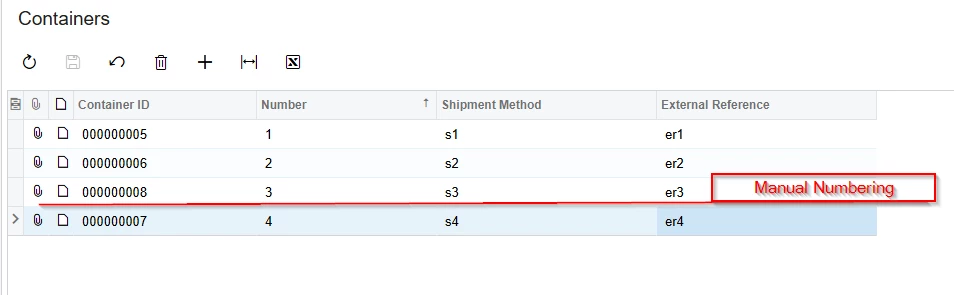
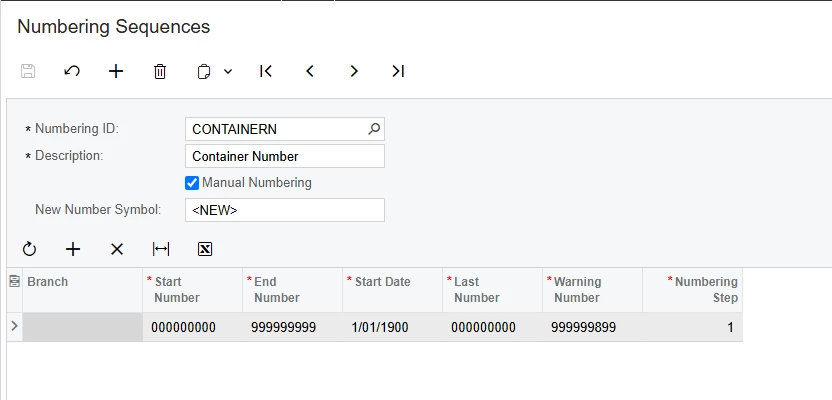
  1. If the "Manual Numbering" checkbox is checked in the Numbering Sequence settings screen, values in ContainerCD are not entered automatically, but the field allows manual entry, and the record saves successfully.
  2. If the "Manual Numbering" checkbox is not checked in the Numbering Sequence settings screen, values in ContainerCD are entered automatically, and the record saves successfully.
  3. The property ValidateValue = false in the PXSelector attribute has no effect on saving the record or generating errors.

Yes, that’s why I suggest you to Uncheck the Manual Numbering. because in number sequence we usually prefer that numbers sequence will generate automatically as per settings (you can check it as per need).

I hope ​its clear & gets the idea to handle it.

5 replies

Forum|alt.badge.img+3

I guess the issue is in the PXSelector attribute.
Try commenting it out, or at least add the property ValidateValue = false and test again.


Forum|alt.badge.img+2

Hello ​@TharidhiP 
Try with “Uncheck - Manual Numbering Checkbox” - > clear cache & test.
If any confusion visit posts :

Post 1
Post 2

OR post further details here.

I hope it helps!


Forum|alt.badge.img+1

Hi ​@TharidhiP ​@aleksandrsechin ​@Abhishek Niikam 

I tested the code functionality, and here's what I found:

  1. If the "Manual Numbering" checkbox is checked in the Numbering Sequence settings screen, values in ContainerCD are not entered automatically, but the field allows manual entry, and the record saves successfully.
  2. If the "Manual Numbering" checkbox is not checked in the Numbering Sequence settings screen, values in ContainerCD are entered automatically, and the record saves successfully.
  3. The property ValidateValue = false in the PXSelector attribute has no effect on saving the record or generating errors.


Forum|alt.badge.img+2
  • Jr Varsity II
  • Answer
  • November 17, 2025

Hi ​@TharidhiP ​@aleksandrsechin ​@Abhishek Niikam 

I tested the code functionality, and here's what I found:

  1. If the "Manual Numbering" checkbox is checked in the Numbering Sequence settings screen, values in ContainerCD are not entered automatically, but the field allows manual entry, and the record saves successfully.
  2. If the "Manual Numbering" checkbox is not checked in the Numbering Sequence settings screen, values in ContainerCD are entered automatically, and the record saves successfully.
  3. The property ValidateValue = false in the PXSelector attribute has no effect on saving the record or generating errors.

Yes, that’s why I suggest you to Uncheck the Manual Numbering. because in number sequence we usually prefer that numbers sequence will generate automatically as per settings (you can check it as per need).

I hope ​its clear & gets the idea to handle it.


Forum|alt.badge.img+2
  • Author
  • Pro III
  • November 19, 2025

Thank you everyone for the suggestions, I unchecked manual numbering and it worked!