

Answer

Add new button to Vendor screen

  • February 27, 2025
  • 2 replies
  • 57 views

Forum|alt.badge.img

In my acumatica customisation project . I want to add a new button in Vendor edit screen . I added the below code in graph .

namespace TestcustomPlugin
{
    public class VendorMaint_Extension : PXGraphExtension<VendorMaint>
    {
        public static bool IsActive() => true;

        public PXAction<Vendor> TestBtnCheck;
        [PXButton]
        [PXUIField(DisplayName = "Test Check")]
        protected virtual IEnumerable testBtnCheck(PXAdapter adapter)
        {
            return adapter.Get();
        }

        public delegate void PersistDelegate();
        [PXOverride]
        public void Persist(PersistDelegate baseMethod)
        {
            baseMethod();
           throw new PXException("Saved!".ToString());
        }
    }
}
but after publish the button is not visible there . But when i added the button same way to customer screen it came there and worked . Why ?
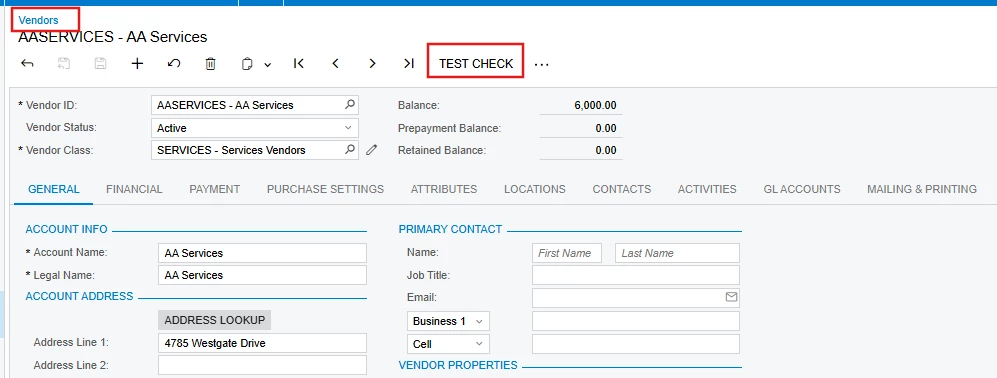

Best answer by DipakNilkanth

Hi ​@PraveenBeo,

Try to replace your DAC from Vendor to VendorR.

  •  public PXAction<VendorR> TestBtnCheck;
namespace TestcustomPlugin
{
public class VendorMaint_Extension : PXGraphExtension<VendorMaint>
{
public static bool IsActive() => true;

public PXAction<VendorR> TestBtnCheck;
[PXButton]
[PXUIField(DisplayName = "Test Check")]
protected virtual IEnumerable testBtnCheck(PXAdapter adapter)
{
return adapter.Get();
}

public delegate void PersistDelegate();
[PXOverride]
public void Persist(PersistDelegate baseMethod)
{
baseMethod();
throw new PXException("Saved!".ToString());
}
}
}
Output


Hope, it helps!

2 replies

DipakNilkanth
Pro III
Forum|alt.badge.img+13
  • Pro III
  • Answer
  • February 27, 2025

Hi ​@PraveenBeo,

Try to replace your DAC from Vendor to VendorR.

  •  public PXAction<VendorR> TestBtnCheck;
namespace TestcustomPlugin
{
public class VendorMaint_Extension : PXGraphExtension<VendorMaint>
{
public static bool IsActive() => true;

public PXAction<VendorR> TestBtnCheck;
[PXButton]
[PXUIField(DisplayName = "Test Check")]
protected virtual IEnumerable testBtnCheck(PXAdapter adapter)
{
return adapter.Get();
}

public delegate void PersistDelegate();
[PXOverride]
public void Persist(PersistDelegate baseMethod)
{
baseMethod();
throw new PXException("Saved!".ToString());
}
}
}
Output


Hope, it helps!


Forum|alt.badge.img
  • Author
  • Jr Varsity II
  • February 27, 2025

Hi ​@PraveenBeo,

Try to replace your DAC from Vendor to VendorR.

  •  public PXAction<VendorR> TestBtnCheck;
namespace TestcustomPlugin
{
public class VendorMaint_Extension : PXGraphExtension<VendorMaint>
{
public static bool IsActive() => true;

public PXAction<VendorR> TestBtnCheck;
[PXButton]
[PXUIField(DisplayName = "Test Check")]
protected virtual IEnumerable testBtnCheck(PXAdapter adapter)
{
return adapter.Get();
}

public delegate void PersistDelegate();
[PXOverride]
public void Persist(PersistDelegate baseMethod)
{
baseMethod();
throw new PXException("Saved!".ToString());
}
}
}


Hope, it helps!

This Worked . Thank you .!
