Question

Add department entity to Purchase Order Approval workflow

  • March 13, 2026
  • 5 replies
  • 33 views

I am creating a purchase order approval workflow for a client. They previously used Purchase Requests with an approval workflow and are wanting to replace this with Purchase Order approvals.

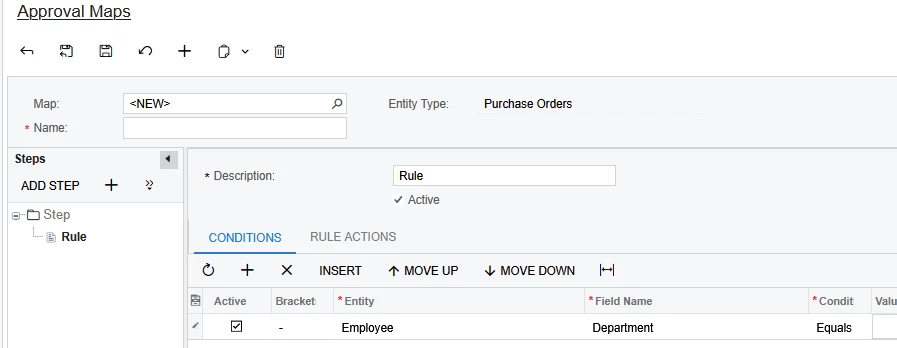
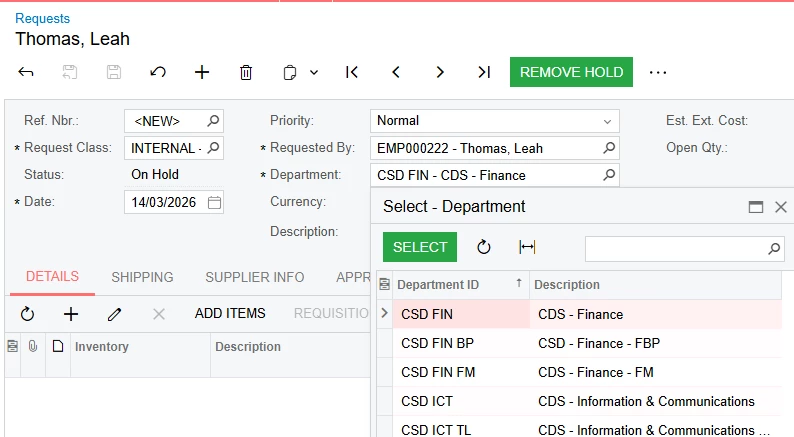
Their Request Approval Workflow conditions are based off Department and $ amount. 

 

Currently it is not possible to setup Purchase Order workflows in the same way, as the Department Entity is not available.
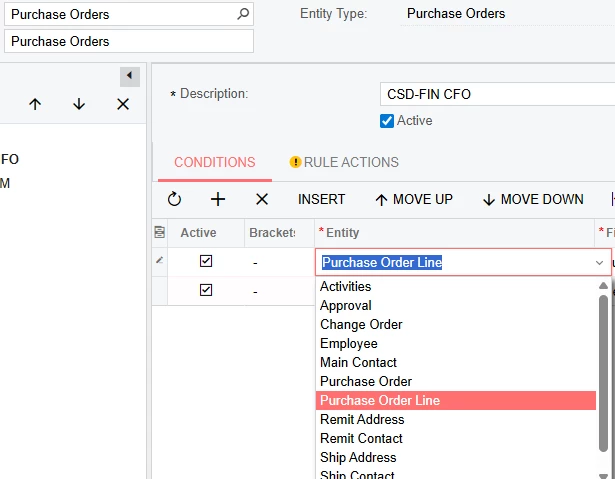
Can we add the department field to the Purchase Order header and add the department entity to the Purchase Order workflow?

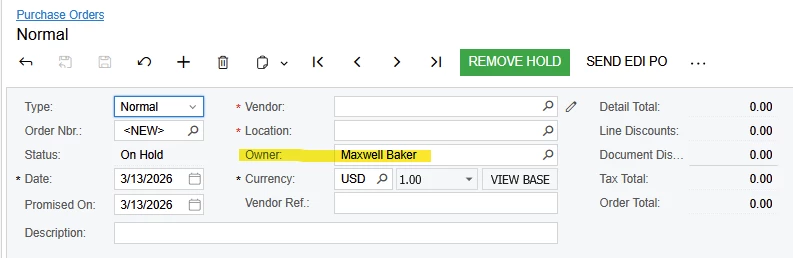
Additionally we would probably get the Purchase Order department field to default to the PO Owner (employee’s) department but they could select any department, as it will not always be the same department as the user who is creating the PO.

Has anyone implemented a customisation like this before?

5 replies

Forum|alt.badge.img+9
  • Captain II
  • March 13, 2026

@Leahth 


Could you not use Employee.DepartmentID instead? 


Alternatively, add a data view for the Department as is in RQRequestEntry:

[PXViewName(RQ.Messages.Department)]
public PXSetup<EPDepartment, Where<EPDepartment.departmentID, Equal<Optional<RQRequest.departmentID>>>> depa;

For the new field, you would add it as normal (through Screen Editor or code) and add the PXDefault as so:

[PXDefault(typeof(EPEmployee.DepartmentID))]

//Or with FieldUpdated on PO Owner (OwnerID)

protected virtual void _(Events.FieldUpdated<POOrder, POOrder.OwnerID> e, PXFieldUpdated b)
{
b?.Invoke(e.Cache, e.Args);
POOrder row = e.Row;
if (row == null)
return;

if (row.OwnerID == null)
return;

EPEmployee employee = SelectFrom<EPEmployee>.
Where<EPEmployee.defContactID.IsEqual<P.AsInt>>.View.Select(Base, row.OwnerID);
if (employee == null)
return;

e.Cache.SetValueExt<YourPOOrderExt.usrDepartmentID>(row, employee.DepartmentID);
}


Laura03
Captain II
Forum|alt.badge.img+20
  • Captain II
  • March 13, 2026

Hello,

I agree with Aleks:  I have routed many POs for approval using Entity = Employee and Field Name = Department. 

In Configurations, Employees… Departments will need to be accurate on Employees, for the above routing to work. (I have also used Subaccount to route PO’s by line to Department heads, when Subaccounts represent Departments of a Company.)

Also, Each PO will need accurate Owners representing the persons who requested the items, not the person who types in the Purchase Orders:


  • Author
  • Freshman II
  • March 13, 2026

Hello,

I agree with Aleks:  I have routed many POs for approval using Entity = Employee and Field Name = Department. 

In Configurations, Employees… Departments will need to be accurate on Employees, for the above routing to work. (I have also used Subaccount to route PO’s by line to Department heads, when Subaccounts represent Departments of a Company.)

Also, Each PO will need accurate Owners representing the persons who requested the items, not the person who types in the Purchase Orders:


Apologies I should have included the detail that we already explored employee / department but the issue is that sometimes a user creates POs for various departments that are not their own


  • Author
  • Freshman II
  • March 13, 2026

@Leahth 


Could you not use Employee.DepartmentID instead? 


Alternatively, add a data view for the Department as is in RQRequestEntry:

[PXViewName(RQ.Messages.Department)]
public PXSetup<EPDepartment, Where<EPDepartment.departmentID, Equal<Optional<RQRequest.departmentID>>>> depa;

For the new field, you would add it as normal (through Screen Editor or code) and add the PXDefault as so:

[PXDefault(typeof(EPEmployee.DepartmentID))]

//Or with FieldUpdated on PO Owner (OwnerID)

protected virtual void _(Events.FieldUpdated<POOrder, POOrder.OwnerID> e, PXFieldUpdated b)
{
b?.Invoke(e.Cache, e.Args);
POOrder row = e.Row;
if (row == null)
return;

if (row.OwnerID == null)
return;

EPEmployee employee = SelectFrom<EPEmployee>.
Where<EPEmployee.defContactID.IsEqual<P.AsInt>>.View.Select(Base, row.OwnerID);
if (employee == null)
return;

e.Cache.SetValueExt<YourPOOrderExt.usrDepartmentID>(row, employee.DepartmentID);
}


Thank you. Can you see a way for this to work where a user can select a different department from their own?

We are thinking for it to default to the employee’s own department but they can select a different one, as sometimes a employee creates POs on behalf of other departments.

We would want the same option on a purchase order as currently on requests:


Laura03
Captain II
Forum|alt.badge.img+20
  • Captain II
  • March 16, 2026

Hello,

Employee who enters POs may simply enter the  Owner for the PO  = person who is requesting the merchandise, or person in the Department who is requesting the merchandise. 

Then routing POs will work without effort or customization.

Laura