

Answer

Add Custom Location fields to AR303020 (Customer Locations)

  • November 4, 2025
  • 10 replies
  • 123 views

I’m trying to update a customization for Modern UI. I’ve done the same on several other screens without problem, but can’t seem to make Customer Locations work.

I’m getting the dreaded “cannot be bound to a FieldState.” but the fields are in the DAC Extension. They show up fine in GIs (which is generally my test.)

Can  anyone see what I’m doing wrong?

TS File:

import { PXFieldState, PXFieldOptions, createCollection, PXView, gridConfig, GridPreset  } from "client-controls";

import { Location } from "../AR303020";

export interface LocationExtTest extends Location {}

export class LocationExtTest {

    UsrTEKServiceTradeSend: PXFieldState;

    UsrTEKServiceTradeManualID: PXFieldState<PXFieldOptions.CommitChanges>;

    UsrTEKServiceTradeID: PXFieldState;


}

HTML File:

<template>

    <qp-tab after="#tabGeneral" id="tab-STInfo" caption="ServiceTrade"  load-on-demand="true">

        <qp-template id="formSTGeneral" name="1-1" class="label-size-m">

            <div slot="A">

                <qp-fieldset id="STTesting3" view.bind="Location" caption="ID #s">

                    <field name="UsrTEKServiceTradeID"></field>

                </qp-fieldset>

            </div>

            <div slot="B">

            </div>

        </qp-template>

    </qp-tab>

</template>

DAC

public sealed class LocationTEKServiceTradeExt : PXCacheExtension<Location>

  {

        public static bool IsActive()

        {

            return true; 

        }

        #region UsrTEKServiceTradeID

        [PXDBString(25)]

        [PXUIField(DisplayName="ServiceTrade ID")]

        public string UsrTEKServiceTradeID { get; set; }

        public abstract class usrTEKServiceTradeID : PX.Data.BQL.BqlString.Field<usrTEKServiceTradeID> { }

        #endregion

}
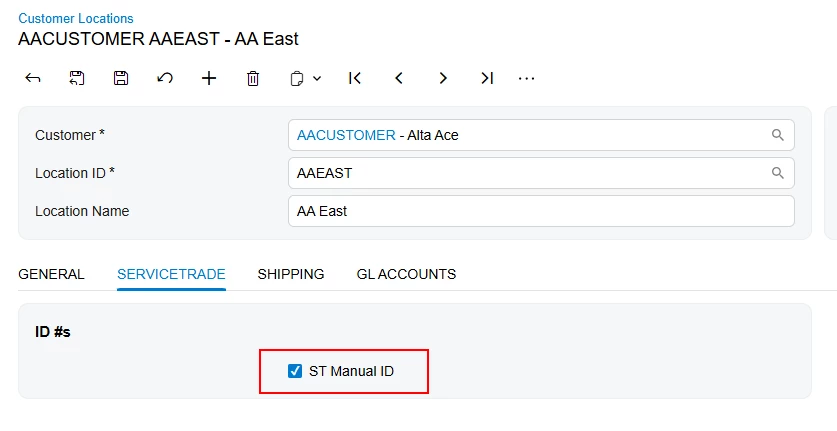


Best answer by aleksandrsechin

It seems that everything should be fine with your code. I’ve tried the same setup, and it works on my instance (I only changed the import path for Location, but I don’t think that’s the actual issue).

I’ve faced a similar problem before. I assume you’re building the screens from the terminal using commands.

Try the following steps to resolve the issue:

1. Update your .ts file to specify the most appropriate path to Location as follows:
import { Location } from "src/screens/AR/AR303020/AR303020";

2. Place your .ts and .html files under the path:
FrontendSources\screen\src\development\screens\AR\AR303020\extensions

3. Add these files to the Customization Project under the Modern UI Files node. You may also need to remove them from the FrontendSources\screen\src\screens\AR\AR303020\extensions path to avoid conflicts during publishing.

4. Publish your Customization Project.

Let me know if this helps or if the issue still persists.


10 replies

Vignesh Ponnusamy
Acumatica Moderator
Forum|alt.badge.img+5

Hi ​@travisk91,

A quick question, I don’t see the DAC definition for the fields UsrTEKServiceTradeSend and UsrTEKServiceTradeManualID. Did you remove those fields from the TypeScript extension to see if that fixes the issue? 


  • Author
  • Freshman I
  • November 4, 2025

There are actually bunch of fields that I didn’t include in the DAC. I tried to strip everything down to the minimum for ease of troubleshooting. Seems like there are views for Location and LocationCurrent and I’m not quite sure why the graph is setup like that. I’ve tried all combinations that make sense (and a few that probably don’t) and I can’t get this form to work. I feel like I’m missing something obvious.

I updated the typescript to look like below, exact same results:

import { PXFieldState, PXFieldOptions, createCollection, PXView, gridConfig, GridPreset  } from "client-controls";

import { Location } from "../AR303020";

export interface LocationExtTest extends Location {}

export class LocationExtTest {

    UsrTEKServiceTradeID: PXFieldState;


}

For what it’s worth, those look like this in the DAC Extension (UsrTEKServiceTradeManualID is a non-db field):

        #region UsrTEKServiceTradeManualID

        [PXBool]

        [PXUIField(DisplayName = "ST Manual ID")]

        public bool? UsrTEKServiceTradeManualID { get; set; }

        public abstract class usrTEKServiceTradeManualID : PX.Data.BQL.BqlBool.Field<usrTEKServiceTradeManualID> { }

        #endregion

        #region UsrTEKServiceTradeSend

        [PXDBBool]

        [PXUIField(DisplayName = "Send to ST")]

        public bool? UsrTEKServiceTradeSend { get; set; }

        public abstract class usrTEKServiceTradeSend : PX.Data.BQL.BqlBool.Field<usrTEKServiceTradeSend> { }

        #endregion


Forum|alt.badge.img+3

It seems that everything should be fine with your code. I’ve tried the same setup, and it works on my instance (I only changed the import path for Location, but I don’t think that’s the actual issue).

I’ve faced a similar problem before. I assume you’re building the screens from the terminal using commands.

Try the following steps to resolve the issue:

1. Update your .ts file to specify the most appropriate path to Location as follows:
import { Location } from "src/screens/AR/AR303020/AR303020";

2. Place your .ts and .html files under the path:
FrontendSources\screen\src\development\screens\AR\AR303020\extensions

3. Add these files to the Customization Project under the Modern UI Files node. You may also need to remove them from the FrontendSources\screen\src\screens\AR\AR303020\extensions path to avoid conflicts during publishing.

4. Publish your Customization Project.

Let me know if this helps or if the issue still persists.


  • Author
  • Freshman I
  • November 5, 2025

TL;DR; Works now. Updating, moving and publishing seems to be the fix.

I tried just changing the path and then compiling, same results.

Moved the file to the “development” path, imported to customization, published and it works perfectly. Is there some issue with my development setup that is causing that? I searched and I don’t have that extension anywhere else in the entire instance path.

Thoughts on why that might be happening?

Thanks for the assist!


Forum|alt.badge.img+3

I haven’t found any specific information about this issue — only the note:
“When you build the generated files, make sure they are located in the src/screens folder. The files that were generated in the development folder are ignored.”
So, if you build screens from the terminal, you need to place them here:
FrontendSources\screen\src\screens
And if you want to include them in a customization, place them here instead:
FrontendSources\screen\src\development\screens

I also tried performing the Troubleshooting the Modern UI steps, but in my case, nothing helped. 

What helped me was either reinstalling the instance or building the screens through publishing the customization.


Vignesh Ponnusamy
Acumatica Moderator
Forum|alt.badge.img+5

Hi ​@aleksandrsechin ​@travisk91,

To build ModernUI files from the development folder you need use customFolder=development parameter in the build command. Below is an example of the command and it should be run from the FrontendSources/screen folder,

npm run build-dev --- --env screenids=PO301000 customFolder=development

Ideally, you shouldn’t have the any ModernUI files publish through the customization project editor.

To build/test and package the ModernUI files you can try the following approach,

  • For development purpose, you can create extension in the development folder and use the above command to build and test the changes
  • As you complete the development, you can add these files to the customization and publish from there

Ofcourse, you can also make changes directly from the customization project editore and publish. Hope that help! Feel free to post if you have any questions. 


Forum|alt.badge.img+3

Thank you! This is a really useful parameter — just what I was missing.


  • Author
  • Freshman I
  • November 5, 2025

Thank you Vignesh for that extra context! 

That said, when I add customFolder=development I get this error “Task never defined customFolder=development.


Thoughts?


Vignesh Ponnusamy
Acumatica Moderator
Forum|alt.badge.img+5

Hi ​@travisk91,

Are you using 25R2? As far as I remember, its applicable from 25R2 onwards. Also, are you executing the command from  FrontendSources/screen and not from FrontendSources folder?


Forum|alt.badge.img+3

I’ve tried it and can confirm that the “Task never defined...” error appears when the command is executed from the FrontendSources folder, which is incorrect.

It works perfectly when run from FrontendSources/screen.

So, ​@travisk91 , you probably just need to switch to the FrontendSources/screen folder, as ​@Vignesh Ponnusamy  mentioned above.


