

Answer

Add Custom Button in Move (AM302000) Screen

  • October 4, 2024
  • 2 replies
  • 60 views

Forum|alt.badge.img+2

Hi All,

I am trying to add a custom button in the Move screen called “Print Label” in the highlighted section where on pressing it runs the report Move Serial Number Layout (MAIN6501) for the given line details generated.
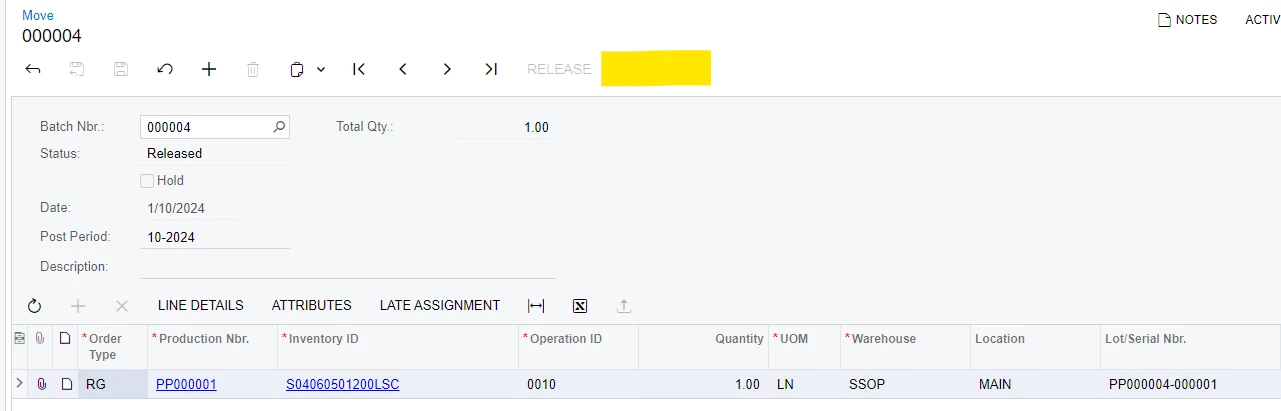
I have written this action but it’s giving me errors. Basically the line details Production Number, Inventory ID and the Lot/ Serial number are the parameters required to run the report.

using PX.Data;
using PX.Objects.CS;
using PX.Objects.AM.Attributes;
using System;
using System.Collections.Generic;
using PX.Objects;
using PX.Objects.AM;
using PX.Objects.IN;

namespace PX.Objects.AM
{
public class MoveEntry_Extension : PXGraphExtension<PX.Objects.AM.MoveEntry>
{
#region Event Handlers

public PXAction<AMBatch> ReportSerialNumberLayout;
[PXButton(CommitChanges = true)]
[PXUIField(DisplayName = "Print Label", MapEnableRights = PXCacheRights.Select, MapViewRights = PXCacheRights.Select)]
protected void reportSerialNumberLayout()
{
var currentMove = Base.BatchRecords.Current;
if (currentMove != null)
{
// Open the report and pass parameters
var reportParameters = new Dictionary<string, string>
{
["ProductionNbr"] = currentMove.ProdOrdID,
["InventoryID"] = currentMove.InventoryID,
["LotSerialNbr"] = currentMove.LotSerialNbr
};
throw new PXReportRequiredException(reportParameters, "MAIN6501", "Serial Number Layout Report");
}
}

#endregion
}
}

Thank you!

Best answer by TharidhiP

Hi @hdussa thanks for the help! I refined it and the report runs when the button is clicked with this code below.

using PX.Data;
using PX.Objects.CS;
using PX.Objects.AM.Attributes;
using System;
using System.Collections.Generic;
using PX.Objects;
using PX.Objects.AM;
using PX.Objects.IN;

namespace PX.Objects.AM
{
public class MoveEntry_Extension : PXGraphExtension<PX.Objects.AM.MoveEntry>
{
#region Event Handlers
// This will be the action for your PrintLabel button added via the Workflow Editor
public PXAction<AMBatch> PrintLabel;
[PXButton(CommitChanges = true)]
[PXUIField(DisplayName = "Print Label", MapEnableRights = PXCacheRights.Select, MapViewRights = PXCacheRights.Select)]
protected void printLabel()
{
var currentMove = Base.batch.Current; // Ensure you're accessing the correct data view
if (currentMove != null)
{
// Retrieve the transactions related to the current move
foreach (AMMTran tran in Base.transactions.Select(currentMove.BatNbr))
{
// Set up the parameters for the report based on current record
var reportParameters = new Dictionary<string, string>
{
["ProdNumber"] = tran.ProdOrdID, // Access ProdOrdID from AMMTran
["InventoryID"] = tran.InventoryID.ToString(), // Access InventoryID from AMMTran
["LotSerialNbr"] = tran.LotSerialNbr // Access LotSerialNbr from AMMTran
};

// Throw the report with parameters
throw new PXReportRequiredException(reportParameters, "MAIN6501", "Serial Number Layout Report");
}
}
}


#endregion
}
}


2 replies

hdussa
Jr Varsity I
Forum|alt.badge.img+1
  • Jr Varsity I
  • October 4, 2024

Hello @TharidhiP ,

More details on the error would help here. I tried the below code and it tried to access the report successfully.

namespace PX.Objects.AM
{
public class MoveEntryExt : PXGraphExtension<PX.Objects.AM.MoveEntry>
{
#region Event Handlers

public PXAction<AMBatch> ReportSerialNumberLayout;
[PXButton(CommitChanges = true)]
[PXUIField(DisplayName = "Print Label", MapEnableRights = PXCacheRights.Select, MapViewRights = PXCacheRights.Select)]
protected void reportSerialNumberLayout()
{
var currentMove = Base.batch.Current;
if (currentMove != null)
{
// Open the report and pass parameters
var reportParameters = new Dictionary<string, string>
{
//["ProductionNbr"] = currentMove.ProdOrdID,
//["InventoryID"] = currentMove.InventoryID,
//["LotSerialNbr"] = currentMove.LotSerialNbr
};
throw new PXReportRequiredException(reportParameters, "MAIN6501", "Serial Number Layout Report");
}
}

#endregion
}
}


Forum|alt.badge.img+2
  • Author
  • Pro III
  • Answer
  • October 4, 2024

Hi @hdussa thanks for the help! I refined it and the report runs when the button is clicked with this code below.

using PX.Data;
using PX.Objects.CS;
using PX.Objects.AM.Attributes;
using System;
using System.Collections.Generic;
using PX.Objects;
using PX.Objects.AM;
using PX.Objects.IN;

namespace PX.Objects.AM
{
public class MoveEntry_Extension : PXGraphExtension<PX.Objects.AM.MoveEntry>
{
#region Event Handlers
// This will be the action for your PrintLabel button added via the Workflow Editor
public PXAction<AMBatch> PrintLabel;
[PXButton(CommitChanges = true)]
[PXUIField(DisplayName = "Print Label", MapEnableRights = PXCacheRights.Select, MapViewRights = PXCacheRights.Select)]
protected void printLabel()
{
var currentMove = Base.batch.Current; // Ensure you're accessing the correct data view
if (currentMove != null)
{
// Retrieve the transactions related to the current move
foreach (AMMTran tran in Base.transactions.Select(currentMove.BatNbr))
{
// Set up the parameters for the report based on current record
var reportParameters = new Dictionary<string, string>
{
["ProdNumber"] = tran.ProdOrdID, // Access ProdOrdID from AMMTran
["InventoryID"] = tran.InventoryID.ToString(), // Access InventoryID from AMMTran
["LotSerialNbr"] = tran.LotSerialNbr // Access LotSerialNbr from AMMTran
};

// Throw the report with parameters
throw new PXReportRequiredException(reportParameters, "MAIN6501", "Serial Number Layout Report");
}
}
}


#endregion
}
}