

Answer

Accessing the menu edit screen

  • October 29, 2021
  • 2 replies
  • 790 views

Our IT department is telling me that to access the edit menu screen you need to have Admin access  and that it cannot be changed. This doesn’t sound right. How can you configure all users to have access to the menu edit screen?

Best answer by gailpatterson13

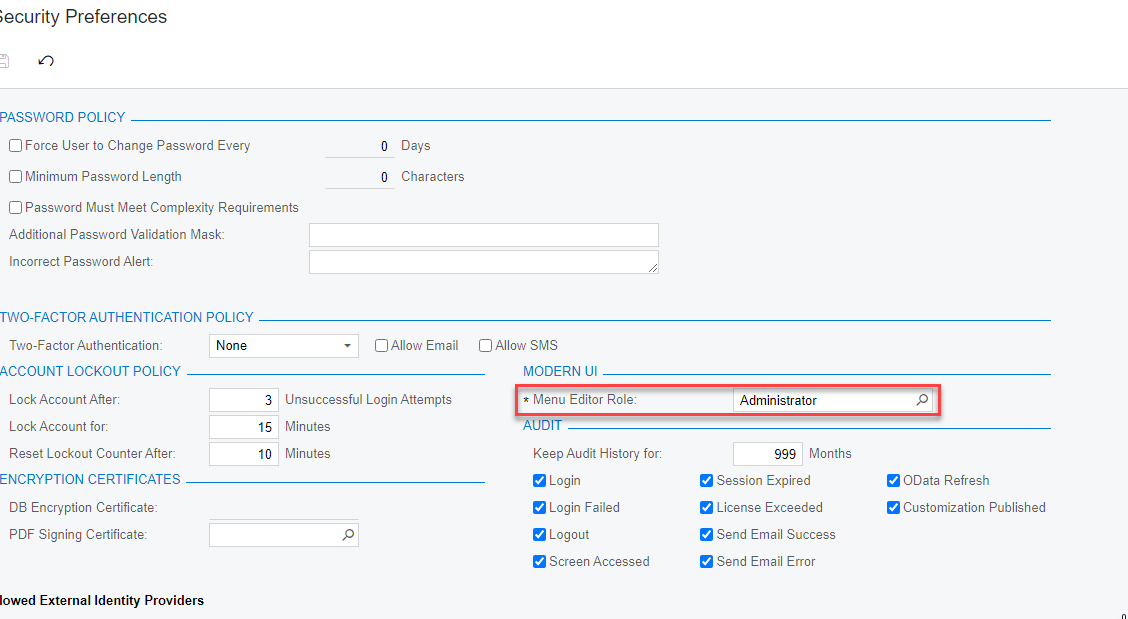
This is set on the Security Preference screen (SM201060).  

You select the role which grants access to the Menu Edit option.  I think its set as Administrator by default but can’t see why you cannot assign a different role allowing access to more users if required.
 

2 replies

This is set on the Security Preference screen (SM201060).  

You select the role which grants access to the Menu Edit option.  I think its set as Administrator by default but can’t see why you cannot assign a different role allowing access to more users if required.



hsarjapur
Varsity I
Forum|alt.badge.img
  • Varsity I
  • February 21, 2022

If I understand correctly you don’t want users to access Edit Menu option under the navigation/workspace if so then create a new user role called “Menu Editor” and then add only users who have access to edit menu or workspace. 

Upon doing that then head to Security preferences and in the Modern UI select the user role from Administrator to Menu Editor, this will restrict other users not to have that option to edit menu’s.

Hope this helps.