Answer

Ability to Add Selector to Custom Field in Mobile Application

  • September 12, 2022
  • 4 replies
  • 348 views

Forum|alt.badge.img+1

Hello,

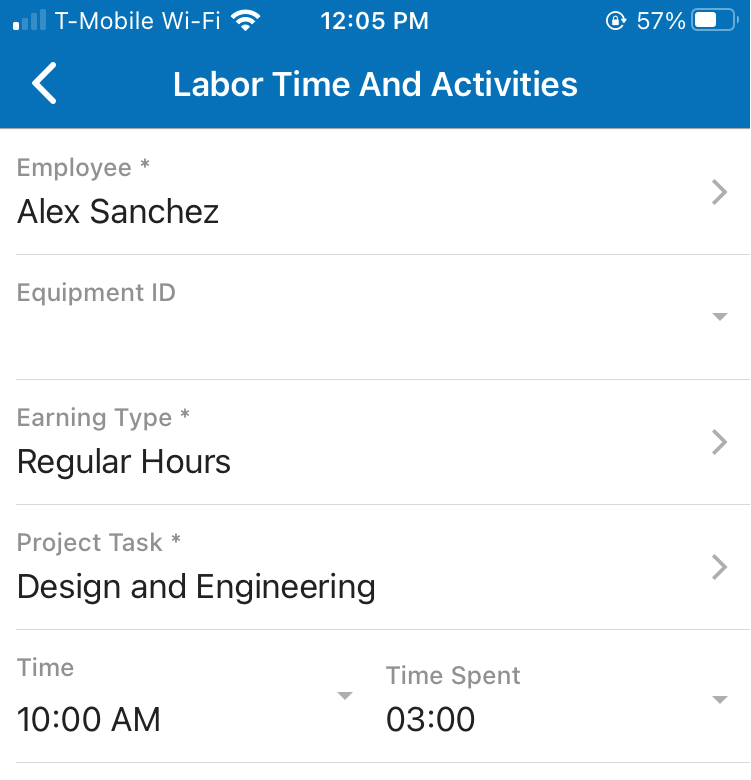
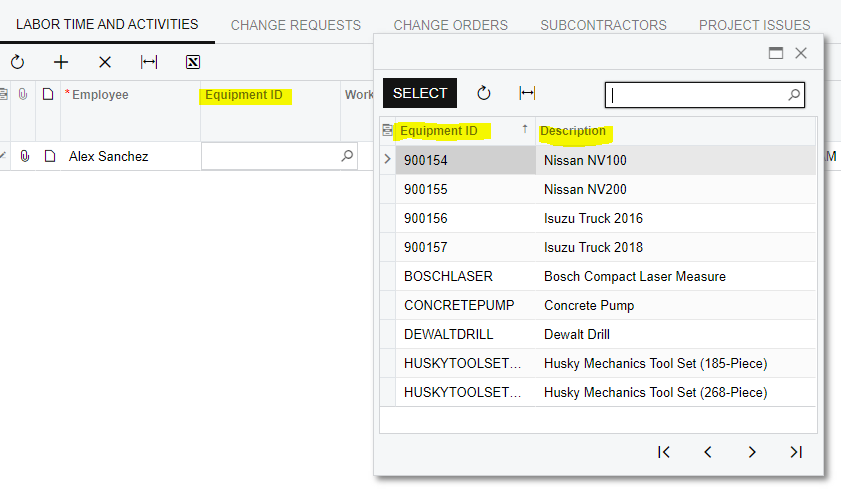
Has anyone had any success in getting a selector to work on a custom field added to the mobile application? I have added the field successfully, however, it is giving me a weird dropdown arrow instead of directing me to a selector screen like I would expect (similar to “Employee” field above it).

My code:

update screen PJ304000 {
update container "LaborTimeAndActivities" {
fieldsToShow = 7
add field "EquipmentID"{
placeAfter field "Employee"
}
}
}

Mobile view:
Application View:
 

Best answer by rhooper91

Ok… this was a bit of a monster. You have to add levels to the grid. By default it shows as a grid control. You then need to add it as a selector control type.

4 replies

Fernando Amadoz
Jr Varsity I
Forum|alt.badge.img+2

@rhooper91

Try something like this

update screen PJ304000 {
update container "LaborTimeAndActivities" {
fieldsToShow = 7
add field "EquipmentID"{
      selectorDisplayFormat = KeyDescription
      pickerType = Searchable
      weight = 2
      selector {
       add field "EquipmentID"
       add field "[Your Description (if you have one)]"
    }
placeAfter field "Employee"
}
}
}


Forum|alt.badge.img+1
  • Author
  • Varsity III
  • September 12, 2022

@Fernando Amadoz

I just attempted this. Replaced “EquipmentID” and “Description” in your brackets and I’m still getting the same functionality.

Updated Mobile Code:

update screen PJ304000 {
update container "LaborTimeAndActivities" {
fieldsToShow = 7
add field "EquipmentID"{
selectorDisplayFormat = KeyDescription
pickerType = Searchable
weight = 2
selector {
add field "EquipmentID"
add field "Description"
}
placeAfter field "Employee"
}
}
}


Could it have something to do with the way I defined the DAC extension? See below for my field code:

    #region UsrEquipmentID
[PXDefault(PersistingCheck = PXPersistingCheck.Nothing)]
[PXDBInt()]
[PXUIField(DisplayName = "Equipment ID")]
[PXSelector(typeof(Search<EPEquipment.equipmentID, Where<EPEquipment.status, Equal<EPEquipmentStatus.EquipmentStatusActive>>>), SubstituteKey = typeof(EPEquipment.equipmentCD), DescriptionField = typeof(EPEquipment.description))]
public virtual int? UsrEquipmentID { get; set; }
public abstract class usrEquipmentID : PX.Data.BQL.BqlInt.Field<usrEquipmentID> { }
#endregion


Forum|alt.badge.img+1
  • Author
  • Varsity III
  • Answer
  • September 12, 2022

Ok… this was a bit of a monster. You have to add levels to the grid. By default it shows as a grid control. You then need to add it as a selector control type.


Chris Hackett
Community Manager
Forum|alt.badge.img
  • Acumatica Community Manager
  • September 12, 2022

Thank you for sharing your solution with the community @rhooper91 !