Answer

25 R1 - Auto Numbering is NOT working for Custom field in Custom screen

  • December 8, 2025
  • 19 replies
  • 136 views

Forum|alt.badge.img

Hi Everyone,

I'm working on version 25 R1 and have implemented logic to generate an auto-numbering sequence for a custom field (Batch Nbr) on a custom screen.

However, when I apply the AutoNumber attribute to the BatchNbr field, the value gets cleared whenever I select any other field in the header section. The numbering is not being generated as expected.

Note: The same code works correctly in 24 R1, so this issue appears to be specific to 25 R1.

Could you please guide me on what might be causing this issue or if there are any changes in 25 R1 related to AutoNumbering?


DAC Field:

  [Serializable]
[PXCacheName("NBBLCBatchLabel")]
[PXPrimaryGraph(typeof(NBBatchLabelMaint1))]
public class NBBLCBatchLabel : PXBqlTable, IBqlTable
{


#region BatchNbr
[PXDBString(15, IsKey = true, IsUnicode = true)]
[PXUIField(DisplayName = "Batch Nbr", Required = true)]
[PXDefault]
[AutoNumber(typeof(Search<NBBLINSetupExt.usrNBBLNumberingID>), typeof(AccessInfo.businessDate))]
[PXSelector(
typeof(NBBLCBatchLabel.batchNbr),
typeof(NBBLCBatchLabel.storeID),
typeof(NBBLCBatchLabel.labelFormat),
typeof(NBBLCBatchLabel.status)
)]

[PX.Data.EP.PXFieldDescription]
public virtual string BatchNbr { get; set; }
public abstract class batchNbr : BqlString.Field<batchNbr> { }
#endregion
}


Graph Code:

  public class NBBatchLabelMaint : PXGraph<NBBatchLabelMaint, NBBLCBatchLabel>
{

public SelectFrom<NBBLCBatchLabel>.View NBBLCHeaderView;

public SelectFrom<NBBLCLabelItems>
.Where<NBBLCLabelItems.batchNbr.IsEqual<NBBLCBatchLabel.batchNbr.FromCurrent>>
.View NBBLCDetails;


public PXSetup<INSetup> AutoSetupView;

}


CC: ​@Dmitrii Naumov  ​@Nayan Vadher  ​@Dhiren Chhapgar 
Best answer by Naveen Boga

@nsmith51  If I remember correctly, I have seen this issue before in one of my projects.

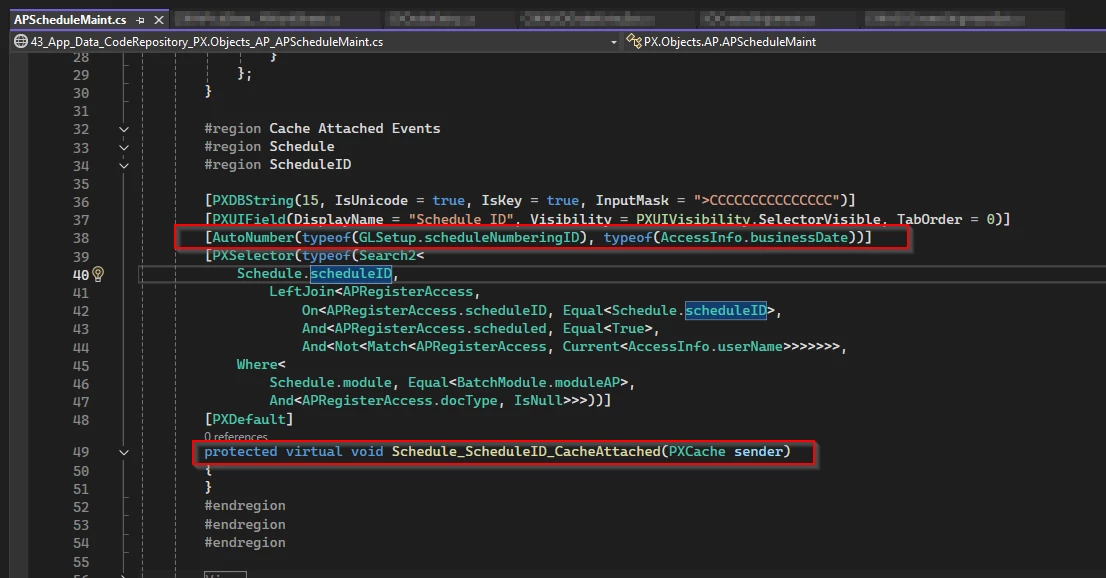
I don’t see any issue with your AutoNumber attribute at DAC level. Can you please declare the AutoNumbering attribute for the BatchNbr field with the CacheAttached event as well in your custom graph and verify?


Attached screenshot for reference.


19 replies

palbores
Jr Varsity I
Forum|alt.badge.img+1
  • Jr Varsity I
  • December 8, 2025

make sure this field has a  value in the preference screen. NBBLINSetupExt.usrNBBLNumberingID


Dmitrii Naumov
Acumatica Moderator
Forum|alt.badge.img+7
  • Acumatica Moderator
  • December 8, 2025

The code itself looks ok. The issue may be somewhere else, e.g. data not being entered in the setup field or UI definition.


Forum|alt.badge.img+7
  • Captain II
  • December 8, 2025

Do you also have a constructor for the graph where you are forcing the graph to call the view where your custom autonumber code resides? e.g.
 

INSetup inSetup = AutoSetupView.Current;

NBBLINSetupExt inSetupExt = inSetup.GetExtension<NBBLINSetupExt>();


Forum|alt.badge.img+3

Hi ​@nsmith51
Try adjusting your PXDBString attribute by adding the InputMask property as shown below:

[PXDBString(15, IsKey = true, IsUnicode = true, InputMask = ">CCCCCCCCCCCCCCC")]


Forum|alt.badge.img+3

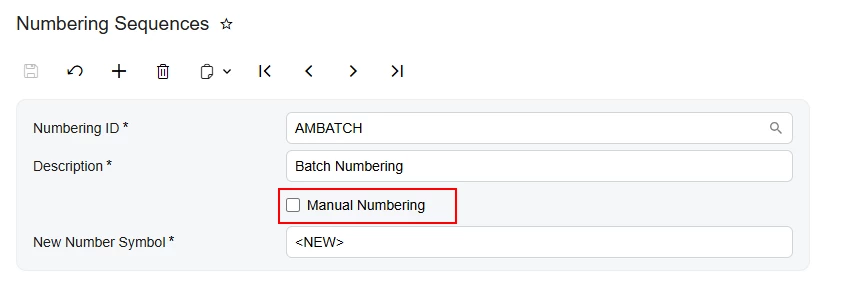
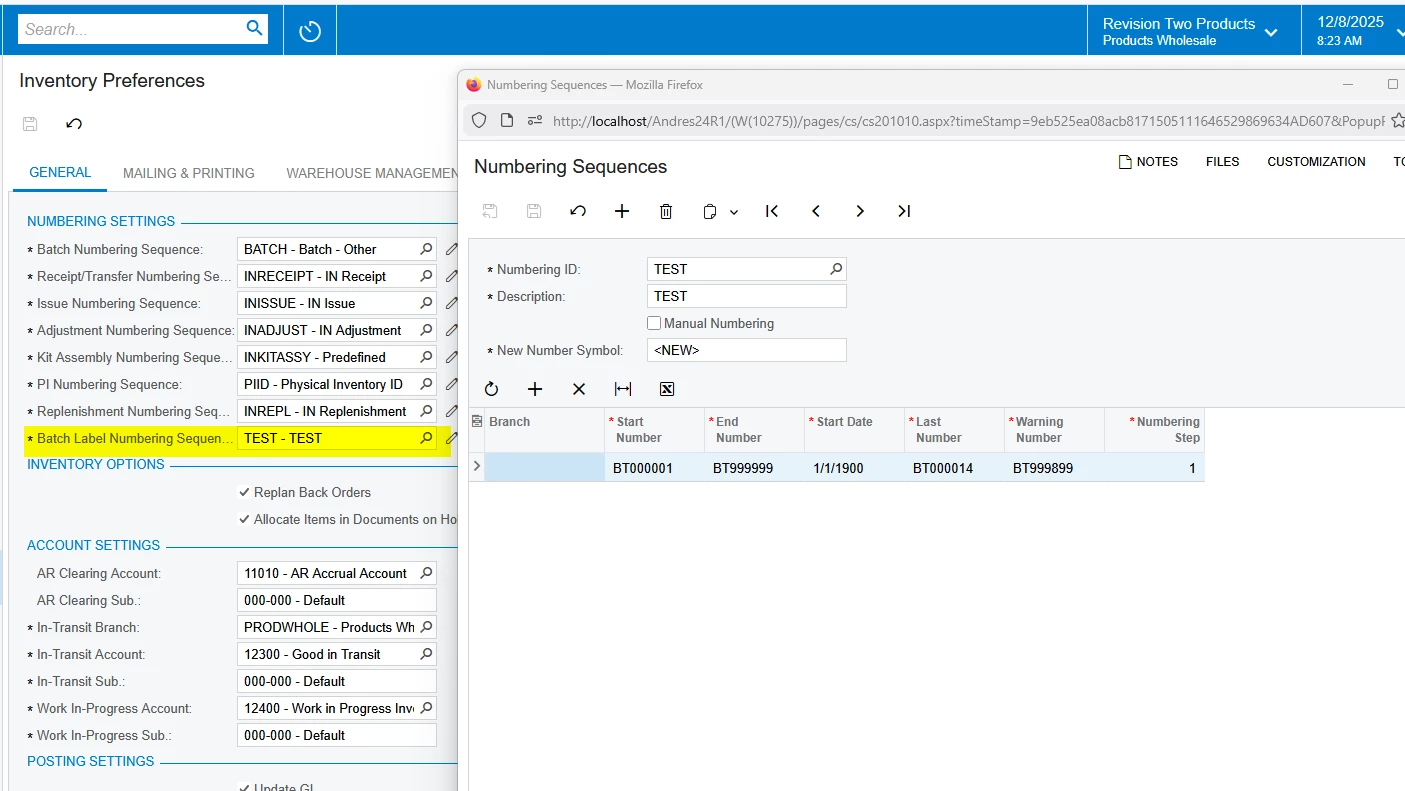
Additionally, make sure that the Numbering Sequence you entered in the NBBLINSetupExt.usrNBBLNumberingID field has the Manual Numbering checkbox unchecked:


Forum|alt.badge.img
  • Author
  • Jr Varsity III
  • December 8, 2025

Yes, configured properly at Inventory Preferences screen.

Any field in the screen when I enter the value and tab it and it is clearing automatically.


Forum|alt.badge.img
  • Author
  • Jr Varsity III
  • December 8, 2025

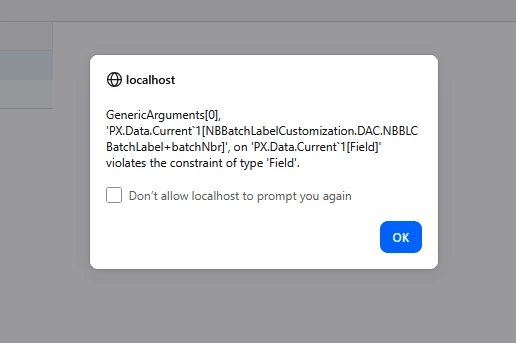
When I try to delete old records also getting below error.


palbores
Jr Varsity I
Forum|alt.badge.img+1
  • Jr Varsity I
  • December 8, 2025

@nsmith51  the Primary Graph of your DAC is having “1” in the end.

[PXPrimaryGraph(typeof(NBBatchLabelMaint1))]


but you have this graph - NBBatchLabelMaint .

  public class NBBatchLabelMaint : PXGraph<NBBatchLabelMaint, NBBLCBatchLabel>
{

public SelectFrom<NBBLCBatchLabel>.View NBBLCHeaderView;

public SelectFrom<NBBLCLabelItems>
.Where<NBBLCLabelItems.batchNbr.IsEqual<NBBLCBatchLabel.batchNbr.FromCurrent>>
.View NBBLCDetails;


public PXSetup<INSetup> AutoSetupView;

}


Forum|alt.badge.img
  • Author
  • Jr Varsity III
  • December 9, 2025

@palbores Sorry. That I have added by mistakenly. I don’t have that in my code.


Forum|alt.badge.img
  • Author
  • Jr Varsity III
  • December 9, 2025

Can anyone please give me the idea that why field value is clearing when I enter a value in header fields?


palbores
Jr Varsity I
Forum|alt.badge.img+1
  • Jr Varsity I
  • December 9, 2025

There is something wrong in this DAC - NBBLCLabelItems
 

 public SelectFrom<NBBLCLabelItems>
.Where<NBBLCLabelItems.batchNbr.IsEqual<NBBLCBatchLabel.batchNbr.FromCurrent>>
.View NBBLCDetails;


Forum|alt.badge.img
  • Author
  • Jr Varsity III
  • December 9, 2025

Here is the DAC for the NBBLCLabelItems.


    [Serializable]
[PXCacheName("NBBLC Primary Listing Item")]
// public class NBBLCPrimaryListingItem : PXBqlTable, IBqlTable
public class NBBLCLabelItems : PXBqlTable, IBqlTable
{
#region LineNbr
[PXDBIdentity(IsKey = true)]
[PXUIField(DisplayName = "Line Nbr", Enabled = false)]
public virtual int? LineNbr { get; set; }
public abstract class lineNbr : BqlInt.Field<lineNbr> { }
#endregion

#region BatchNbr
[PXDBString(15)]
[PXDBDefault(typeof(NBBLCBatchLabel.batchNbr))]
[PXParent(typeof(Select<NBBLCBatchLabel,
Where<NBBLCBatchLabel.batchNbr, Equal<Current<NBBLCBatchLabel.batchNbr>>>>))]
public virtual string BatchNbr { get; set; }
public abstract class batchNbr : BqlString.Field<batchNbr> { }
#endregion

#region InventoryID
[Inventory]
[PXUIField(DisplayName = "Inventory ID")]
public virtual int? InventoryID { get; set; }
public abstract class inventoryID : BqlInt.Field<inventoryID> { }
#endregion

#region Description
[PXDBString(256, IsUnicode = true)]
[PXUIField(DisplayName = "Description", IsReadOnly = true)]
[PXFormula(typeof(Selector<inventoryID, InventoryItem.descr>))]
public virtual string Description { get; set; }
public abstract class description : BqlString.Field<description> { }
#endregion

#region CreatedByID
[PXDBCreatedByID()]
public virtual Guid? CreatedByID { get; set; }
public abstract class createdByID : BqlGuid.Field<createdByID> { }
#endregion

#region CreatedByScreenID
[PXDBCreatedByScreenID()]
public virtual string CreatedByScreenID { get; set; }
public abstract class createdByScreenID : BqlString.Field<createdByScreenID> { }
#endregion

#region CreatedDateTime
[PXDBCreatedDateTime()]
public virtual DateTime? CreatedDateTime { get; set; }
public abstract class createdDateTime : BqlDateTime.Field<createdDateTime> { }
#endregion

#region LastModifiedByID
[PXDBLastModifiedByID()]
public virtual Guid? LastModifiedByID { get; set; }
public abstract class lastModifiedByID : BqlGuid.Field<lastModifiedByID> { }
#endregion

#region LastModifiedByScreenID
[PXDBLastModifiedByScreenID()]
public virtual string LastModifiedByScreenID { get; set; }
public abstract class lastModifiedByScreenID : BqlString.Field<lastModifiedByScreenID> { }
#endregion

#region LastModifiedDateTime
[PXDBLastModifiedDateTime()]
public virtual DateTime? LastModifiedDateTime { get; set; }
public abstract class lastModifiedDateTime : BqlDateTime.Field<lastModifiedDateTime> { }
#endregion

#region NoteID
[PXNote()]
public virtual Guid? NoteID { get; set; }
public abstract class noteID : BqlGuid.Field<noteID> { }
#endregion

#region Tstamp
[PXDBTimestamp()]
[PXUIField(DisplayName = "Tstamp")]
public virtual byte[] Tstamp { get; set; }
public abstract class tstamp : BqlByteArray.Field<tstamp> { }
#endregion
}


palbores
Jr Varsity I
Forum|alt.badge.img+1
  • Jr Varsity I
  • December 9, 2025

For your NBBLCLabelItems.batchNbr field.

Change the PXParent


[PXParent(typeof(Select<NBBLCBatchLabel,Where<NBBLCBatchLabel.batchNbr, Equal<Current<batchNbr>>>>))


Forum|alt.badge.img
  • Author
  • Jr Varsity III
  • December 10, 2025

That did not help and value is still clearing from the header fields.

@Naveen Boga  ​@darylbowman  Can you please review and provide your inputs.


Forum|alt.badge.img+3

It would be helpful if you could share the remaining related code snippets (including the using sections). With that, I can try to reproduce the issue and help find a solution:

  • Master DAC

  • DB table schemas (XML files)

  • ASPX


darylbowman
Captain II
Forum|alt.badge.img+15

Can anyone please give me the idea that why field value is clearing when I enter a value in header fields?

The fields blanking is likely due to a key error, but there are other possibilities.

Firstly, have you restarted the application (from Apply Updates) since the changes? Selectors are very finicky.

Next, what is the key on your table?

If you remove the AutoNumber designation, how do the records behave?


Also, I don't think this is your issue, but BatchNbr in the detail DAC needs to designate IsUnicode = true


Naveen Boga
Captain II
Forum|alt.badge.img+19
  • Captain II
  • Answer
  • December 10, 2025

@nsmith51  If I remember correctly, I have seen this issue before in one of my projects.

I don’t see any issue with your AutoNumber attribute at DAC level. Can you please declare the AutoNumbering attribute for the BatchNbr field with the CacheAttached event as well in your custom graph and verify?


Attached screenshot for reference.


Forum|alt.badge.img
  • Author
  • Jr Varsity III
  • December 10, 2025

Hey ​@Naveen Boga  Thank you so much. I don’t know the root cause here but when I add the CacheAttached Event it solves the problem.

BIG THANKS TO YOU!!


darylbowman
Captain II
Forum|alt.badge.img+15

Just curious. Did you try restarting before adding the CacheAttached? I haven’t figured out why sometimes selector attributes don’t ‘stick’, but it makes sense if it wasn’t ‘sticking’ that it being added dynamically in CacheAttached would possibly remedy the situation.