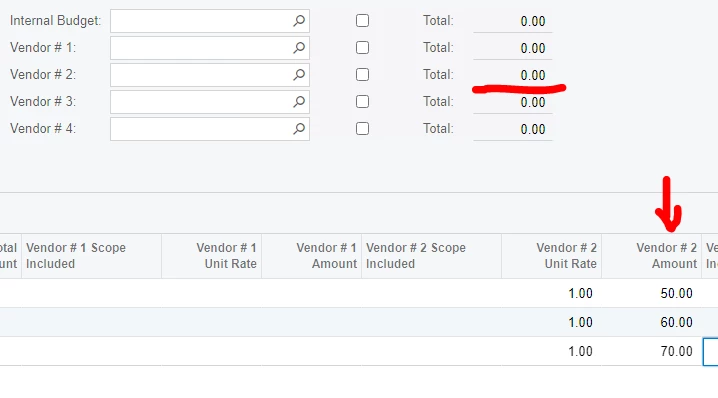
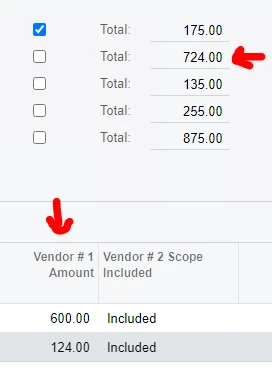
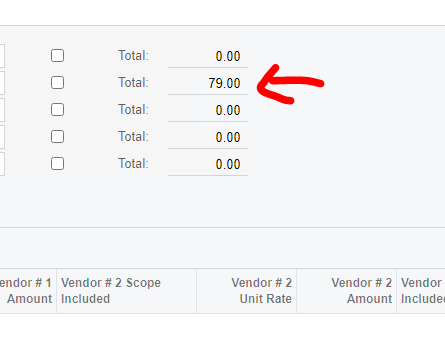
Hello Goodnight. How can I put de sum of the “Vendor # 2 Amount” column (grid) in the Total field ( Vendor # 2).
the result in the “Vendor #2” field should be: 180.
I need to update the total value (Vendor #2 field) for each record the user adds in the grid (the user does not necessarily have to save the record to reflect the update in the “Vendor #2” field) too.
Additional: is a master detail form
could someone help me please.
Best answer by eddiedaco
@Naveen B yes, i activate that property but the results are the same.
@ddunn yes, i used formula but i have the same result.
i solved it this way.
in the rowUpdated Event of the detail grid. i add the code that @Naveen B shared with me.
// use this code to get the current data of Master table
CEBidLeveling item = viewCEBidLeveling.Current;

//Calculate the sum of values from the column InternalTotalAmount (detailTable)
// viewCEBidLeveling is my detail table
      decimal? Vendor1Total = this.viewCEBidLevelingItem.Select().FirstTableItems.ToList().Select(x => x.Vendor_1TotalAmount).Sum();

//put the value of the sum in Master table column (viewCEBidLeveling)
      item.Vendor_1Total = Vendor1Total;
change the values of the columns (commit changes = true or AutoCallBack=true) that you want to trigger the changes (in my case the Vendor1_TotalAmount column) and that's it. When you enter real-time values, whether or not they are saved in the database, the column will be automatically recalculated.
thank you very much for your help. I hope my solution can help others.
\App_RuntimeCode\BidLevelingMaint.cs(15): error CS1061: 'BidLevelingMaint' does not contain a definition for 'CEBidLevelingItem' and no accessible extension method 'CEBidLevelingItem' accepting a first argument of type 'BidLevelingMaint' could be found (are you missing a using directive or an assembly reference?)
\App_RuntimeCode\BidLevelingMaint.cs(15): error CS1061: 'BidLevelingMaint' does not contain a definition for 'CEBidLevelingItem' and no accessible extension method 'CEBidLevelingItem' accepting a first argument of type 'BidLevelingMaint' could be found (are you missing a using directive or an assembly reference?)
“BidLevelingItem” is my detail table (and my DAC) and from where I need to extract the value of "Vendor_1TotalAmount" to display in my master table “BidLeveling” (Vendor_1Total).
I changed BidLevelingItem to viewBidLevelingItem (my view) and I had no errors but the code in preview mode doesnt refresh de Total_1Vendor (Master table: BidLeveling)
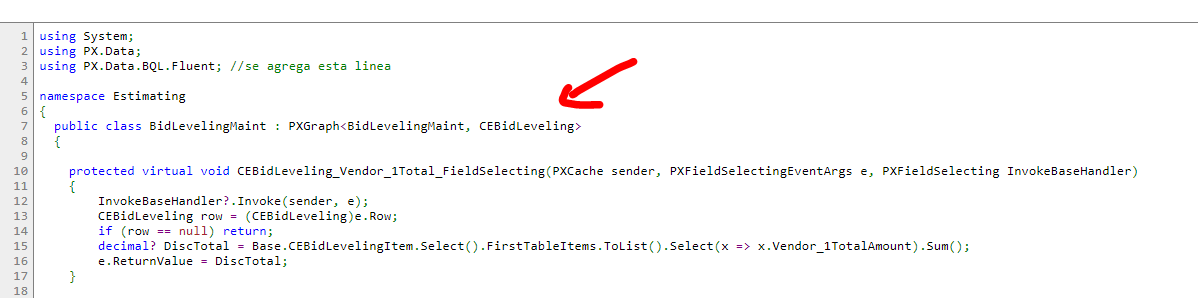
using System; using PX.Data; using PX.Data.BQL.Fluent; //se agrega esta linea using System.Linq;
I dont kown how to obtain de value of cache data and do sum.
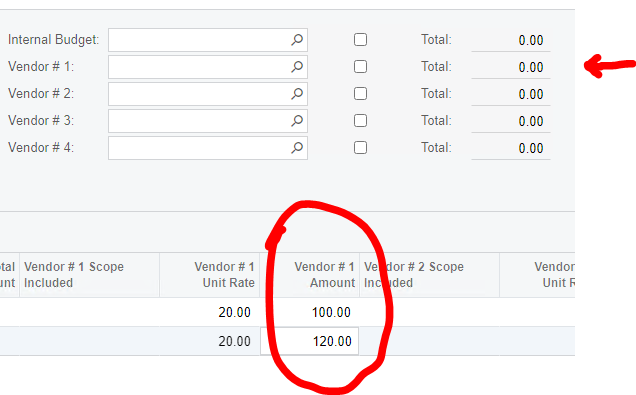
the objective is: when the value of the rows of the grid "Total # 1 Amount" (Detail) is updated (this value is saved in the database or not) automatically reflect the sum in the field "Vendor1_Total" (Master)
\App_RuntimeCode\BidLevelingMaint.cs(15): error CS1061: 'BidLevelingMaint' does not contain a definition for 'CEBidLevelingItem' and no accessible extension method 'CEBidLevelingItem' accepting a first argument of type 'BidLevelingMaint' could be found (are you missing a using directive or an assembly reference?)
using System; using PX.Data; using PX.Data.BQL.Fluent; //se agrega esta linea using System.Linq;
@Naveen B Its correct. CEBidLeveling and CEBidLevelingItem are DAC. viewCEBidLeveling and viewCEBidLeveling are the views.
I made the change (CEBidLeveling → viewCEBidLeveling) and an error does not appear, but nothing is calculated.
I modified de Event FieldSelecting with the new declaration and put the valor of the Vendor1Total = 79. (only for test). And i see the value in the header.
using System; using PX.Data; using PX.Data.BQL.Fluent; //se agrega esta linea using System.Linq;
Another option might be to look at using the PXFormula() attribute within the DAC’s fields to have the system automatically update the header field values instead of writing code to update it.
@Naveen B yes, i activate that property but the results are the same.
@ddunn yes, i used formula but i have the same result.
i solved it this way.
in the rowUpdated Event of the detail grid. i add the code that @Naveen B shared with me.
// use this code to get the current data of Master table
CEBidLeveling item = viewCEBidLeveling.Current;

//Calculate the sum of values from the column InternalTotalAmount (detailTable)
// viewCEBidLeveling is my detail table
      decimal? Vendor1Total = this.viewCEBidLevelingItem.Select().FirstTableItems.ToList().Select(x => x.Vendor_1TotalAmount).Sum();

//put the value of the sum in Master table column (viewCEBidLeveling)
      item.Vendor_1Total = Vendor1Total;
change the values of the columns (commit changes = true or AutoCallBack=true) that you want to trigger the changes (in my case the Vendor1_TotalAmount column) and that's it. When you enter real-time values, whether or not they are saved in the database, the column will be automatically recalculated.
thank you very much for your help. I hope my solution can help others.