Question

Self-service portal - view case details for salespersons' customers

  • April 24, 2026
  • 4 replies
  • 57 views

Hi there,

I’m working on the self-service portal in 25R2. My company has decided to implement it for brand ambassadors (salespeople) before rolling it out individual customers. I’ve already created a GI to filter cases based on User → Employee → Salesperson → SalespersonCustomer → Customer → Case, but when I redirect navigation of the CaseCD link to the Case Details screen, I get this error upon clicking the CaseCD:
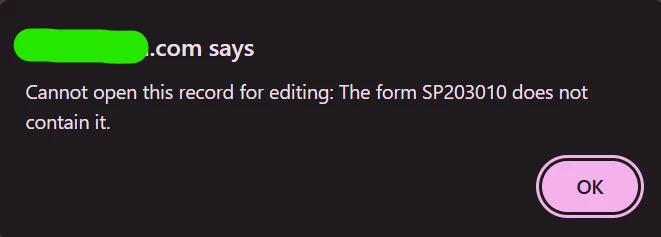
 

My theory is that the portal only “loads in” the cases from the currently logged-in company, which works great for customers but not so well for employees. 
Is there a way I can extend / customize this behavior to make these cases’ details visible to the salesperson? I’m pretty new to Acumatica, so please forgive my lack of knowledge about the backend workings of the software - I’m eager to learn more.

4 replies

KrunalDoshi
Varsity III
Forum|alt.badge.img+1
  • Varsity III
  • April 28, 2026

Hi ​@cjmess,

You can extend “SPCaseOpenInquiry” graph which is for your Open Cases screen (SP204000) and modify FilteredItems dataview based on your requirements. For instance, I have included below code for your reference where I have filtered the Open Cases screen to eliminate Close cases.

Hope this helps!

public class SPCaseOpenInquiryExt : PXGraphExtension<SPCaseOpenInquiry>
{
public class status_CLOSE : PX.Data.BQL.BqlString.Constant<status_CLOSE>
{
public status_CLOSE() : base("C")
{ }
}

public SelectFrom<CRCase>
.LeftJoin<CRCaseClass>
.On<CRCaseClass.caseClassID.IsEqual<CRCase.caseClassID>>
.LeftJoin<Contract>
.On<Contract.contractID.IsEqual<CRCase.contractID>>
.LeftJoin<BAccount>
.On<BAccount.bAccountID.IsEqual<CRCase.customerID>>
.LeftJoin<CRCustomerClass>
.On<CRCustomerClass.cRCustomerClassID.IsEqual<BAccount.classID>>
.LeftJoin<Contact2>
.On<CRCase.ownerID.IsEqual<Contact2.contactID>>
.LeftJoin<Contact>
.On<CRCase.contactID.IsEqual<Contact.contactID>>
.LeftJoin<CRContactClass>
.On<CRContactClass.classID.IsEqual<Contact.classID>>
.Where<Brackets<MatchWithBAccountNotNull<CRCase.customerID>>
.And<CRCase.isActive.IsEqual<True>>
.And<Brackets<CRCaseClass.isInternal.IsEqual<False>
.Or<CRCaseClass.isInternal.IsNull>>>
.And<Brackets<CRCustomerClass.isInternal.IsEqual<False>
.Or<CRCustomerClass.isInternal.IsNull>>>
.And<Brackets<CRContactClass.isInternal.IsEqual<False>
.Or<CRContactClass.isInternal.IsNull>>>
.And<Brackets<CRCase.status.IsNotEqual<status_CLOSE>>>
.And<Brackets<OwnerFilter.contractID.FromCurrent.IsNull
.Or<CRCase.contractID.IsEqual<OwnerFilter.contractID.FromCurrent>>>>
.And<Brackets<OwnerFilter.currentOwnerID.FromCurrent.IsNull
.Or<CRCase.contactID.IsEqual<OwnerFilter.currentOwnerID.FromCurrent>>>>>
.View
FilteredItems;
}


Forum|alt.badge.img+2
  • Pro III
  • April 28, 2026

Hi ​@cjmess employee users created in the main Acumatica site should be able to log into the portal using their credentials and see all cases in the open cases/closed cases screen, assuming that they have appropriate access. 

Are you able to share your GI to see if we can reproduce your error? Thanks!


  • Author
  • Freshman I
  • April 29, 2026

Yes, here you go ​@jzhu:

FROM [PX.SM.Users] AS User
INNER JOIN [PX.Objects.EP.EPEmployee] AS Employee
ON User.PKID = Employee.UserID
INNER JOIN Salesperson
ON Employee.SalesPersonID = Salesperson.SalesPersonID
INNER JOIN [PX.Objects.AR.CustSalesPeople] AS CustomerSalespersons
ON Salesperson.SalesPersonID = CustomerSalespersons.SalesPersonID
INNER JOIN [PX.Objects.AR.Customer] AS Customer
ON CustomerSalespersons.BAccountID = Customer.BAccountID
INNER JOIN [PX.Objects.CR.CRCase] AS Case
ON Customer.BAccountID = Case.CustomerID
WHERE User.PKID = @me
ORDER BY
Case.Status DESC,
Case.LastModifiedDateTime DESC
SELECT
Case.CaseCD SCHEMA [PX.Objects.CR.CRCase].CaseCD,
Case.CustomerID SCHEMA [PX.Objects.CR.CRCase].CustomerID,
Customer.AcctName SCHEMA [PX.Objects.AR.Customer].AcctName,
Case.Subject SCHEMA [PX.Objects.CR.CRCase].Subject,
Case.Status SCHEMA [PX.Objects.CR.CRCase].Status,
Case.LastModifiedDateTime SCHEMA [PX.Objects.CR.CRCase].LastModifiedDateTime

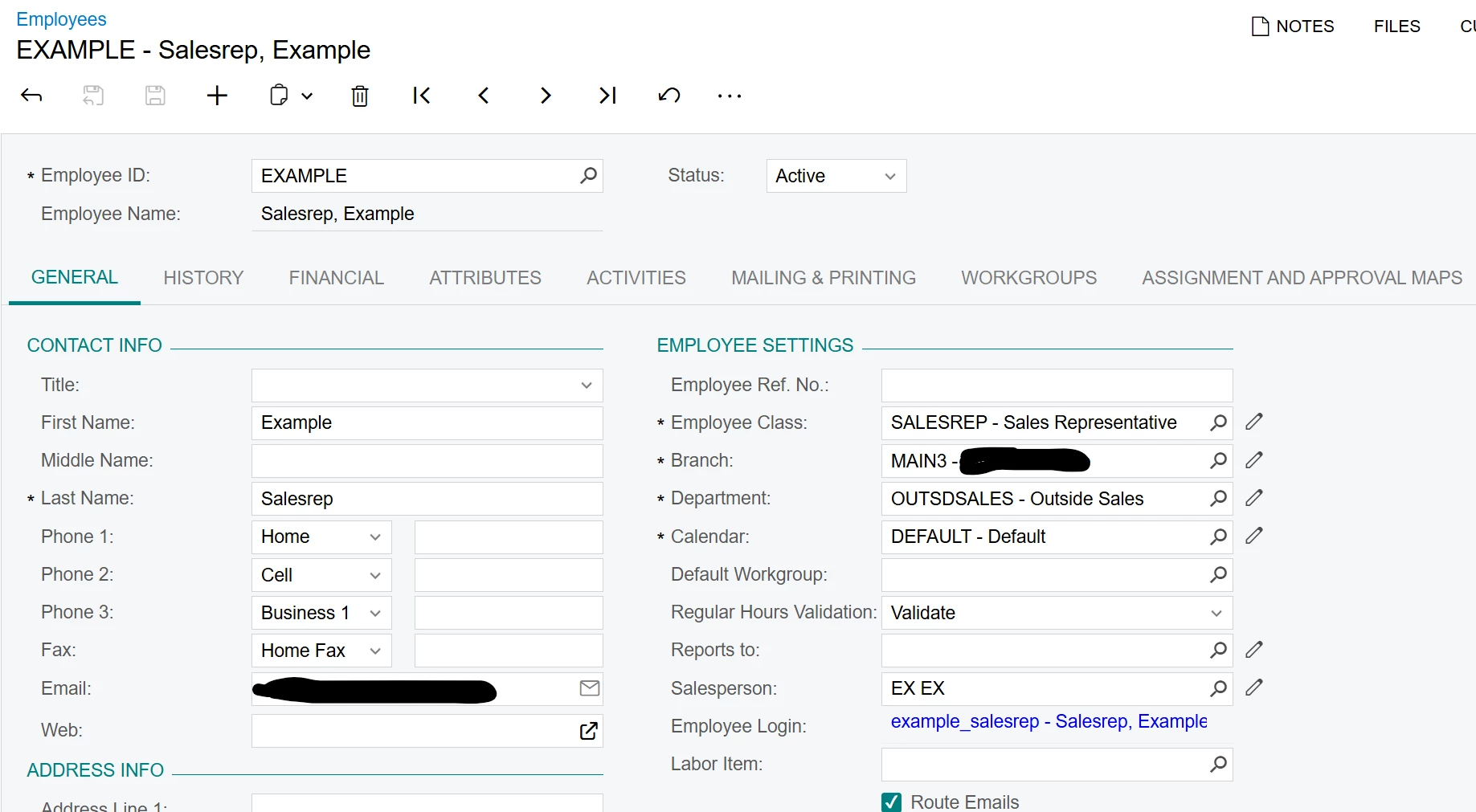
The GI works perfectly and shows cases from every customer assigned to the salesperson that is currently logged-in. What doesn’t is when I redirect the navigation of CaseCD to SP203010 (Case Details). I had revoked the user’s access to Open Cases, but I double-checked and that screen is blank. Here’s how the employee linked to the user is set up:

I’m going to implement ​@KrunalDoshi’s suggested changes and report back. Appreciate both your help so far!


  • Author
  • Freshman I
  • April 29, 2026

I’ve found some extra details that might help here. The Customer Self-Service Portal is, as the name implies, expressly built for individual customers and not employees. There’s logic in BAccountHelper.cs to support this via data hiding: a Restriction for portal customers. 
 

public class Restriction
{
public sealed class currentAccountID : BqlInt.Constant
{
public currentAccountID() : base(BAccountHelper.ReadCurrentAccount().BAccountID.GetValueOrDefault(0)) { }
}

public sealed class currentContactID : BqlInt.Constant
{
public currentContactID() : base(BAccountHelper.ReadCurrentContact().ContactID.GetValueOrDefault(0)) { }
}

public sealed class currentUserID : BqlGuid.Constant
{
public currentUserID() : base(PXAccess.GetUserID()) { }
}

public class PortalCustomers : IBqlConstants,
IBqlConstantsOf>,
IBqlConstantsOf>>
{
///

///
///

///
///
public IEnumerable GetValues(PXGraph graph)
{
return PXAccess.GetBAccountIDTree().Cast();
}
}
public class PortalConsolidatedCustomers : IBqlConstants,
IBqlConstantsOf>,
IBqlConstantsOf>>
{
///

///
///

///
///
public IEnumerable GetValues(PXGraph graph)
{
if (graph == null)
return new List();
return CustomerFamilyHelper
.GetCustomerFamily(graph,
BAccountHelper.ReadCurrentAccount().BAccountID.GetValueOrDefault(0))
.Where(customerInfo => customerInfo.BusinessAccount.BAccountID != null)
.Select(customerInfo => customerInfo.BusinessAccount.BAccountID)
.Cast();

}
}
}

This “Restriction” is used in a variety of places to filter out what records should and should not be shown on the Portal. For example, in SPCaseMaint.cs,

public class SPCasesMaint : PXGraph<SPCasesMaint>
{
#region Select


[PXCopyPasteHiddenView]
public SelectFrom<SPCRCase>
.LeftJoin<CRCaseClass>.On<CRCaseClass.caseClassID.IsEqual<SPCRCase.caseClassID>>
.LeftJoin<Contact>.On<Contact.contactID.IsEqual<SPCRCase.contactID>>
.LeftJoin<CRContactClass>.On<Contact.classID.IsEqual<CRContactClass.classID>>
.LeftJoin<Users>.On<Users.pKID.IsEqual<CR.Contact.userID>>
.LeftJoin<SPCRActivity>.On<SPCRActivity.refNoteID.IsEqual<SPCRCase.noteID>
.And<SPCRActivity.isPrivate.IsNotEqual<True>>>
.LeftJoin<SMEmailBody>.On<SMEmailBody.refNoteID.IsEqual<SPCRActivity.noteID>>
.Where<SPCRCase.customerID.IsInSequence<Restriction.PortalCustomers> // HERE
.And<Brackets<CRCaseClass.isInternal.IsEqual<False>.Or<CRCaseClass.isInternal.IsNull>>>
.And<Brackets<CRContactClass.isInternal.IsEqual<False>.Or<CRContactClass.isInternal.IsNull>>>
.And<Not<Exists<SelectFrom<SPCRActivityAlias>
.Where<SPCRActivityAlias.refNoteID.IsEqual<SPCRCase.noteID>
.And<SPCRActivityAlias.isPrivate.IsNotEqual<True>>
.And<SPCRActivityAlias.lastModifiedDateTime.IsGreater<SPCRActivity.lastModifiedDateTime>>>>>>>
.OrderBy<SPCRCase.lastModifiedDateTime.Desc> // TODO: change order to combination of SPCRActivity.lastModifiedDateTime and SPCRCase.lastModifiedDateTime
.View Cases;

protected virtual IEnumerable cases()
{
var view = new PXView(this, false, Cases.View.BqlSelect);
var cases = view.SelectWithViewContext();


foreach (PXResult<SPCRCase, CRCaseClass, Contact, CRContactClass, Users, SPCRActivity, SMEmailBody> row in cases)
{
SPCRCase cRCase = row;
SPCRActivity activity = row;
CRCaseClass caseClass = row;
Users userContact = row;
SMEmailBody email = row;

var message = cRCase.Description;
if (activity.RefNoteID != null)
{
message = (activity.ClassID == CRActivityClass.Email) ? email.Body : activity.Body;
}

cRCase.LastMessage = PX.Data.Search.SearchService.Html2PlainText(message);

SetVisible<SPCRCase.contactID>(Cases.Cache, cRCase, userContact.Username != this.Accessinfo.UserName);
}

return cases;
}

#endregion

#region Action

#region CacheAttached

}

I’ve tried making a separate SPCasesMaintExt2.cs file to override the behavior which unfortunately didn’t work. My main question is, is there any way to override this PortalCustomers restriction to show cases from salesperson customers as well, or introduce a new restriction? The end goal is to allow the portal to show case details from the logged-in user’s (linked to Employee, linked to Salesperson) customers.

Any guidance would be greatly appreciated! Happy to share code if it helps.