

Route Employee Emails - External Accounts

  • September 18, 2024
  • 1 reply
  • 98 views

Forum|alt.badge.img

Scenario:

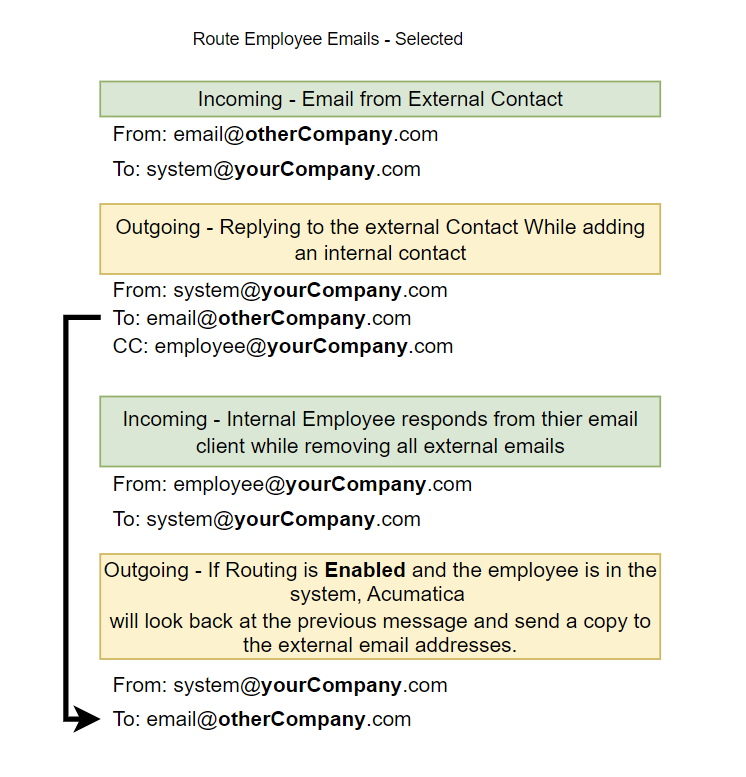
An internal user (employee within Acumatica) receives an email from the Acumatica system email with an external email address. The internal user (employee) removes the external email addresses and replies to the system email. If the “Route Employee Emails” is enabled and Acumatica has the employee’s emails, the system (RouterEmailProcessor) will route the email to the external email address.


Problem:

Internal communications can get exposed to external users without the knowledge of the employee who replied to the email. 


Solution:

Turn off Route Employee Emails on System Email Accounts (SM204002)


Final Thoughts:

I don't know if this is a feature or a bug, but I would think it is bad practice to have the system take action that the user (employee email responder) did not intend. This has caused issues with customers who received responses that the employee believed to be internal communication.


Is anyone else experiencing this? Please share if you have any best practices for handling Acumatica emails.


1 reply

  • Freshman I
  • March 20, 2026

We are experiencing this exact issue and have been for a very long time.  We worked up the channels in Acumatica support and called in another consultant who created the gmail intergration for ACU and he was also stumped.  The fact that there is no reply here to a problem I would think is plaguing many is surprising to me.  I am starting to feel like there is something everyone else figured out and does not want to share it 😂

If you have gotten any further on a solution, please let me know. 

Here is what I have been able to pinpoint as the place where the issue starts:

We use an outbound SMTP relay that requires no authentication since it is already added in our DNS record and the initial email outbound works great Albert Zeigler <support@absc-savannah.com>

When setting up the email account, acumatica does not allow a no authentication method for outbound replies but we have to use the oauth2 for authentication on the inbound...if i could do both i think i would see some progress.

When a user replies, the email comes back in the system from Support@ with no display name and then it successfully tracks the record to the case and it knows at this point if there are multiple people copied because it is visible in all emails that another email is created and then goes out of the system and the sender is identified as Support@ and not the person who actually sent it, and all names added along the way as this goes round and round become absorbed and hidden as Support@ including the customer contacts. 

If only I could get the incoming processor to send an email with the names it already knows, I would be in business….