Question

Restricting Business Account visibility by company/branch on Opportunities and Sales Quotes

  • September 14, 2026
  • 2 replies
  • 37 views

valentynbeznosiuk
Jr Varsity II
Forum|alt.badge.img+4

Hello community!

One of our customers has a single-tenant setup with several companies. We need Business Accounts in CRM to behave the way Customers do in Sales Orders — a user should only see the business accounts belonging to their own company/branch.

"Restrict Visibility To" handles Customers and Vendors and works well. Business Accounts have no equivalent, so everyone sees every account and prospect. The real issue is the Business Account selector on Opportunities (CR304000) and Sales Quotes (CR304500): even where the linked customer is restricted, typing the account ID directly into the field still finds and accepts it.

What we plan to build, unless something native already covers it: a "Restrict Visibility To" field on the Business Account, defaulted from the user's current branch, carried through to Customer and Vendor on extension and kept in sync, and applied to both the data view and the selector on Opportunities and Sales Quotes so a direct ID entry can't bypass it.

Has anyone run into this requirement before and managed to solve it with native tools, before we go ahead and build the customization?

2 replies

nhatnghetinh
Captain II
Forum|alt.badge.img+13
  • Captain II
  • September 16, 2026

Hi ​@valentynbeznosiuk 

You won't find a "Branch" field on any CRM screens (Opportunities, Sales Quotes, etc.). Because there is no "Branch" field in CRM, there is no built-in feature to restrict the visibility of Business Accounts/Opportunities/Sales Quotes. I wonder why Acumatica didn't include a "Branch" field for CRM screens??
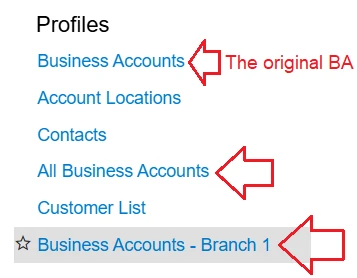
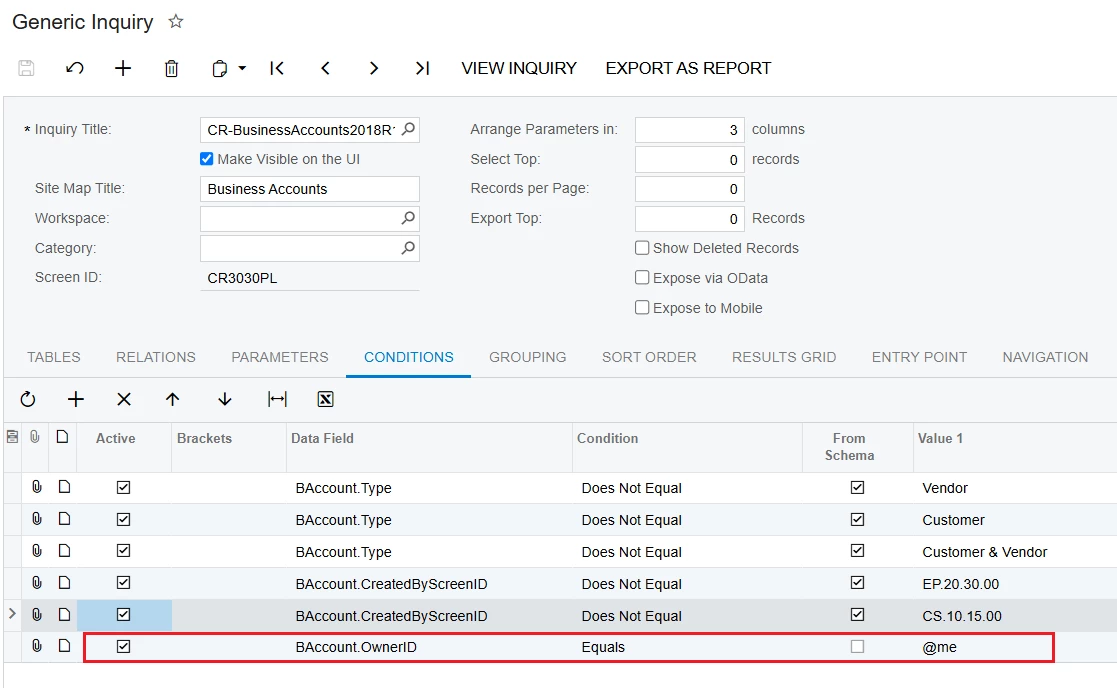
My non-customization workaround is to create additional Generic Inquiries for Business Accounts, Opportunities, and Sales Quotes, and then grant users from specific branches permission to view these specific Generic Inquiries.

Within these new Generic Inquiries, you can set conditions for each branch based on Class, Owner, etc.


Then, for the original Generic Inquiries (Business Accounts, Opportunities, Sales Quotes), you would restrict user permissions so they cannot view them (unless they are the Owner).


Additionally, you can restrict user permissions so they do not see the navigation buttons—"Go to First Record," "Go to Previous Record (PgUp)," "Go to Next Record (PgDn)," and "Go to Last Record"—on the Business Accounts, Opportunities, and Sales Quotes screens.


Best Regards,

NNT


valentynbeznosiuk
Jr Varsity II
Forum|alt.badge.img+4

@nhatnghetinh 

Thank you for the answer.

The main challenge the customer is facing is that on Opportunities/Sales Quotes, anyone can pick any Business Account. Despite there being no branch field on those screens, we noticed that the "Restrict Visibility To" functionality does work on Opportunities/Sales Quotes once the Business Account is extended to a Customer — iis driven by the user's current branch. However, until it's extended to a Customer, this doesn't apply. So our customization idea was to find a way to unlock this logic, which already works in some cases, and let users select "Restrict Visibility To" values from Business Account records as well.