Solved

Outlook Addin in 25R2 - Register an Instance with Microsoft Entra

  • November 13, 2025
  • 4 replies
  • 122 views

Forum|alt.badge.img

We upgraded from 25R1 to 25R2 and the add-in for classic Outlook 365 stopped working.  I reviewed help and it seems there are some updated steps for registering the Acumatica instance in Entra.  Under the Expose an API section, we need to add an Application ID in the format of api://<fully-qualified-domain-name>/<app-id>.  We are on SaaS - what do we use as the fully-qualified-domain-name?  Entra does not accept mycompany.acumatica.com since its not verified.  I can’t verify it since I can’t add it to my DNS.  Any insight?

Best answer by nickcerri32

@brucewarrell96 - I had a customer who had a similar issue.  Ultimately, we escalated a case with Acumatica that required a server-level config change.  

4 replies

nickcerri32
Semi-Pro III
Forum|alt.badge.img+7
  • Semi-Pro III
  • Answer
  • December 16, 2025

@brucewarrell96 - I had a customer who had a similar issue.  Ultimately, we escalated a case with Acumatica that required a server-level config change.  


Forum|alt.badge.img+1
  • Acumatica Moderator
  • December 22, 2025

Hi ​@brucewarrell96  Thanks for reaching out.  As ​@nickcerri32  suggests, please open a case with support so that they can connect and answer appropriate to your specific instance.  

Best,

Tara


WillH
Semi-Pro I
Forum|alt.badge.img+4
  • Semi-Pro I
  • March 11, 2026

Adding a note here as I came across this while researching something else.
MYOB Customers all have a similar situation with the domain verification.

MYOB’s client specific instructions are here:
https://help.myob.com.au/advanced/Docs/Published/UserGuide/US__how_AzureAD_Registering_with_Azure.html

The relevant part is this note, which I believe is probably cross transferable to SaaS Acumatica customers:
 

In the Edit application ID URI dialog box, confirm the suggested URI of your MYOB Acumatica URI.
We suggest accepting the system-generated value in the api://<Application_Client_ID> format.

Attention: For single-tenant applications, Microsoft Entra ID validates that the domain in the URI is in the verified domain list in the Entra ID tenant. If the specified domain is not verified, you should use the default scheme (api://<Application_Client_ID>) suggested by Microsoft Entra ID.


WillH
Semi-Pro I
Forum|alt.badge.img+4
  • Semi-Pro I
  • March 11, 2026

Ok, sorry ​@brucewarrell96  /anyone else reading this
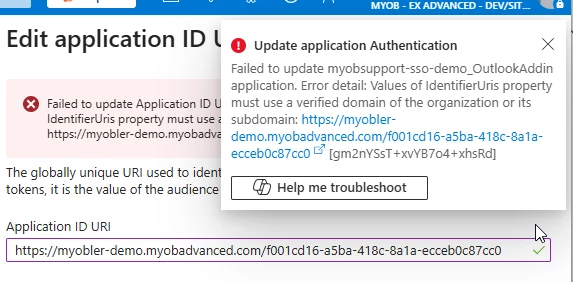
The above is wrong, the difference that generates the above warnings is the difference between:
Https://
And
api://


use of Https:// will generate the above error

If you use api:// then you won’t get an error.
 

Correct Format:

api://myobsupport-sso-demo.myobadvanced.com/f001cd16-a5ba-418c-8a1a-ecceb0c87cc0
 

Incorrect Format:
https://myobsupport-sso-demo.myobadvanced.com/f001cd16-a5ba-418c-8a1a-ecceb0c87cc0


Bit of an opaque error,

The problem is the https:// at the start.  Using api:// will work fine.