


Consider the following scenario that based on my understanding will work as described. EMail comes into an Outlook Inbox. From this message the user uses the Acumatica Outlook Add-In to CREATE CASE. The case is created and the email is listed in the ACTIVITIES of the case. From this point forward for the case, the user wants to handle all communication from inside the case. If the user replies to the initial email from within the case screen ACTIVITIES, that email reply does not get tagged with the [Case ########]? If the person who gets that email replies, even though we have Incoming EMail Processing turned on for that email account, since there is no tag of [Case #######] in the subject, it will not automatically get linked to that case? Am I understanding this correctly? If so, how do others handle this? Do you just manually add [Case #######] to the initial reply so that all future emails in this chain are processed and linked correctly? Did you create a customization to automatically add that [Case ######] if email generated from within the case and it is missing from the subject? Or am I missing something?
Outlook Add-In case creation and future emails
Best answer by jzhu
Hi
For example, the initial Email Response from the bottom is captured when the case came into Acumatica via email. The second row from the bottom is an automatic reply we have set up to let people know we have received the case. We are doing this through business event and hard coded the Case # in the subject.
But notice after that, none of the email or email responses have the case # in subject field because when we answered the case initially, we opened the first email activity via the blue hyperlink, then click on reply all or reply there. And in the Related Entity column, you can tell the system is recognizing that the email is associated to the case as long as you are replying from Acumatica and the recipient is replying back directly to the email you sent.
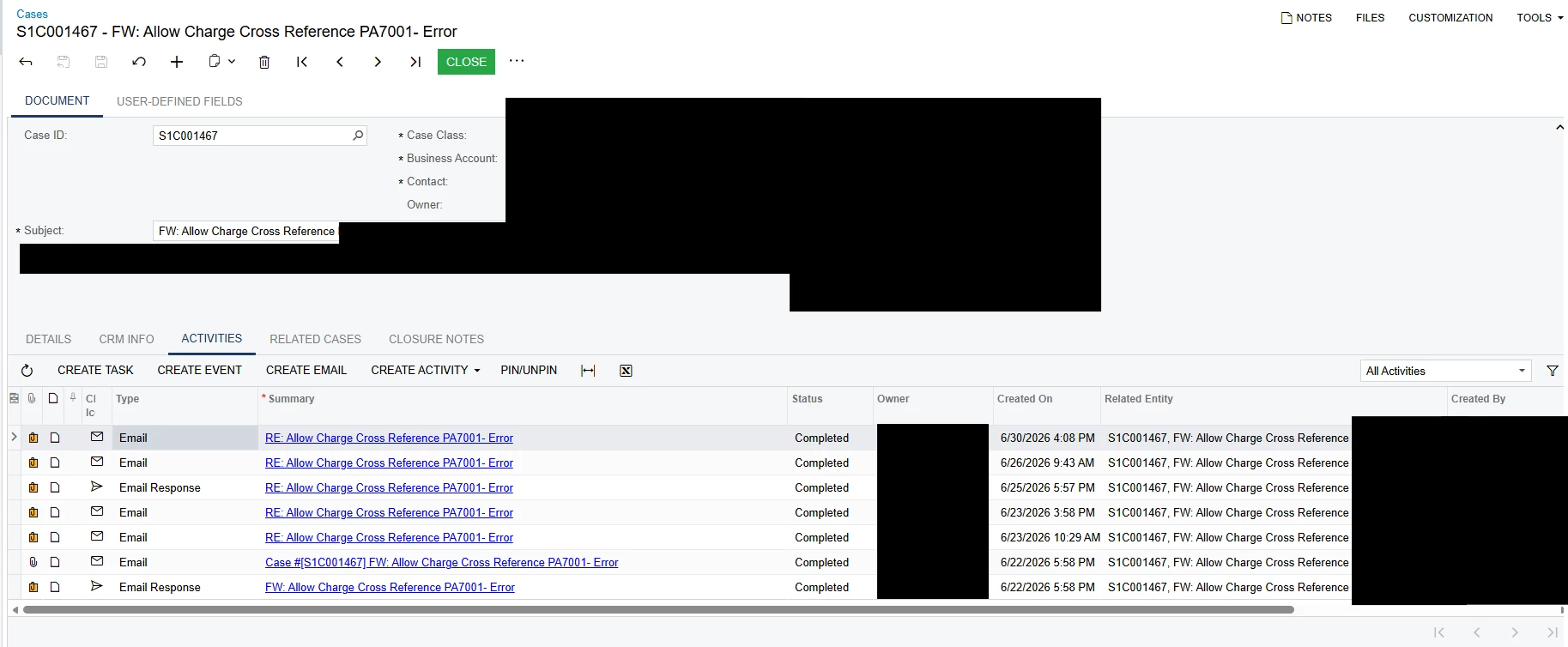
So you don’t necessarily need to have the case # in the subject for the system to recognize that the email is tied to this case.
Hope this helps!


Enter your E-mail address. We'll send you an e-mail with instructions to reset your password.