Question

Incoming email not associating with contact / business account

  • November 20, 2025
  • 5 replies
  • 98 views

jhouser
Captain II
Forum|alt.badge.img+6

Hi all,

I’ve added an email address as a customer contact. When receiving email from this contact, Acumatica is not associating email activity with the contact. When I click “Create Case” from the email, the contact and business account fields are blank. I expect them to default. 

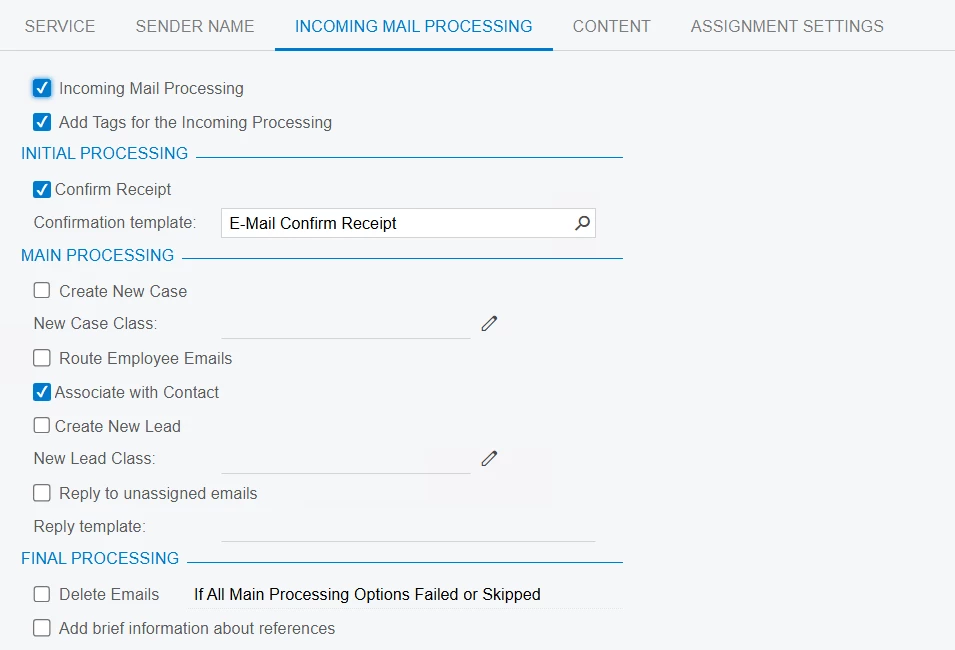
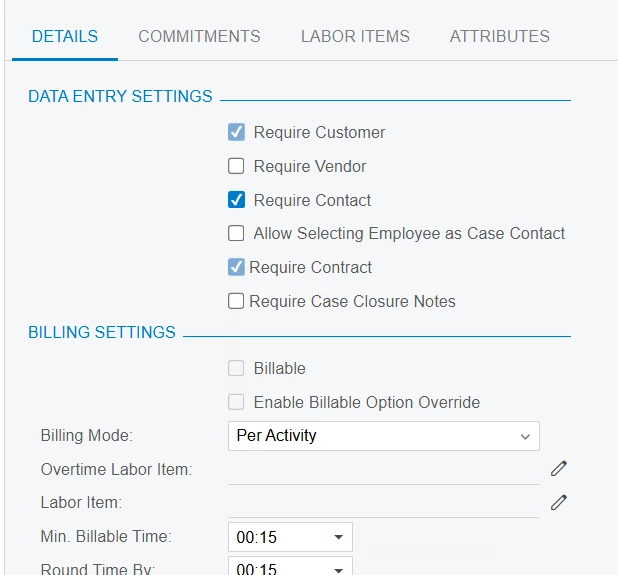
The email account is not set to automatically create a case because I’m requiring a contract for this case class. Below are screenshots of the email and case, followed by screenshots of settings for Email Account and Case Class, respectively. Thanks in advance!
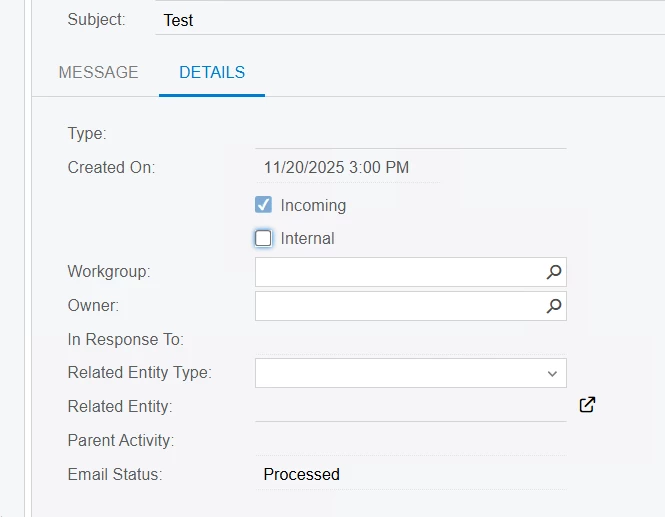
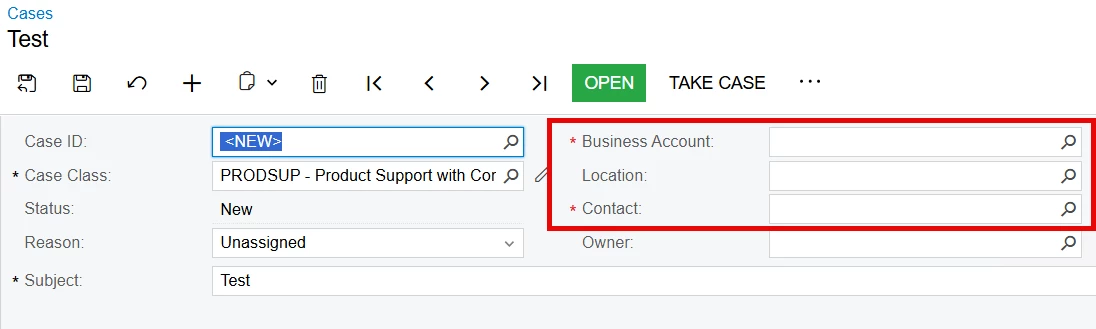


5 replies

MissyMain41
Jr Varsity I
Forum|alt.badge.img
  • Jr Varsity I
  • November 21, 2025

Hey there!

Long time no see, hope you’ve been doing well :) 

I was playing around with this on my own local install of ACU 24R2 (not sure what version you are using).

I reviewed the description provided, but there is one step I am not clear on - you mentioned you click “create case” from the email? 

If we take the cases out of the picture here entirely and just focus on incoming mail processing rules, then I have this working flawlessly on my local. 

Here’s how associate contact works with incoming mail processing rules. 

  1. I added my email account to the contact profile in my local ACU 
  2. I added my testing email account (different from the one on my contact) into my Email Accounts in ACU and activated email processing on my test site
  3. in my Outlook that controls email account on step 1, I generate a new email and send to email account in step 2
  4. I “receive all” email for step 2 email account
  5. The email is received and is associated with that Contact under the “activities” tab on the contact specific profile 

If following these same steps, when you navigate to the “Contact” profile, are you seeing the incoming email activity in the “Activities” tab of that contact’s profile? Because this is what “associate with contact” entails in regard to Incoming Email Processing rules. 


jhouser
Captain II
Forum|alt.badge.img+6
  • Author
  • Captain II
  • November 21, 2025

Hi Missy, nice to hear from you, and thanks for your time!

So, after making this post I came to the same conclusion you did. But my actual issue is that it’s not defaulting Contact / BA on the new case as it did in 24R1. I made an assumption that this was caused by it not associating activity with the contact, but that’s not true. I think I jumped there because I thought “Associate with Contact” was a new field, but apparently it’s been around for a while and I just forgot. 🙃

In 24R1, if email activity was from a contact of a customer, clicking “Create Case” on the activity would create a new case and default in the contact and BA. (“Create Case” is an action on Email Activity screen) Have not tried in 24R2, but in 25R1 and 25R2, when I click “Create Case” the new case has Contact and BA fields empty. This has a couple impacts:

  1. In production, we have automatic case creation turned on, but our case class requires a contact. Email from someone who is not a contact shows up on a dashboard. If it's a legitimate email, we click "Create Contact" from the email activity, then "Create Case". Having to then look up the contact and BA is redundant since email was already associated with a contact / customer. 
  2. I am working on a demo of the case management functionality in 25R2. I will show Per Activity billing, so the case class needs to require a contract. Unless I'm missing something, this means automatic case creation won't work because system doesn't know which contract to select. So I need to "Create Case" from the email activity. Having to then manually select contact / BA doesn't look very good. I could try using the Outlook add-in, but I would prefer to do this inside Acumatica.

MissyMain41
Jr Varsity I
Forum|alt.badge.img
  • Jr Varsity I
  • November 21, 2025

Oh, how embarrassing, all these years and I didn’t realize incoming emails had the option to create things from them via the 3-dot menu on the email activity, ha!

I checked out this option, and in 24R2 for me this also doesn’t automatically associate the contact from the email into the new case creation pop up that appears when clicking “create case” from the incoming email. 

If this was not specified in release notes of 24R2 as being removed, and you are certain it worked this way in 24R1, then as long as you send support an image from 24R1 step/result versus 24R2 step/result showing the differences I do believe they take those seriously and will look into it further.

Personally, I do not have a 24R1 to test in right now, but maybe I’ll check it out and see that difference for myself. 

The good news is that if you add the baccount/contact to that new case pop up window from that email, once you save, it does associate that email to the case (via related entity) automatically, so thats a plus! But it does seem to take that extra step of filling out the baccount/contact on that create case pop up from the incoming email. 


jhouser
Captain II
Forum|alt.badge.img+6
  • Author
  • Captain II
  • November 21, 2025

Well we both learned something. :)

Yes, I’ve already submitted a case with Acumatica. We’ll see what they say. 

Thanks for looking at it!


meganfriesen37
Captain II
Forum|alt.badge.img+12

@jhouser We’ve also noticed some changes in incoming email behavior since we upgraded to 25R1 and our cases from incoming emails are no longer being created.  I also have a case in with Acumatica that just got upgraded to level 2 support.