Answer

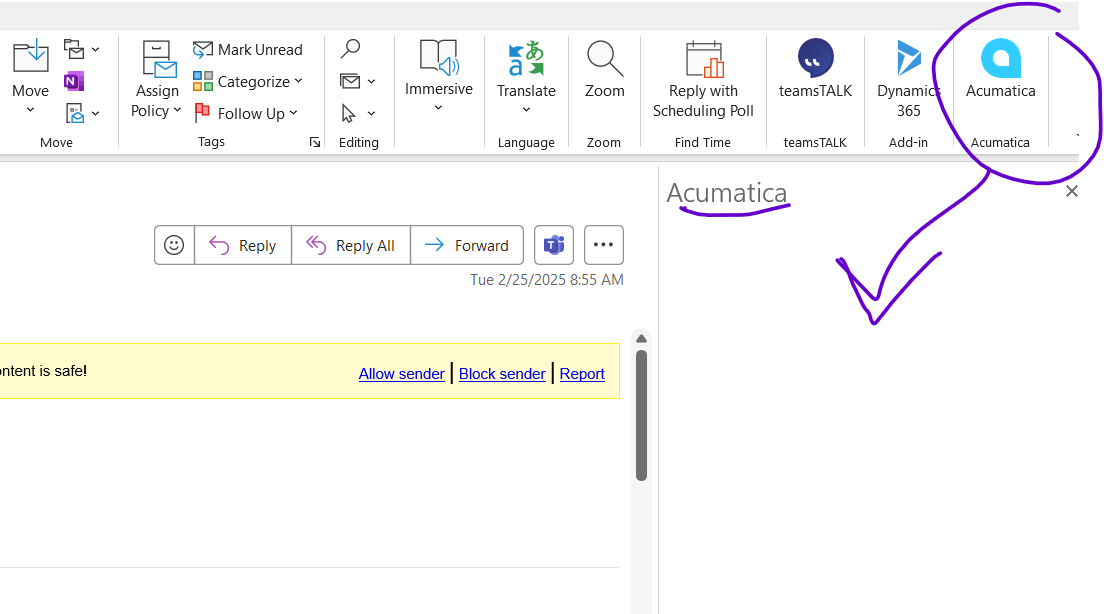
Acumatica Outlook plug-in tool is not presenting when clicked.

  • February 25, 2025
  • 11 replies
  • 840 views

Acumatica Outlook plug-in tool is not presenting when clicked.   Reinstall is not working…..  

what is the issue and how do I resolve it.  


Best answer by Tara H

Hello everyone, 

Sorry for not seeing this post until now - but I am happy to report that the Acumatica teams have worked hard to get this resolved.   The latest update is as follows:

----------

Acumatica Community - We wanted to provide you with an important update regarding this known issue. We are in the final stages of resolving the authentication issue caused by Microsoft's deprecation of the current method used for Microsoft 365 customers.   We understand the importance of this fix.  Please see the expected availability timeline: 

  • Version 24R1 - June 13, 2025 

  • Version 24R2 - June 6, 2025 

  • Version 25R1 - June 11, 2025 

As part of the update, the Outlook Add-In will manage authentication using Single Sign On (SSO) and your Microsoft 365 credentials (on-premise Exchange deployments are not affected).  Documentation will be published with the update on the configuration required to use the new SSO solution, which is powered by OpenID Connect. 

We appreciate your patience and support.  Documentation and Release Information will be made available here on the Community site.   


Please keep an eye on this page for release details! Known issue: Starting 17th February, 2025, Acumatica Outlook Add-in may stop working | Community

11 replies

rfairchild58
Varsity I
Forum|alt.badge.img+1
  • Varsity I
  • February 25, 2025

What version of Outlook are you using?  Was it ever working for you?  If you are using Outlook Classis, many Outlook issues can be resolved by deleting and recreating your Outlook user profile. 


-ron


  • Author
  • Freshman I
  • February 25, 2025

Yes. The plug in has been working for years.  It stopped recently


Outlook Version 2501  Build  16.0.18429.20132


Forum|alt.badge.img+12
  • Acumatica Support Team
  • February 26, 2025

Hi ​@amyrizzo50 

Have you updated/switched to new Outlook? If yes, the plug in may not work. Refer to this KB thread.

Regards,


  • Freshman I
  • February 27, 2025

We also started getting the blank white screen for a user this week. Acumatica 2023 R2 (23.212.0024). It was working fine on Monday Feb 24th on both “New Outlook” and “Outlook on the Web”, but stopped working Tuesday Feb 25th.

  • The white screen happens on “New Outlook”, “Classic Outlook” and “Outlook on the Web”.
  • "Turn on optional connected experiences" in “New Outlook” is already checked.
  • Server-side Cookie flags are good in web.config.
  • Uninstalling and reinstalling the plugin doesn’t fix it.
  • Occasionally the Acumatica sign in screen does pop up in “Classic Outlook” and “New Outlook”, but then when clicking sign-in, gives error: Get Token error. Status: Failed. Error: [object Object] the underlying json says ErrorForbiddenClientAccessTokenRequest

  • Author
  • Freshman I
  • February 27, 2025

@ Acumatica Team 


This seems to be affecting many users.   When will we see a resolution?    


Manikanta Dhulipudi
Captain II
Forum|alt.badge.img+15

Forum|alt.badge.img
  • Jr Varsity II
  • May 28, 2025

Is there an update with this issue? We have been experiencing the same thing. 

-Brent


  • Author
  • Freshman I
  • May 28, 2025

@ bbondura and all,   


I am wondering the same.   Is there a solution available?   


Forum|alt.badge.img+1
  • Acumatica Moderator
  • Answer
  • June 4, 2025

Hello everyone, 

Sorry for not seeing this post until now - but I am happy to report that the Acumatica teams have worked hard to get this resolved.   The latest update is as follows:

----------

Acumatica Community - We wanted to provide you with an important update regarding this known issue. We are in the final stages of resolving the authentication issue caused by Microsoft's deprecation of the current method used for Microsoft 365 customers.   We understand the importance of this fix.  Please see the expected availability timeline: 

  • Version 24R1 - June 13, 2025 

  • Version 24R2 - June 6, 2025 

  • Version 25R1 - June 11, 2025 

As part of the update, the Outlook Add-In will manage authentication using Single Sign On (SSO) and your Microsoft 365 credentials (on-premise Exchange deployments are not affected).  Documentation will be published with the update on the configuration required to use the new SSO solution, which is powered by OpenID Connect. 

We appreciate your patience and support.  Documentation and Release Information will be made available here on the Community site.   


Please keep an eye on this page for release details! Known issue: Starting 17th February, 2025, Acumatica Outlook Add-in may stop working | Community


Forum|alt.badge.img
  • Jr Varsity II
  • June 13, 2025

Hello Tara,


We tested it again with no resolution. Has the documentation been published yet? This is going to be integral in our business. Any further help would be greatly appreciated!


Thank You!
Brent


Forum|alt.badge.img+1
  • Acumatica Moderator
  • June 16, 2025

hi ​@bbondura -  Yes, documentation has been posted to the Known Issue article - you will find upgrade details in the Solution section that includes necessary steps to restore functionality. 

Regards, 

Tara