Answer

Run Project Billing Invoice has lines for all tasks not just the one with Pending Invoice Amount

  • November 20, 2024
  • 5 replies
  • 87 views

Forum|alt.badge.img+1

Hi all,


Our Projects could have up to 25 tasks. We bill on certain tasks by adding the amount to Pending Invoice amount and running project billing. When we do that, the invoice will have 0.00 lines for each task and 1 line for the task that we entered an amount. Is this the expected behavior? Can that be turned off?


Thank you

Best answer by iqraharrison

@keithschm hi there!


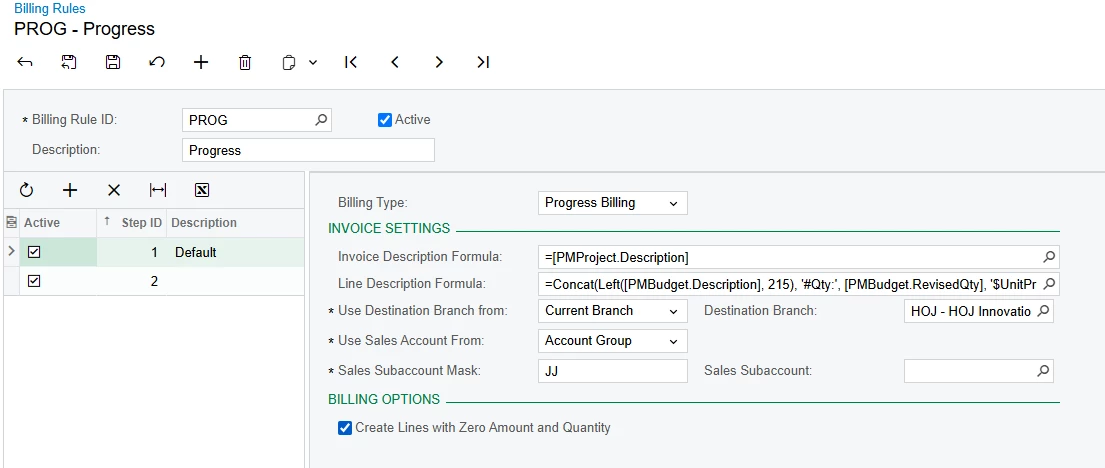
you should be able to turn this off on the billing rule.  There’s an option towards the bottom called “create zero lines for unbilled item” (or something close to that). If you unselect that checkbox, you should only get a bill for the lines that have pending invoice amounts!


hope this helps! 

5 replies

iqraharrison
Captain II
Forum|alt.badge.img+8
  • Captain II
  • Answer
  • November 20, 2024

@keithschm hi there!


you should be able to turn this off on the billing rule.  There’s an option towards the bottom called “create zero lines for unbilled item” (or something close to that). If you unselect that checkbox, you should only get a bill for the lines that have pending invoice amounts!

hope this helps! 


dcomerford
Captain II
Forum|alt.badge.img+15
  • Captain II
  • November 20, 2024

@keithschm I believe the Create Lines with Zero Amount and Quantity should be unchecked on the Billing Rules


Forum|alt.badge.img+1
  • Author
  • Varsity I
  • November 20, 2024

Thank you all. That worked.


Heidi Dempsey
Community Manager
Forum|alt.badge.img+3
  • Community Manager
  • November 20, 2024

@keithschm  Although this does work, you need the box checked if you are using AIA reporting.


Forum|alt.badge.img+1
  • Author
  • Varsity I
  • November 21, 2024

@keithschm  Although this does work, you need the box checked if you are using AIA reporting.

Thank you. We do not use AIA, LOL I had to look it up.