Question

Reclassifying Cost Budget values to new TaskID / Cost Code pairs.

  • August 28, 2026
  • 4 replies
  • 34 views

bpickles
Freshman II

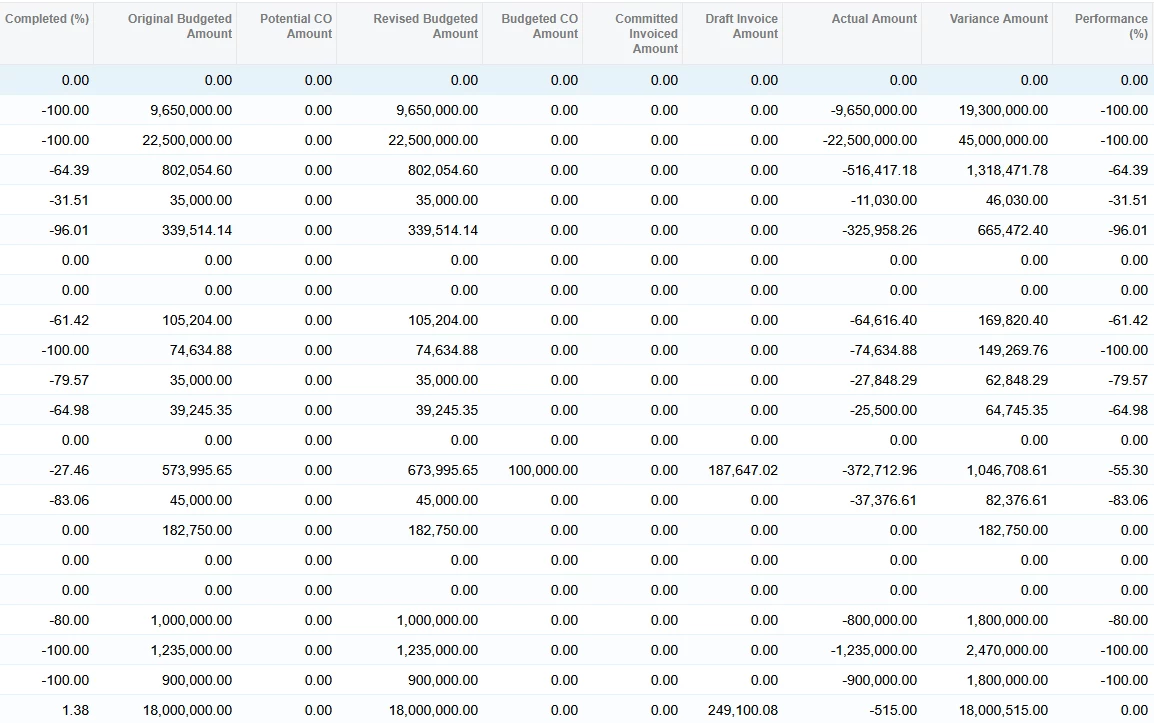
As the title says we changed our budget layout a year later.  We reclassified many transactions through the Reclassify Transactions process screen.  Worked great for the Cost Budget but then noticed that in the Revenue Budget everything put through already appears to be a negative:


On an old tab I noticed that the Reclassification screen was still loaded with transactions I didn’t reclassify (because they didn’t add with the Cost Budget #’s I was looking for).  However on one line in the Revenue Budget it’s value for Actual Amount was the exact same as the 2 transactions showing that I didn’t reclassify.  Little confused here.

This is going to seriously mess up our AIA report.  I reversed all 80 of the GL reclassifications I did believing that would fix the Revenue Budget; however it did not.

Any help would be greatly appreciated; not sure what I did wrong nor how to fix it.

 

4 replies

smilner3
Varsity III
Forum|alt.badge.img+1
  • Varsity III
  • August 28, 2026

@bpickles Run Recalculate Project Balance from the More menu of the Projects screen (PM301000). The budget tabs hold stored balances, and getting them back in line with the transactions is what that process is for; that's why reversing the batches didn't bring the Revenue Budget back on its own. The default run rebuilds Actual Quantity and Actual Amount on both budget tabs from the released project transactions. Leave the extra check boxes cleared, since Recalculate Unbilled Summary can drop the project back onto Run Project Billing, and prove it on a test tenant off a snapshot first if you can.

Your screenshot is the tell. Several lines are at exactly minus 100 percent, and the partial ones look like percent billed. That points at the income entries from your billings having gone through the reclassification too. Reclassification posts to the project on every line, and the account group follows the GL account, so lines on revenue accounts move revenue actuals between task and cost code pairs the same way cost lines do.

After the recalc, open Project Transaction Details (PM401000) and filter to your revenue account group. Wherever billed revenue is still keyed to the wrong pair, reclassify those income lines back. If a line refuses because it was already reclassified, work from Reclassification History (GL405000); only the last entry in a chain can be reclassified again. Check the Cost Budget too, and when you redo those moves, only check the expense lines.


bpickles
Freshman II
  • Author
  • Freshman II
  • August 28, 2026

@smilner3 
Thanks for the reply.

Deleted a Draft Pro-Forma.  Recalculated Project Balances with all check boxes active.
When I did the original reclassification I didn’t select any revenue/income items, just the cost ones and they added perfectly to the cent on every cost budget line item I wanted to move.

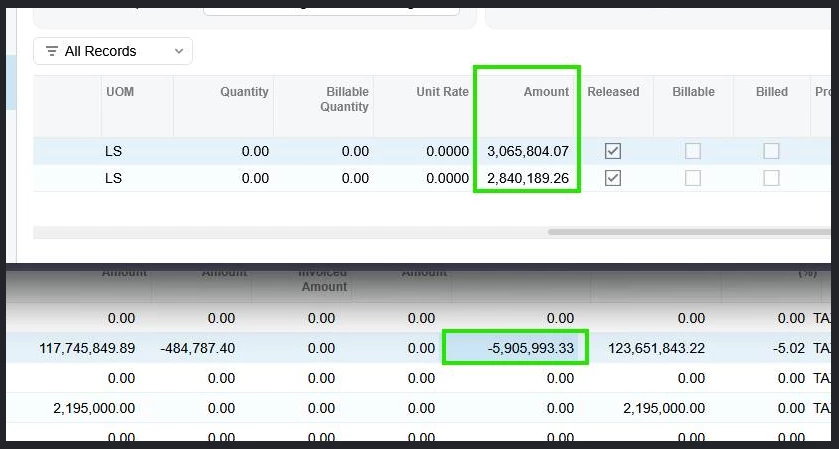
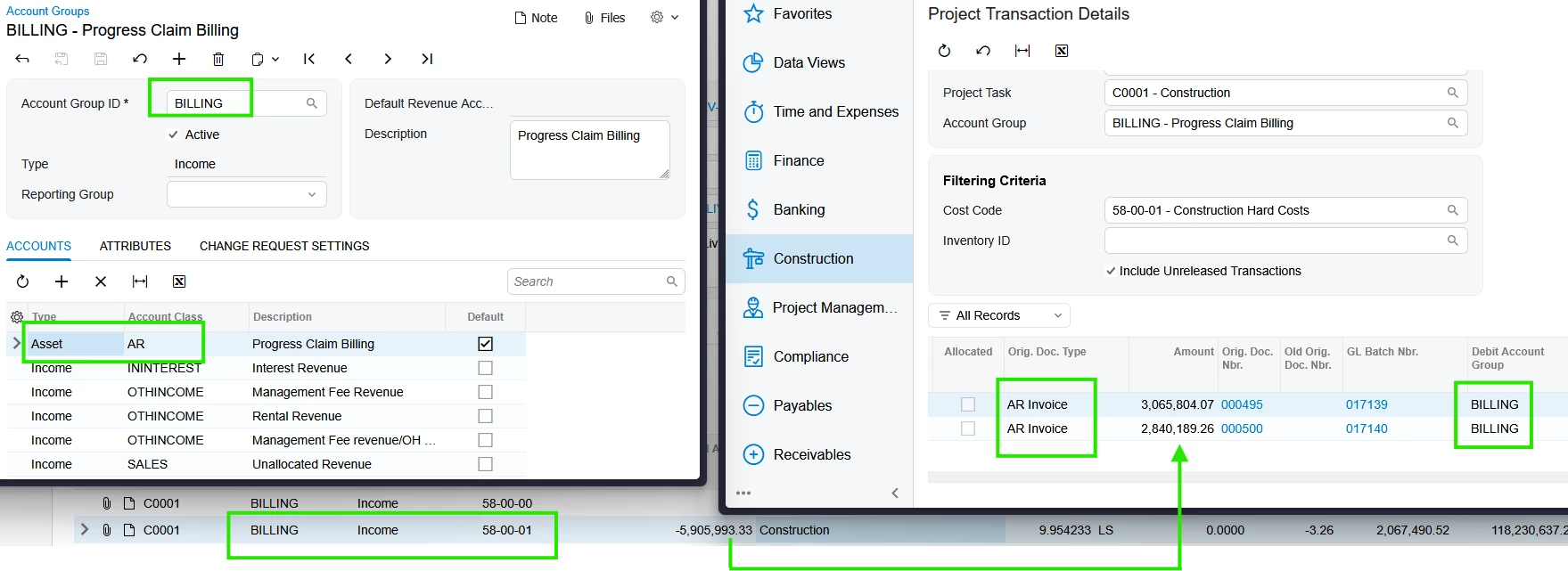
As example; the upper green box are the 2 project transaction details for the lower green box on a revenue budget line item.  None of these that I can find were ever reclassified.

All the values are correct, just displaying everything as negatives.


smilner3
Varsity III
Forum|alt.badge.img+1
  • Varsity III
  • August 28, 2026

@bpickles That test narrows it down. The two transactions tie to the line to the cent, so your values are intact and the reclassification had nothing to do with this. The problem is the sign, and the sign comes from account group typing.

When a posted line becomes a project transaction, the system compares the GL account's type with the type of the account group it's mapped to. Matching types land billed revenue on the Revenue Budget as a positive. Mismatched types reverse it. An income-type group can legally hold accounts of any type, so nothing blocks the disagreement.

Open one of those two transactions and note its account and account group. Compare the group's Type on Account Groups (PM201000) with the account's own type in the chart of accounts. Your whole tab is flipped, so the group holding your billing income account is the one to check. If account groups were edited during the budget rebuild, that's when it broke. Fix the typing or mapping, then run the recalc again and the tab re-aggregates positive. Do it on a snapshot copy first and confirm there, because a group edit reaches every project using that group. If the typing already matches, the transactions themselves were recorded with the wrong sign: reverse them on Project Transactions (PM304000), re-enter them with the income account group on the credit side, and recalc.


bpickles
Freshman II
  • Author
  • Freshman II
  • August 28, 2026

@smilner3 
That makes sense; but I don’t see that we have anything mismatched:


We haven’t changed Account Groups or preferences like that in a while.  System has been running well with 5 tenants more or less setup the same.  Even our TaskID’s and Cost Codes are shared so we can export from one and import to another.

There’s other projects in this tenant setup exactly the same as this and there’s no issues.  I only noticed this after the reclassification.