

Answer

Receiving this error when attempting to create an AP Bill from a Subcontract

  • October 24, 2025
  • 2 replies
  • 44 views

Hello,


I am receiving the following error when trying to create an AP Bill from a Subcontract.

The subcontract is open, not complete. 
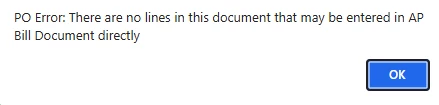


“PO Error: There are no lines in this document that may be entered in AP Bill Document directly”

Best answer by MuthumaliDhanushika27

Hello ​@kelsyj 

This is the known issue and this has been already fixed in 25R1.


AC-328789: If the Purchase Receipts Without Inventory feature was enabled on the Enable/Disable Features (CS100000) form, and a non-stock item had the Process Item via Receipt check box selected on the Non-Stock Item (IN202000) form, when a user added this non-stock item to a subcontract detail line on the Subcontracts (SC301000) form, removed it from this line, and then clicked Enter AP Bill, the created bill did not contain this detail line on the Bills and Adjustments (AP301000) form.

Workaround: Delete the detail line from the subcontract, add another line, and add a non-stock item with the Process Item via Receipt check box cleared.

https://acumatica-builds.s3.amazonaws.com/builds/25.1/ReleaseNotes/AcumaticaERP_2025R1_ReleaseNotes_Other_Enhancements.pdf


Thank you.


2 replies

Forum|alt.badge.img+1

Hello ​@kelsyj 

This is the known issue and this has been already fixed in 25R1.


AC-328789: If the Purchase Receipts Without Inventory feature was enabled on the Enable/Disable Features (CS100000) form, and a non-stock item had the Process Item via Receipt check box selected on the Non-Stock Item (IN202000) form, when a user added this non-stock item to a subcontract detail line on the Subcontracts (SC301000) form, removed it from this line, and then clicked Enter AP Bill, the created bill did not contain this detail line on the Bills and Adjustments (AP301000) form.

Workaround: Delete the detail line from the subcontract, add another line, and add a non-stock item with the Process Item via Receipt check box cleared.

https://acumatica-builds.s3.amazonaws.com/builds/25.1/ReleaseNotes/AcumaticaERP_2025R1_ReleaseNotes_Other_Enhancements.pdf


Thank you.


  • Author
  • Freshman I
  • October 24, 2025

Hello ​@kelsyj 

This is the known issue and this has been already fixed in 25R1.


AC-328789: If the Purchase Receipts Without Inventory feature was enabled on the Enable/Disable Features (CS100000) form, and a non-stock item had the Process Item via Receipt check box selected on the Non-Stock Item (IN202000) form, when a user added this non-stock item to a subcontract detail line on the Subcontracts (SC301000) form, removed it from this line, and then clicked Enter AP Bill, the created bill did not contain this detail line on the Bills and Adjustments (AP301000) form.

Workaround: Delete the detail line from the subcontract, add another line, and add a non-stock item with the Process Item via Receipt check box cleared.

https://acumatica-builds.s3.amazonaws.com/builds/25.1/ReleaseNotes/AcumaticaERP_2025R1_ReleaseNotes_Other_Enhancements.pdf


Thank you.


Thank you for the help! How can we add detail lines to a subcontract that has already been posted ?

What settings need to be changed in order to prevent this from happening again? 

What is the process if we want to upload an AP Bill to a subcontract that has already been posted?
